




 here!
here!
I’m your shopping assistant for PC builds, upgrades, and everything tech.
Got questions? Ask away!
Start a conversation
here!
I’m your shopping assistant for PC builds, upgrades, and everything tech.
Got questions? Ask away!
Start a conversationShipped by Newegg
 Top Rated


Make informed decisions with expert advice. Learn More



Any questions? Ask CelesteSM will help you find out quickly.


Intel® Core™ 14th gen desktop processors maximize performance to let your PC do even more at once.

Focus on the task at hand while your PC juggles complex programs and heavy workloads in the background without slowing down.(* Only for Intel® Core™ i5 processor above. Intel® Core™ i3 processor can handle easy multitasking.)

Don’t miss a second with Intel® Wi-Fi 6/6E (Gig+), the best Wi-Fi technology for streaming video.1

Edit and enhance your most demanding creative projects with ease, and transfer your work at gig speeds with Thunderbolt™ 4 technology.
| Recommended for: |

Intel® Core™ i3Value-packed processors deliver outstanding performance for everyday tasks. |
Intel® Core™ i5Experience exceptional performance for home and business PCs with up to 14 cores for gaming, creativity, and multitasking. |

Intel® Core™ i7Packs the power of up to 20 cores for accelerated computing supporting high-end gaming, connectivity, and security. |
Intel® Core™ i9Delivering up to 24 cores for seamless 4K Ultra HD and 360-degree video, robust gameplay, and multitasking performance. |
| Streaming your favorite content | ✓ | ✓ | ✓ | ✓ |
| Picture-perfect video chatting | ✓ | ✓ | ✓ | ✓ |
| Juggling programs with ease | ✘ | ✓ | ✓ | ✓ |
| The most advanced photo and video editing | ✘ | ✘ | ✓ | ✓ |
| Smooth 4K streaming | ✘ | ✘ | ✓ | ✓ |
1. Based on Over the Air (OTA) multi-client Wi-Fi testing executed at Intel’s wireless test facility to help simulate real-world network environments.
Performance varies by use, configuration and other factors.
Intel technologies may require enabled hardware, software or service activation.
Intel® Core™ desktop processors (14th gen). Results may vary. © Intel Corporation. Intel, the Intel logo, and other Intel marks are trademarks of Intel Corporation or its subsidiaries. Other names and brands may be claimed as the property of others.
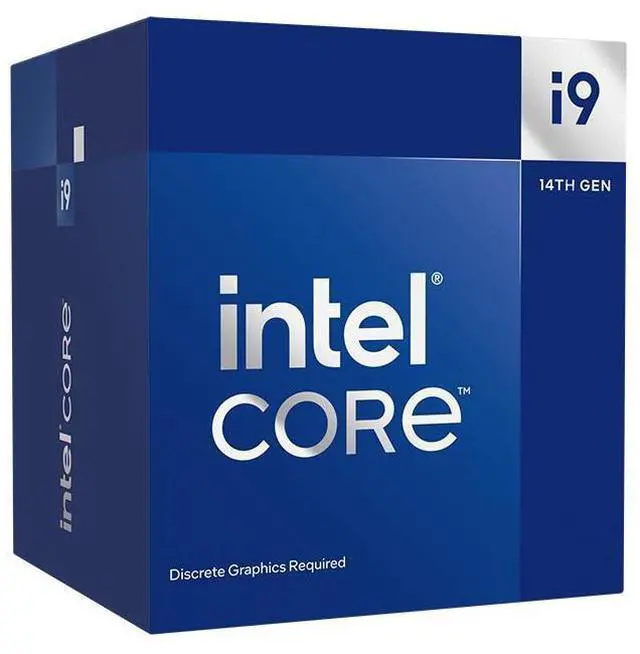
The Intel Core i9-14900F is a 24-core, 32-thread desktop processor with boost speeds up to 5.8 GHz, suited to demanding gaming and multitasking builds that use a separate graphics card.
| Attribute | Value |
|---|---|
| Best For | Desktop builds needing 24-core, 32-thread processing, a compatible LGA 1700 motherboard, and discrete graphics |
| Cores And Threads | 24 cores (8 Performance-cores + 16 Efficient-cores) and 32 threads, with Hyper-Threading support |
| Clock Speeds | Performance-core base 2 GHz and maximum turbo 5.4 GHz; Efficient-core base 1.5 GHz and maximum turbo 4.3 GHz; maximum turbo frequency 5.8 GHz, including Thermal Velocity Boost, and Turbo Boost Max Technology 3.0 up to 5.6 GHz |
| Cache And Power | 32 MB L2 cache and 36 MB L3 cache; 65 W thermal design power and up to 219 W turbo power |
| Socket And Platform | Raptor Lake, LGA 1700 socket; compatible with Intel H610, H670, B660, Q670, W680, Z690, H770, B760, and Z790 chipsets. A BIOS update may be needed on some older chipset motherboards; supports 1S systems, Linux, Windows 10 (21H2 and 22H2), and Windows 11 (21H2 and 22H2) |
| Memory Support | Dual-channel DDR4-3200 or DDR5-5600 memory, up to 192 GB, with maximum bandwidth of 89.6 GB/s |
| Expansion And Virtualization | PCI Express 5.0 and 4.0, up to 20 lanes, with configurations up to 1x16+4 or 2x8+4; supports virtualization |
| Graphics And Cooling | No integrated graphics; Intel Laminar RH1 cooling device included |
| Process And Instruction Set | Intel 7 manufacturing technology and 64-bit instruction set |
| Model Identifiers | Intel Core i9-14900F, Core i9 14th Gen; model BX8071514900F |
Q: Should I get the Core i9-14900F or the Core i7-14700F?
A: Choose the Core i9-14900F for heavily multithreaded work: it has 24 cores (8 P-cores + 16 E-cores) and 32 threads, compared with the 14700F’s 20 cores (8 P-cores + 12 E-cores) and 28 threads. For gaming and general use, the 14700F is the lower-tier option to consider if its price is meaningfully lower; both require a discrete graphics card.
Q: Core i9-14900F or Core i9-14900K: which should I buy?
A: Choose the 14900F if you do not need integrated graphics or CPU overclocking and want the 65W-base-power model; it still requires a discrete graphics card. Choose the 14900K if you want integrated graphics for display or troubleshooting, unlocked overclocking, or its higher 6.0 GHz maximum turbo frequency. The 14900K has higher stated power limits, so compare your cooling and motherboard plans as well.
Q: Is the Core i9-14900F a worthwhile upgrade from the Core i9-13900F?
A: For most owners of a working 13900F system, the 14900F is a small generational step rather than a major upgrade: both have 24 cores and 32 threads, while the 14900F raises maximum turbo frequency from 5.6 GHz to 5.8 GHz. Consider it for a new build or when the price difference is small; otherwise, keeping the 13900F is usually the more practical choice. Check motherboard BIOS support before replacing the CPU.
Q: Should I choose the Core i9-14900F or the Core i9-14900?
A: Choose the 14900F if your system already has a discrete graphics card and you do not need the CPU’s integrated graphics. Choose the 14900 if you want a built-in graphics option for basic display output or troubleshooting. Their core configuration and top listed turbo frequency are the same, but the F model has no integrated graphics, so it cannot provide video output without a separate graphics card.
Q: Can I use this processor without a separate graphics card?
A: No. The Core i9-14900F has no integrated graphics, so you need a separate graphics card to connect a display and use the system.
Q: Is this processor compatible with my motherboard?
A: It uses the LGA 1700 socket and is listed for Intel H610, H670, B660, Q670, W680, Z690, H770, B760, and Z790 chipsets. Some older chipset motherboards may need a BIOS update; verify the specific motherboard’s CPU support before buying.
Q: Does it come with a CPU cooler?
A: Yes. The listed package includes an Intel Laminar RH1 cooler. The processor’s maximum turbo power is 219W, so consider your cooling setup and airflow, especially for sustained heavy workloads.
Q: What memory can I use with this processor?
A: It supports either DDR4-3200 or DDR5-5600 memory. The motherboard determines which memory type you can install; DDR4 and DDR5 are not interchangeable on a given board.
Q: Is the Core i9-14900F worth choosing over a Core i7-14700F?
A: It depends on the workload and price difference. The 14900F has 24 cores (8P+16E) and 32 threads; consider paying more if your work can use the additional CPU resources. A Reddit comparison thread also frames the choice around intended use, rather than treating the i9 as the automatic choice.
Q: Is the 14900F suitable for gaming and creative work like Blender or video editing?
A: It may suit a PC used for both: the CPU has 24 cores and 32 threads, and a Reddit user specifically described using a 14900F system for gaming, Blender, and video editing. It has no integrated graphics, so the system needs a separate graphics card.
Q: Is the included cooler enough, or should I buy an aftermarket cooler?
A: The product listing says an Intel Laminar RH1 cooler is included, but that alone does not establish how it will perform in every system. Reddit discussions report different temperatures with air-cooled 14900F systems, so consider the case airflow, motherboard power settings, and expected sustained workload before deciding whether to upgrade.


