here!
here!
I’m your shopping assistant for PC builds, upgrades, and everything tech.
Got questions? Ask away!
Start a conversation
here!
I’m your shopping assistant for PC builds, upgrades, and everything tech.
Got questions? Ask away!
Start a conversationShipped by Newegg
 Top Rated






Any questions? Ask CelesteSM will help you find out quickly.
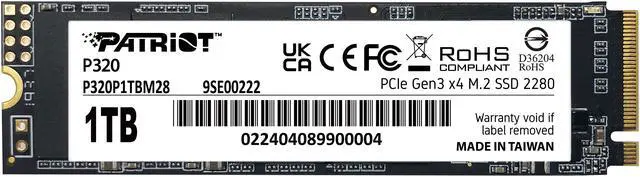
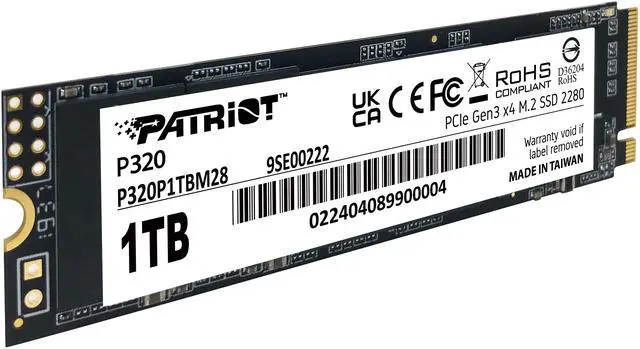
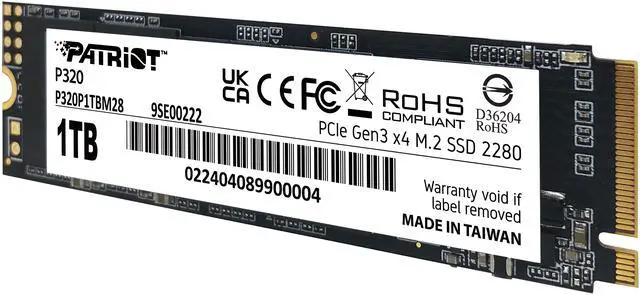
The Patriot P320 is a 1TB M.2 2280 NVMe SSD for desktop and laptop users seeking a responsive storage upgrade, with PCIe 3.0 x4 connectivity and sequential speeds up to 3,000MB/s read and 2,200MB/s write.
| Attribute | Value |
|---|---|
| Best For | Consumer PC or laptop storage upgrades that support an M.2 2280 PCIe NVMe drive |
| Capacity | 1TB internal solid-state storage |
| Interface And Form Factor | M.2 2280, PCIe 3.0 x4, NVMe 1.3; no heatsink |
| Read And Write Performance | Sequential speeds up to 3,000 MB/s read and 2,200 MB/s write |
| Endurance And Reliability | 480TB endurance rating, no DRAM with HMB, thermal throttling and end-to-end data-path protection; backed by a 5-year warranty |
| Power And Operating Conditions | 0.37W idle and 2.07W active power consumption; operating temperature 0°C to 70°C |
| Physical Specifications | 80 × 22 × 3.8mm; weighs 9g |
| Model Identifiers | Patriot P320, model P320P1TBM28 |
Q: Patriot P320 1TB or Crucial P3 Plus 1TB—which should I choose?
A: Choose the Crucial P3 Plus if your system supports PCIe 4.0 and higher peak sequential speeds matter: its 1TB model is rated up to 5,000MB/s read and 3,600MB/s write, versus 3,000MB/s and 2,200MB/s for the PCIe 3.0 Patriot P320. The P320 has the higher published write-endurance rating—480TBW versus 220TBW—so it may suit buyers prioritizing rated endurance or a PCIe 3.0 system. Compare current prices before deciding; rated speeds are maximums, not guaranteed real-world results.
Q: Is the Patriot P320 1TB worth choosing over the Patriot P300 1TB?
A: If prices are close, choose the P320 for its higher published sequential speeds: up to 3,000MB/s read and 2,200MB/s write, compared with 2,100MB/s and 1,650MB/s for the P300. The P300 can make sense if it costs less and your use is mainly everyday computing; both are PCIe 3.0 x4 M.2 NVMe drives.
Q: Should I get the Patriot P320 512GB or 1TB?
A: Choose the 1TB P320 if you need more room for games, applications, or files; choose 512GB if your storage needs are modest and it is meaningfully cheaper. Both are M.2 2280 PCIe 3.0 x4 models, and Patriot lists up to 3,000MB/s read and 2,200MB/s write for the P320 line. Check the listing for the exact capacity-specific specifications.
Q: Will this SSD fit my laptop or desktop?
A: It fits devices with an M.2 2280 slot that supports PCIe NVMe storage. Check your device’s specifications first: an M.2 slot that supports SATA only may not work with this PCIe NVMe drive.
Q: Does it come with a heatsink?
A: No. The P320 is listed without a heatsink. Check whether your computer provides an M.2 heatsink and whether its space and mounting setup are suitable for a bare 2280 drive.
Q: Is this a good SSD for a laptop upgrade?
A: It can suit a laptop upgrade if the laptop supports an M.2 2280 PCIe NVMe drive. Its listed active power consumption is 2.07 W, and the bare drive has no heatsink; confirm the laptop’s interface and clearance before buying.
Q: Is it suitable as a boot drive for everyday use and games?
A: Yes, if your system supports PCIe NVMe storage. The 1TB capacity and sequential speeds of up to 3,000 MB/s read and 2,200 MB/s write make it suitable for an operating system, applications, and games. These are maximum sequential speeds, not guaranteed real-world performance.
Q: Is the Patriot P320 a reasonable SSD for a budget gaming PC?
A: It can suit a budget gaming PC if the system supports an M.2 2280 NVMe drive and the price is competitive. Its PCIe 3.0 x4 interface and stated sequential speeds of up to 3,000 MB/s read and 2,200 MB/s write are adequate for general gaming use; compare current prices before choosing it over a faster or higher-capacity alternative.
Q: Will the P320 work in a laptop?
A: It can work in a laptop with an available M.2 2280 slot that supports PCIe NVMe. Check the laptop’s specifications first: an M.2 slot that supports SATA only, or a different drive length, may not be compatible.
Q: Is the P320 suitable for sustained, heavy writes?
A: It is not the clearest fit for sustained heavy-write workloads. The provided specifications list no onboard DRAM (the drive uses HMB), and the stated write speed is a maximum rather than a guaranteed sustained rate. A YouTube review of the P320 family examines sustained performance and thermals, while an individual Reddit report describes problems; that report is anecdotal and does not establish a general failure rate.
Q: Can the P320 replace a hard drive as a system drive?
A: It is a possible replacement if the computer has a compatible M.2 2280 PCIe NVMe slot. The P320 is an internal NVMe SSD, so it is not a direct fit for a computer that only accepts a SATA drive; confirm the system’s storage interface before buying.