here!
here!
I’m your shopping assistant for PC builds, upgrades, and everything tech.
Got questions? Ask away!
Start a conversation
here!
I’m your shopping assistant for PC builds, upgrades, and everything tech.
Got questions? Ask away!
Start a conversationShipped by Newegg







Combo Up Savings Up To $370+
The more you add, the more you'll save!
Any questions? Ask CelesteSM will help you find out quickly.


T-FORCE G70 Pro / G70 PCIe4.0 SSD adopt PCIe Gen4x4 interface. Having read and write speeds reaching 7000 MB/s, the SSDs allow users to open games in a split second and enjoy fast and smooth gaming experience.


T-FORCE G70 Pro / G70 PCIe4.0 SSD use InnoGrit controller solutions by default, allowing users a peace of mind in their usage experience.


The SSDs come with different grading systems to suit different needs: T-FORCE G70 Pro PCIe4.0 SSD supports DRAM Caching and SLC Caching, whereas T-FORCE G70 PCIe4.0 SSD only supports SLC Caching. Choose the one that suits you best.


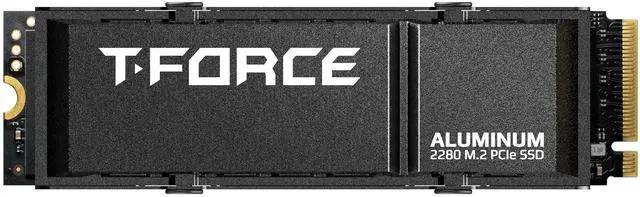
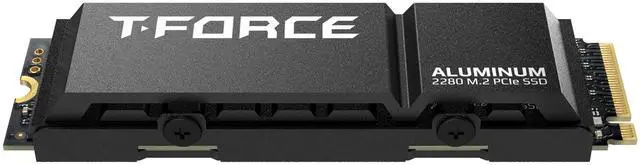
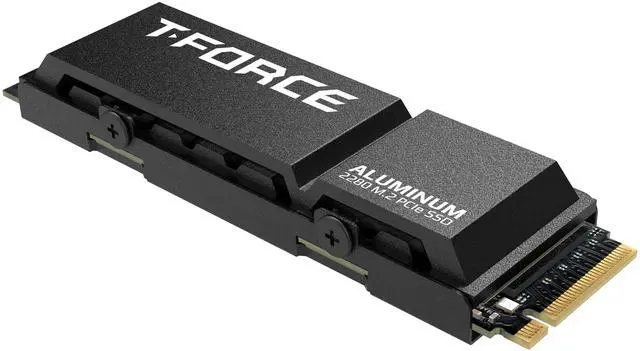
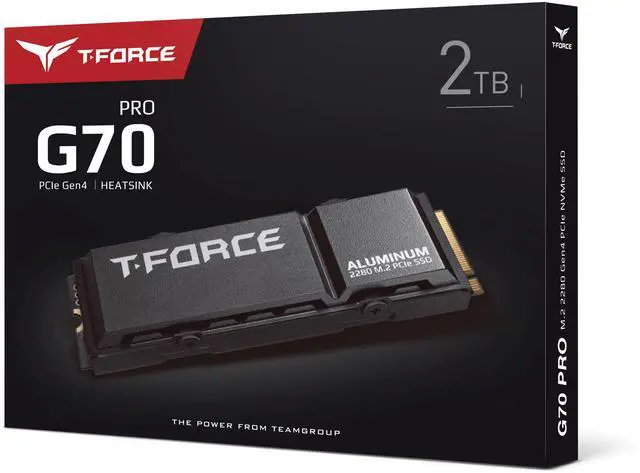
The SSDs offer two heat dissipation modules compliant to PS5 console heat-sink regulations—the patented ultra-thin graphene heat-sink and the brand-new aluminum alloy heat spreader. Choose the one that best fits your needs.


Windows TRIM SSD Optimization makes sure Free Block is made into use upon being released to speed up transmission and write performances. The wear-leveling technology and ECC enhance data transmission reliability while prolonging SSD lifetime.


TEAMGROUP’s patented S.M.A.R.T. monitoring software tracks SSD status at all times and conducts fast and simple settings and inspections to monitor the SSD’s quality status and performance.


The entire production is lead-free and halogen-free, RoHS-compliant, and adopts recyclable environmentally friendly materials for packaging to conserve Earth by being eco-friendly.


The Team Group T-FORCE G70 PRO (Aluminum) is a 2TB M.2 2280 PCIe 4.0 NVMe SSD with TLC flash, 2GB DRAM cache, an aluminum heatsink, and sequential speeds up to 7,400 MB/s read and 6,200 MB/s write, suited to gaming PCs and compatible PS5 setups that need fast, high-capacity storage.
| Attribute | Value |
|---|---|
| Best For | Consumer systems needing a 2TB M.2 internal SSD |
| Capacity | 2TB |
| Interface And Form Factor | M.2 2280 drive with PCIe 4.0 x4 and NVMe 1.4 |
| Controller And Cache | InnoGrit controller, TLC memory, and 2GB DRAM cache |
| Read Write Performance | Sequential read speeds up to 7400 MB/s and write speeds up to 6200 MB/s |
| Heatsink And Thermal Design | Heatsink included; listed with an aluminum heatsink and a patented graphene heatsink feature |
| Operating Environment And Durability | Operating temperature: 0°C to +70°C; storage temperature: -40°C to +85°C; operating humidity: RH 90% under 40°C; shock resistance: 1,500G/0.5ms; vibration resistance: 80Hz–2,000Hz/20G |
| Physical Specifications | 80 × 22 × 2.25 mm; 7 g; black; listed for chassis mounting |
| Endurance | 1480TBW |
| Model Identifiers | Team Group T-FORCE G70 PRO (Aluminum), model TM8FFH002T0C128 |
Q: Is the G70 PRO a good choice for adding 2TB to a PS5?
A: Choose the 2TB G70 PRO if you want a PCIe 4.0 M.2 drive with a heatsink included. TEAMGROUP lists the G70 PRO as PS5-compatible, and a review sample exceeded Sony’s 5,500 MB/s recommended read-speed threshold in the PS5’s storage test. Check that the heatsink version fits your console and follow Sony’s installation requirements.
Q: Should I choose the G70 PRO or a more power-efficient SSD for a laptop?
A: The G70 PRO is a better fit for a desktop or compatible console when high PCIe 4.0 performance is the priority. Tom’s Hardware found its power efficiency poor for laptop use, so consider a more power-efficient model if battery life and lower heat matter more.
Q: Is the G70 PRO worth choosing over a DRAM-less PCIe 4.0 SSD?
A: Choose the G70 PRO when you want a 2TB TLC drive with a 2GB DRAM cache and strong sequential-speed specifications. Its DRAM and high-end positioning may suit demanding desktop storage better than a basic DRAM-less model; for routine gaming and everyday use, compare actual prices and reviews for the specific alternatives.
Q: Is this SSD compatible with a PS5?
A: The product is listed as PS5 compatible and has a 2TB M.2 2280 PCIe 4.0 x4 NVMe drive with an included heatsink. Before buying, confirm that the heatsink fits your console’s M.2 bay and follow the console’s installation and formatting steps.
Q: Can I install this SSD in a desktop or laptop?
A: It uses an M.2 2280 NVMe PCIe 4.0 x4 connection, so the computer must have a compatible M.2 NVMe slot. Check the device’s supported drive length and available space for the included heatsink, especially in laptops or compact systems.
Q: Does this SSD include a heatsink, or do I need to buy one separately?
A: The listed configuration includes an aluminum heatsink, so a separate heatsink is not needed for this drive. Check that the included heatsink fits your system; avoid stacking another heatsink on top of it.
Q: Is this SSD suitable for gaming and large file transfers?
A: It offers 2TB of capacity, TLC memory, 2GB of DRAM cache, and rated sequential speeds of up to 7,400 MB/s read and 6,200 MB/s write. Those specifications suit game storage and fast file transfers, but actual speeds depend on the computer or console and the workload.
Q: Is the G70 PRO a reasonable choice for a Windows boot drive?
A: It is worth considering if your system supports PCIe 4.0 and you want a high-speed drive with DRAM cache. Reddit discussions specifically compare it as a boot-drive option; whether it is a good value depends on its price relative to alternatives.
Q: Will this SSD make games load noticeably faster than a cheaper SSD?
A: Not necessarily. Reddit discussions suggest that for game storage, differences between fast NVMe drives may be hard to notice in typical use. The G70 PRO’s high sequential speeds and DRAM may matter more for some workloads than ordinary game loading.
Q: Can I use the G70 PRO in a PCIe 3.0 M.2 slot?
A: A Reddit discussion about this model indicates that it can operate in a PCIe 3.0 slot, but the interface limits its maximum throughput. Check your motherboard’s slot specifications before buying.