




 here!
here!
I’m your shopping assistant for PC builds, upgrades, and everything tech.
Got questions? Ask away!
Start a conversation
here!
I’m your shopping assistant for PC builds, upgrades, and everything tech.
Got questions? Ask away!
Start a conversation



Must the device be the same brand to use Mesh mode?
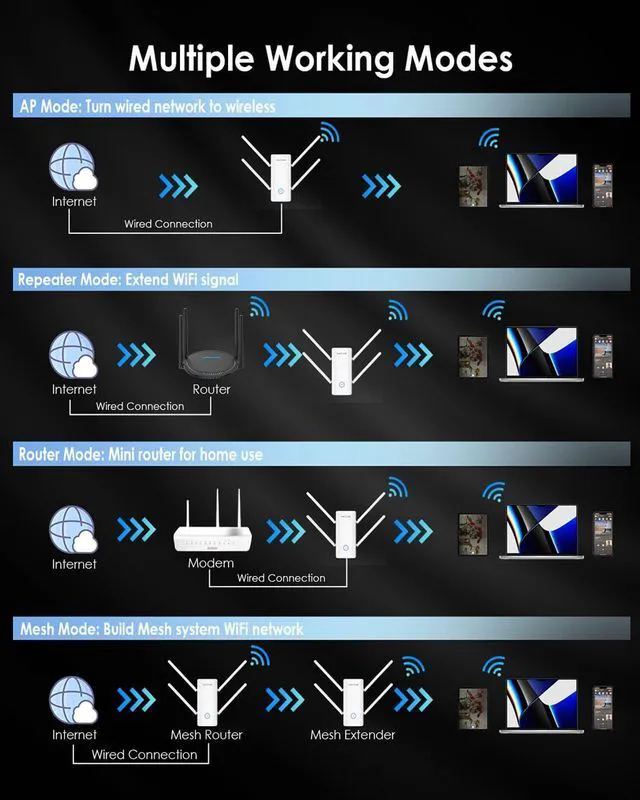
For Mesh mode functionality, this device only supports networking with other WAVLINK Mesh-capable devices and is not compatible with third-party mesh devices systems.
How do l choose the modes?
AP Mode: Extends coverage via ethernet to upstream device.
Repeater Mode: Extends coverage wirelessly.
Mesh Router Mode: Converts wired internet to Wi-Fi.
Mesh Extends coverage via mesh networking.
In repeater mode,I could not connect the wavlink device to the host router,what should I do?
1. Please make sure the DHCP of the router is enabled.
2. Make sure the MAC filter of the router is disabled.
3. Reset the device and configure it again.Repeat the 5g signal of the router.
4. If still have problems, please contact wavlink support team.
The signal strength of wavlink device is not as expected,what should I do?
The obstacle might affect the wifi signal much.Try to adjust the position of wavlink device to avoid the obstacle between the wavlink device and the target area.
Or you could contact the Wavlink official website support team for assistance.
What does it mean if the red light on the product comes on?
The flashing red light simply indicates that the repeater needs to be reconnected. Please reconfigure the connection between the repeater and the main router using the WPS method or the settings page. If attempts fail, please Official Website.



