

Your Browsing History

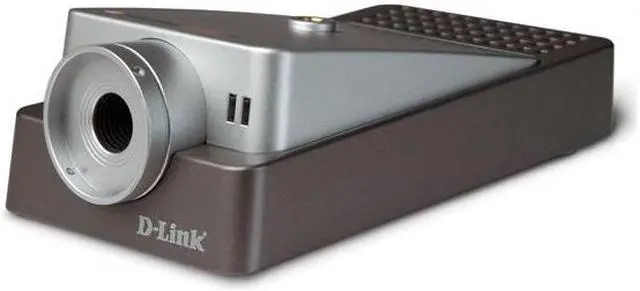


D-Link DCS-1110 640 x 480 MAX Resolution RJ45 10/100 Fast Ethernet PoE Internet Camera
- Wired Camera
- RJ45
- 640 x 480 MAX Resolution
Overview
Specs
Reviews (4)

Any questions? Our AI mode will help you find out quickly.
Try me now
The DCS-1110 is D-Link's most versatile camera yet, and now supports 802.3af Power over Ethernet (PoE) when used with a compatible PoE power injector or PoE switch, eliminating the need for a separate power supply. With 0.5 Lux light sensitivity, this camera is ideal for capturing video in rooms with minimal lighting, and at night. When enclosed in an optional outdoor housing, the DCS-1110 makes an excellent home security camera.
You can access and control your camera using Internet Explorer. As you watch and listen remotely to video and sound, you can record directly from the web browser to a local hard drive. By signing up with one of the many free Dynamic DNS services available on the web, you can assign an easy-to-remember web address to the camera. Remotely access your camera without having to remember the IP address, even if your Internet Service Provider changes it.
Manage and monitor up to four compatible cameras simultaneously with included IP View SE software. You can also use IP View SE to archive video straight to the hard drive, playback video, set up motion detection to trigger video/audio recording and send e-mail alerts. The DCS-1110 is configurable to record to a network-attached storage (NAS) device, eliminating the need to set up a dedicated computer for storing recorded video. Captured video can also be played back using any of the D-Link’s MediaLounge Wireless Media Players. You can even configure your MediaLounge Wireless Media Player to connect to the DCS-1110 and play real-time video feed on your TV screen!
The DCS-1110 is D-Link's most versatile camera yet, and now supports 802.3af Power over Ethernet (PoE) when used with a compatible PoE power injector or PoE switch, eliminating the need for a separate power supply. With 0.5 Lux light sensitivity, this camera is ideal for capturing video in rooms with minimal lighting, and at night. When enclosed in an optional outdoor housing, the DCS-1110 makes an excellent home security camera.
You can access and control your camera using Internet Explorer. As you watch and listen remotely to video and sound, you can record directly from the web browser to a local hard drive. By signing up with one of the many free Dynamic DNS services available on the web, you can assign an easy-to-remember web address to the camera. Remotely access your camera without having to remember the IP address, even if your Internet Service Provider changes it.
Manage and monitor up to four compatible cameras simultaneously with included IP View SE software. You can also use IP View SE to archive video straight to the hard drive, playback video, set up motion detection to trigger video/audio recording and send e-mail alerts. The DCS-1110 is configurable to record to a network-attached storage (NAS) device, eliminating the need to set up a dedicated computer for storing recorded video. Captured video can also be played back using any of the D-Link’s MediaLounge Wireless Media Players. You can even configure your MediaLounge Wireless Media Player to connect to the DCS-1110 and play real-time video feed on your TV screen!
You can access and control your camera using Internet Explorer. As you watch and listen remotely to video and sound, you can record directly from the web browser to a local hard drive. By signing up with one of the many free Dynamic DNS services available on the web, you can assign an easy-to-remember web address to the camera. Remotely access your camera without having to remember the IP address, even if your Internet Service Provider changes it.
Manage and monitor up to four compatible cameras simultaneously with included IP View SE software. You can also use IP View SE to archive video straight to the hard drive, playback video, set up motion detection to trigger video/audio recording and send e-mail alerts. The DCS-1110 is configurable to record to a network-attached storage (NAS) device, eliminating the need to set up a dedicated computer for storing recorded video. Captured video can also be played back using any of the D-Link’s MediaLounge Wireless Media Players. You can even configure your MediaLounge Wireless Media Player to connect to the DCS-1110 and play real-time video feed on your TV screen!
 10/100M Fast Ethernet ConnectionThe D-Link DCS-1110 connects to your network via a 10/100M fast Ethernet port, making it possible to control and monitor the camera from any remote PC in the network.
 Easy Installation and PlacementWith support for 802.3af Power over Ethernet (PoE) and a slim-line housing, the DCS-1110 is D-Link most versatile camera yet. PoE support, when used with a compatible PoE power injector or PoE switch, eliminates the need for mounting the camera near a power supply.
 Excellent Light SensitivityWith 0.5 Lux light sensitivity, this camera is capable of capturing video in rooms with minimal lighting, making it ideal for use at night. When enclosed in an optional outdoor housing, the DCS-1110 makes an excellent home security camera.
 Access Your Camera OnlineYou can access and control D-Link DCS-1110 using Internet Explorer. As you watch and listen remotely to video and sound obtained by the DCS-1110, you can record directly from the web browser to a local hard drive, making it ideal for capturing any moment no matter where you are. By signing up with one of the many free Dynamic DNS services available on the web, you can assign an easy-to-remember web address to the camera. Remotely access your camera without having to remember the IP address, even if your Internet Service Provider changes it.
 MediaLounge CompatibleD-Link DCS-1110 works great with D-Link MediaLounge family of home entertainment products. After setting up the DCS-1110 to record to your PC hard drive or a network-attached storage device, captured video can be played back using any of the MediaLounge Wireless Media Players. You can even configure your MediaLounge Wireless Media Player to connect to the DCS-1110 and play real-time video feed on your TV screen!
 10/100M Fast Ethernet ConnectionThe D-Link DCS-1110 connects to your network via a 10/100M fast Ethernet port, making it possible to control and monitor the camera from any remote PC in the network.
 Easy Installation and PlacementWith support for 802.3af Power over Ethernet (PoE) and a slim-line housing, the DCS-1110 is D-Link most versatile camera yet. PoE support, when used with a compatible PoE power injector or PoE switch, eliminates the need for mounting the camera near a power supply.
 Excellent Light SensitivityWith 0.5 Lux light sensitivity, this camera is capable of capturing video in rooms with minimal lighting, making it ideal for use at night. When enclosed in an optional outdoor housing, the DCS-1110 makes an excellent home security camera.
 Access Your Camera OnlineYou can access and control D-Link DCS-1110 using Internet Explorer. As you watch and listen remotely to video and sound obtained by the DCS-1110, you can record directly from the web browser to a local hard drive, making it ideal for capturing any moment no matter where you are. By signing up with one of the many free Dynamic DNS services available on the web, you can assign an easy-to-remember web address to the camera. Remotely access your camera without having to remember the IP address, even if your Internet Service Provider changes it.
 MediaLounge CompatibleD-Link DCS-1110 works great with D-Link MediaLounge family of home entertainment products. After setting up the DCS-1110 to record to your PC hard drive or a network-attached storage device, captured video can be played back using any of the MediaLounge Wireless Media Players. You can even configure your MediaLounge Wireless Media Player to connect to the DCS-1110 and play real-time video feed on your TV screen!
Warranty & Returns
Warranty, Returns, And Additional Information
Return Policies
- Return for refund within: 30 days
- Return for replacement within: 30 days
- This item is covered by Newegg.com's 30-Day Return Policy.
- Read full return policy for details.
Manufacturer Contact Info
- Manufacturer Product Page
- Manufacturer Website
- Support Phone: 877-453-5465
- Support Email: [email protected]
- Support Website
- View other products from D-Link
LOADING...