here!
I’m your shopping assistant for PC builds, upgrades, and everything tech.
Got questions? Ask away!
Start a conversation
here!
I’m your shopping assistant for PC builds, upgrades, and everything tech.
Got questions? Ask away!
Start a conversation



Any questions? Ask CelesteSM will help you find out quickly.


Specifications may very by model.
We want to ensure your holiday shopping this year is hassle-free. That’s why we’re automatically extending our return policies on almost every product! For purchases placed between November 1st, 2026 and December 31, 2026 you will have until January 31, 2027 to return your product.
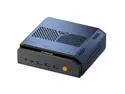
The GEEKOM IT15 is a compact Mini PC with an Intel Core Ultra 9 285H, 32GB DDR5, 1TB SSD, Intel Arc 140T graphics, and Windows 11 Pro, making it a strong fit for users who want high everyday performance in a space-saving desktop for home, office, and mainstream multitasking.
| Attribute | Value |
|---|---|
| Best For | Consumers who want a compact, VESA-mountable mini PC with an Intel Core Ultra 9 285H, Intel Arc 140T GPU, 32GB DDR5 and 1TB SSD — suitable for general-purpose computing, multimedia and GPU-accelerated workloads in a small desktop or mounted setup |
| Processor And Cache | Intel Core Ultra 9 285H (Intel Core Ultra 9, Series 2) with 24 MB L3 cache |
| Memory Configuration | 32GB DDR5 installed, supports up to 128 GB maximum memory |
| Storage And Expansion | 1TB SSD (internal) |
| Graphics | Intel Arc 140T GPU |
| Operating System | Windows 11 Pro |
| Wired And Wireless Networking | 2.5Gbps Ethernet; 802.11be (Wi‑Fi 7) wireless; Bluetooth 5.4 for local network and peripheral connectivity |
| Power And Adapter | 120W power adapter (19V / 6.32A) included |
| Dimensions And Portability | Compact footprint 49.2 x 112 x 117 mm and 600 g weight for desk or mounted use |
| Mounting And Included Accessories | Includes VESA mount and HDMI cable (100mm±10mm); packaged for mounted or desktop installation |
| Package Contents | IT15 Mini PC, 1 × 3.3V button battery, VESA mount, HDMI cable (100mm±10mm), user guide, 10 screws, power adapter, thank you card |
| Model Identifiers | GEEKOM IT15 — Part Number GMIT15U9285H-321-US (Nettop Computer / Mini PC) |
Q: Should I choose the GEEKOM IT15 or an AMD Ryzen AI 9 HX 370 mini PC like the Minisforum AI X1 Pro?
A: Choose the GEEKOM IT15 if you want a very compact Intel-based mini PC for productivity, office work, 4K media, developer workloads, and broad peripheral connectivity in a small chassis. Choose a Ryzen AI 9 HX 370 mini PC if your priority is stronger integrated-graphics gaming performance or heavier AI-focused positioning. Across review and community comparisons, HX 370 systems are commonly favored for iGPU gaming, while Core Ultra 9 285H systems remain competitive for CPU-heavy general use and media tasks.
Q: Is the GEEKOM IT15 a better buy than an older Core Ultra 9 185H mini PC?
A: Yes, the IT15 makes more sense if you are deciding between current Intel mini PCs and want the newer Core Ultra 9 285H platform. It gives you the newer Intel generation, Arc 140T graphics, Wi-Fi 7, and updated connectivity, so it is the more forward-looking choice for buyers who plan to keep the system for several years. An older 185H mini PC is still reasonable for everyday office and media use, but the IT15 is the better fit if you want newer platform features and somewhat more headroom.
Q: Who should buy the GEEKOM IT15 instead of a smaller or lower-tier mini PC configuration?
A: Buy the IT15 when 32GB RAM, a 1TB SSD, 2.5GbE networking, and a higher-end mobile CPU matter on day one. It is the better choice for heavier multitasking, local development work, virtual machines, larger browser workloads, and longer-term use without immediate upgrades. A lower-tier mini PC is a practical alternative for web, streaming, office apps, and light home use, but the IT15 better suits users who want more memory, storage, and CPU headroom from the start.
Q: Should I pick the GEEKOM IT15 or an Asus NUC 15 Pro+ with the same Core Ultra 9 285H?
A: Choose based on form-factor priorities rather than expecting a major platform difference, because both target premium Intel mini PC buyers with the same CPU class. The GEEKOM IT15 is the better fit if you want this exact preconfigured 32GB/1TB setup in a very small chassis. The Asus NUC 15 Pro+ is the better fit if you prefer buying into the NUC ecosystem and want a model that is frequently covered by enterprise-leaning reviews. Benchmark databases that include both systems show the same processor class can perform differently by chassis tuning, so the decision is usually about size, configuration, ports, thermals, and brand preference rather than CPU name alone.
Q: Is the GEEKOM IT15 better for portability-focused use or performance-first desk use?
A: The IT15 fits portability-focused desktop use better than many larger mini PCs because it is small, light, VESA-mountable, and still uses a high-end Core Ultra 9 processor with 32GB RAM and 1TB storage. It is a strong choice for users who move a PC between rooms, desks, or offices and still want desktop-style ports and Windows Pro. A larger performance-first mini PC can be the better choice if you specifically want more internal expansion, higher sustained cooling capacity, or stronger gaming-oriented integrated graphics.
Q: Is this a good mini PC for office work, meetings, and everyday productivity?
A: Yes. This configuration is more than sufficient for office apps, web browsing, video calls, multitasking, and general home or business use. The main buying point is that it offers much higher CPU, memory, and SSD capacity than the baseline mini PCs people often ask about on retail Q&A pages. The main limitation is not performance for office work, but that you still need your own monitor, keyboard, mouse, and webcam if your setup requires them.
Q: Is it worth buying as a travel work device or desk-to-desk computer?
A: It can work well as a portable desktop, but not as a true mobile computer. The small 49.2 x 112 x 117 mm chassis and 600 g weight make it easy to pack and move between offices, hotel TVs, or shared desks. However, it is not a laptop replacement by itself because it still needs external power, a display, and input devices. It makes the most sense for users who want a compact workstation they can carry occasionally, not for people who need battery-powered work on the go.
Q: Who is this mini PC best suited for?
A: It is best suited for users who want a compact but high-spec desktop for mainstream work, heavy multitasking, home office use, and space-saving setups. With a Core Ultra 9 285H, 32GB DDR5, 1TB SSD, 2.5Gb LAN, Wi-Fi 7, and Windows 11 Pro, it fits buyers who want more headroom than entry-level mini PCs provide. It is less suitable for buyers who want maximum internal expansion or desktop-class discrete GPU performance, because mini PCs usually trade upgrade flexibility for size.
Q: What are the main trade-offs versus a larger desktop tower or gaming PC?
A: The trade-off is size and efficiency versus maximum expandability and graphics power. This GEEKOM model should be excellent for productivity and compact setups, but a larger tower is usually the better choice if you want a full-size dedicated GPU, broader internal upgrades, or easier long-term component swaps. In short: choose this mini PC for space-saving performance and convenience, and choose a tower if gaming or expansion is the priority.
Q: Is this a better choice than a basic mini PC for light gaming or creative work?
A: Yes, if you want more headroom. Compared with the low-end mini PCs commonly discussed in retail Q&A, this model's Core Ultra 9 processor, 32GB memory, and Intel Arc 140T graphics make it a stronger fit for heavier multitasking, lighter graphics workloads, and more demanding everyday use. The trade-off is that buyers focused on serious AAA gaming should still look at systems with stronger dedicated graphics rather than relying on a compact mini PC form factor.
Q: Is the GEEKOM IT15 a good replacement for a mainstream desktop or laptop?
A: Yes for most office, browsing, study, coding, and general home use. The Core Ultra 9 285H, 32GB DDR5, and 1TB SSD are strong enough for heavy multitasking and everyday productivity in a very small footprint. It is a better fit as a compact main PC than as a budget-value pick, because buyers in Reddit and YouTube discussions often compare it against larger desktops or lower-cost mini PCs.
Q: Who is the GEEKOM IT15 most suitable for?
A: It is most suitable for users who want a small Windows 11 Pro desktop for productivity, development, light creative work, and dense multitasking. The 32GB RAM, 1TB SSD, 2.5GbE, Wi‑Fi 7, and compact size make it practical for home offices, desks with limited space, and users who want more performance than entry-level mini PCs without moving to a full tower.
Q: Is the GEEKOM IT15 good for gaming or GPU-heavy work?
A: It is suitable for light gaming, media, and modest GPU-accelerated tasks, but it is not the right choice if gaming performance is the main reason to buy. The Intel Arc 140T iGPU is a meaningful step up from basic integrated graphics, yet buyers discussing the IT15 often treat it as a productivity-first mini PC rather than a gaming-first system. If you need consistent high-end gaming or heavy AI/GPU workloads, a system with a discrete GPU is the safer choice.
Q: What are the main trade-offs of buying the GEEKOM IT15?
A: The main trade-offs are price, mini-PC thermal limits, and brand-confidence questions that appear in buyer discussions. You get strong specs in a very compact system, but some shoppers compare it against cheaper mini PCs or more established alternatives such as ASUS NUC-class systems. It makes the most sense if compact size, modern connectivity, and ready-to-use specs matter more than maximum upgrade flexibility or best gaming value per dollar.