here!
I’m your shopping assistant for PC builds, upgrades, and everything tech.
Got questions? Ask away!
Start a conversation
here!
I’m your shopping assistant for PC builds, upgrades, and everything tech.
Got questions? Ask away!
Start a conversation



Combo Up Savings Up To $280+
The more you add, the more you'll save!
Any questions? Ask CelesteSM will help you find out quickly.


We want to ensure your holiday shopping this year is hassle-free. That’s why we’re automatically extending our return policies on almost every product! For purchases placed between November 1st, 2026 and December 31, 2026 you will have until January 31, 2027 to return your product.
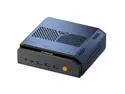
The GEEKOM A9 MAX is a compact mini PC with an AMD Ryzen AI 9 HX 470, 32GB DDR5, 2TB SSD, Radeon 890M graphics, and Windows 11 Pro, making it a strong fit for home users, professionals, and mainstream buyers who want high desktop-class performance in a space-saving setup.
| Attribute | Value |
|---|---|
| Best For | Compact consumer/home mainstream desktop for productivity, multimedia and light creative workflows that benefit from a high-end Ryzen AI 9 HX 470 CPU, 32GB DDR5 memory and a 2TB SSD for responsive multitasking and ample local storage |
| Processor And Core Count | AMD Ryzen AI 9 HX 470 (CPU type: AMD Ryzen AI) with 12 MB L2 cache and 24 MB L3 cache |
| GPU And VRAM | AMD Radeon 890M graphics |
| Memory Configuration | 32GB DDR5 installed; supports up to 128 GB maximum memory |
| Storage And Expansion | 2TB SSD for primary storage |
| Wired And Wireless Networking | Dual 2.5Gbps wired LAN and 802.11be (Wi‑Fi 7) wireless with Bluetooth 5.4 |
| Power And Accessories | 120W power supply; power adapter and AC power line included in package contents |
| Operating System | Windows 11 Pro |
| Dimensions And Portability | Mini PC form factor in silver; dimensions 46.9 x 135 x 132 mm and weight 704.8 g for compact desktop or VESA-mounted setups |
| Model Identifiers | GEEKOM A9 MAX, part number GMA9MAXAI9HX470-322-US |
| Package Contents | A9 Max mini PC, VESA mount, HDMI cable (100mm±10mm), AC power line (120cm±30cm), power adapter, 3V button battery, user guide, 6 screws and thank you card |
Q: Should I buy the GEEKOM A9 MAX HX 470 or a Ryzen AI 9 HX 370 mini PC?
A: Choose the GEEKOM A9 MAX HX 470 if you want the newer AMD refresh and the strongest CPU-side version of this platform without moving to a larger class of mini PC. Official AMD specs show the HX 470 keeps the same 12-core layout and Radeon 890M class graphics as HX 370, with a slightly higher boost clock and updated Ryzen AI 400 positioning. Reviews of HX 470 mini PCs consistently describe it as an incremental upgrade rather than a major generational jump, so the decision is simple: pick HX 470 when the price gap is modest or you want the newest platform; pick HX 370 when a similar 890M-based system is meaningfully cheaper and your workload is mostly gaming, media, or general productivity where the real-world difference is usually small.
Q: Is the GEEKOM A9 MAX a better choice than an older Ryzen 7 8845HS mini PC?
A: Yes, the A9 MAX is the more forward-looking option if you want stronger integrated graphics, newer AI capability, and more headroom for demanding multitasking. The A9 MAX uses AMD's Radeon 890M, while 8845HS systems typically use Radeon 780M; across reviews and buyer discussions, that usually translates into a noticeable step up for 1080p gaming, creator workloads, and GPU-assisted local AI. It is the better fit if you plan to keep the system for several years or want a mini PC that can cover work, light gaming, and AI experimentation in one box. An 8845HS model still makes sense when price matters more than peak iGPU performance.
Q: Should I get the GEEKOM A9 MAX or a larger mini PC like the MINISFORUM AI X1 Pro?
A: Choose the GEEKOM A9 MAX if compact size is a priority and you want high-end AMD mini PC performance in a smaller footprint. Choose a larger model like the MINISFORUM AI X1 Pro if expansion and desktop-style connectivity matter more. The A9 MAX is much smaller and still offers dual 2.5GbE, Wi-Fi 7, USB4, and up to 128GB memory support. The AI X1 Pro class adds a bigger chassis and, depending on model, more storage slots and extra features such as OCuLink or built-in power, which makes it a better fit for eGPU use, heavier storage expansion, or more specialized workstation setups. In short: A9 MAX for compact performance-first setups; AI X1 Pro for expandability-first setups.
Q: Is 32GB RAM on the GEEKOM A9 MAX enough, or should I look for a 64GB mini PC instead?
A: The included 32GB configuration is the right choice for most buyers using the A9 MAX for everyday productivity, media work, programming, and gaming. Choose a 64GB-class setup if you expect to run multiple VMs, larger local AI models, heavier creative projects, or multitask aggressively for long sessions. The key advantage here is that the A9 MAX supports memory upgrades up to 128GB, so the 32GB version is a sensible starting point if you want to control upfront cost while keeping a clear upgrade path.
Q: Is the GEEKOM A9 MAX better for portability-focused use or performance-first desktop replacement use?
A: The A9 MAX works best as a performance-first compact desktop, not as a travel-first PC. Its small chassis, low weight, VESA support, and strong port selection make it easy to place on a desk, behind a monitor, or move between rooms. At the same time, reviews position it more as a fixed mini workstation or compact gaming/productivity system than as something you carry daily like a laptop. Buy it if you want desktop-style power in minimal space; choose a laptop if battery power, display, and frequent travel matter more.
Q: Is this a good mini PC for office work, meetings, and heavy multitasking?
A: Yes. For office apps, video meetings, browser-heavy workflows, and multitasking, this configuration is more than sufficient. The Ryzen AI 9 HX 470, 32GB DDR5, and 2TB SSD put it above the level typically needed for productivity use. Its main trade-off versus a full-size desktop is the usual mini-PC limitation: less expansion headroom for major internal upgrades, even if memory and storage are still important buying considerations in this category.
Q: Is it suitable as a travel work device or portable desktop?
A: Yes, if you want a compact desktop you can move between locations. A mini PC like this is easy to pack and takes very little desk space, but it is not a self-contained travel computer like a laptop. You still need an external display, keyboard, mouse, and power adapter at the destination. It makes sense for users who want desktop-class performance in a small box, not for users who need true on-the-go computing in airports, cafes, or meetings.
Q: Who is this mini PC best suited for?
A: It is best suited for users who want a very small Windows desktop without settling for entry-level performance: home office users, developers, analysts, creators doing moderate GPU-assisted work, and buyers who want fast networking and lots of built-in storage in a compact system. It is a better fit for desk-based users than for people who need a battery-powered mobile device. It is likely overkill for basic email, light browsing, or simple schoolwork if price efficiency is the top priority.
Q: Can it handle gaming or creative work, or is it mainly for productivity?
A: It can do more than basic productivity, but buyers should separate 'integrated-graphics capable' from 'gaming desktop replacement.' The Radeon 890M is stronger than the graphics found in many office mini PCs, so it should be suitable for lighter gaming, media work, and some creative tasks. The trade-off is that a mini PC with integrated graphics still will not match a larger desktop with a dedicated GPU for demanding AAA gaming, heavy 3D work, or top-end video production.
Q: Is this a better choice than a cheaper mini PC alternative?
A: It is a better choice if you specifically want higher-end CPU performance, 32GB of memory, 2TB of storage, newer wireless connectivity, and stronger integrated graphics out of the box. A cheaper mini PC is often the better value for basic office work, streaming, and light home use. The decision comes down to whether you need premium headroom now; if not, lower-tier mini PCs usually cover everyday tasks at a much lower cost.
Q: Is the GEEKOM A9 MAX a good choice if I want one mini PC for both work and light gaming?
A: Yes, if you want a compact PC that prioritizes strong everyday performance first and gaming second. With a Ryzen AI 9 HX 470, 32GB DDR5, 2TB SSD, and Radeon 890M graphics, it is better suited to office work, multitasking, coding, media use, and general desktop replacement use than to high-end gaming. Community discussion around Radeon 890M mini PCs repeatedly frames this class of system as capable for 1080p gaming at moderate settings, but not as a substitute for a dedicated gaming desktop.
Q: Can the GEEKOM A9 MAX replace a full-size desktop for normal home or office use?
A: For many users, yes. Its specs are strong for a primary home or office PC: 32GB DDR5 memory, 2TB SSD storage, Windows 11 Pro, Wi‑Fi 7, Bluetooth 5.4, and dual 2.5GbE LAN in a very small chassis. The trade-off is that a mini PC is less convenient to service and expand than a tower, so it fits best if you value space savings, low clutter, and lower noise more than maximum upgrade flexibility.
Q: Who is the GEEKOM A9 MAX best suited for?
A: It is best suited for users who want a compact, high-spec Windows mini PC for productivity, general home use, media, light creative work, and occasional gaming. It is also a practical fit for buyers who need fast networking, since it includes dual 2.5GbE and Wi‑Fi 7. It is less suitable for buyers whose main priority is maximum gaming performance per dollar or long-term desktop-style expandability.
Q: What are the main trade-offs of buying the GEEKOM A9 MAX instead of a larger PC or a cheaper mini PC?
A: The main trade-offs are price, thermal headroom, and graphics limits. Compared with a larger desktop, a mini PC gives up easier upgrades and sustained cooling capacity. Compared with cheaper mini PCs, the A9 MAX offers a newer CPU class, Radeon 890M graphics, more memory, and more storage, but discussion around 890M systems also shows that the gaming gain over older 780M-class options may not justify the premium for every buyer. It makes the most sense when you specifically want high-end mini PC performance in a very small form factor.