here!
I’m your shopping assistant for PC builds, upgrades, and everything tech.
Got questions? Ask away!
Start a conversation
here!
I’m your shopping assistant for PC builds, upgrades, and everything tech.
Got questions? Ask away!
Start a conversation
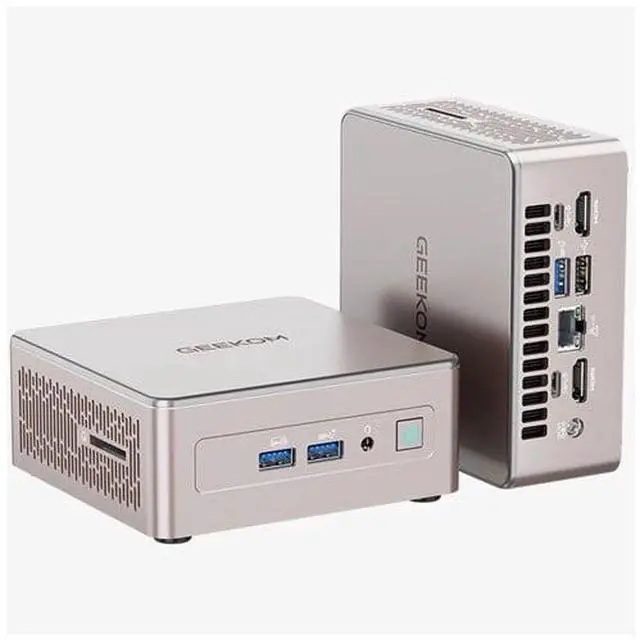

| Brand | GEEKOM |
|---|---|
| Model | A5 PRO |
| Part Number | GMA5PROR77730U-16512-US |
| Type | Business Desktops & Workstations |
|---|---|
| Form Factor | Mini PC |
| Usage | Business / Mainstream |
| Color | Silver |
| Processor | AMD Ryzen 7 7730U |
| Memory | 16GB DDR4 |
| Storage | 512GB PCIe NVMe SSD |
| Graphics | AMD Radeon Graphics |
| Power Supply | 65W |
| CPU Type | AMD Ryzen 7 7000 Series |
|---|---|
| CPU Name | AMD Ryzen 7 7730U |
| L3 Cache Per CPU | 16 MB |
| GPU/VGA Type | AMD Radeon Graphics |
|---|
| Memory Capacity | 16GB |
|---|
| SSD | 512GB |
|---|
| LAN Speed | 2.5Gbps |
|---|---|
| WLAN | 802.11ax Wireless LAN |
| WiFi Generation | Wi-Fi 6 |
| Bluetooth | Bluetooth 5.4 |
| Video Ports | 2 x HDMI |
|---|---|
| RJ45 | 1 port |
| Dimensions (H x W x D) | 112.4 x 112.4 x 37 mm |
|---|---|
| Weight | 429.3g |
| Package Contents | Delivery Content - Mini A5 Pro - VESA Mount - HDMI Cable(100cm+/-10cm) - User Guide - Screws*6 - Thank You Card - Power Adapter 65W |
|---|
| First Listed on Newegg | August 27, 2026 |
|---|
We want to ensure your holiday shopping this year is hassle-free. That’s why we’re automatically extending our return policies on almost every product! For purchases placed between November 1st, 2026 and December 31, 2026 you will have until January 31, 2027 to return your product.
The GEEKOM A5 Pro is a compact business mini PC with an 8-core, 16-thread Ryzen 7 7730U, 16GB DDR4 memory, and a 512GB NVMe SSD, suited to office productivity, multitasking, and home-office use.
| Attribute | Value |
|---|---|
| Best For | Compact business and home-office computing, multitasking, and media-server use |
| Processor And Graphics | AMD Ryzen 7 7730U from the Ryzen 7 7000 Series, with AMD Radeon Graphics and 16 MB of L3 cache |
| Memory And Storage | 16GB DDR4 memory and a 512GB PCIe NVMe SSD |
| Connectivity | 2.5Gbps Ethernet, Wi-Fi 6 (802.11ax), Bluetooth 5.4, two HDMI video outputs, and one RJ45 port |
| Power | 65W power supply |
| Physical Design | Silver mini PC measuring 112.4 × 112.4 × 37 mm and weighing 429.3 g |
| Included Accessories | VESA mount, 100 cm HDMI cable (±10 cm), user guide, six screws, thank-you card, and 65W power adapter |
| Model Identifiers | GEEKOM A5 PRO; part number GMA5PROR77730U-16512-US |
Q: GEEKOM A5 Pro with Ryzen 7 7730U or Ryzen 5 7530U: which is better for multitasking?
A: Choose the A5 Pro with Ryzen 7 7730U for heavier multitasking: it has 8 cores and 16 threads, compared with 6 cores and 12 threads in the Ryzen 5 7530U version. Both configurations suit everyday office and browser-based work.
Q: GEEKOM A5 Pro or GEEKOM A6 for a home office?
A: Choose the A5 Pro for a low-power 15W-class office setup with upgradeable DDR4 memory. Choose the A6 when your work benefits from its Ryzen 7 6800H processor, Radeon 680M graphics, DDR5 memory, and performance modes up to 45W.
Q: Should I keep the A5 Pro at 16GB RAM or upgrade it to 32GB?
A: The included 16GB configuration is a practical fit for typical office work, browsing, and media use. Consider 32GB if you regularly keep many applications or browser tabs open at once; the A5 Pro’s dual-slot DDR4 memory is upgradeable up to 64GB.
Q: Is this mini PC suitable for office work, multitasking, and video meetings?
A: Yes. Its Ryzen 7 7730U, 16GB of RAM, and 512GB NVMe SSD are suited to everyday office work, web browsing, and multitasking. It can connect to meeting peripherals, but a webcam and microphone are not listed as included, so you may need to supply them separately.
Q: Can I upgrade the RAM or add more storage later?
A: Yes. The A5 Pro has two DDR4 memory slots and supports up to 64GB of RAM. Its storage can also be expanded using the M.2 and 2.5-inch drive options; the product listing states up to 10TB total storage.
Q: Can it run multiple monitors at once?
A: The product information specifies support for up to four displays through its dual HDMI and dual USB-C ports, with resolutions up to 8K via USB-C. Check that your monitors, cables, and USB-C connections support the display setup you plan to use.
Q: Is it practical to use as a travel work computer?
A: It is compact and light enough to move between workspaces, but it is not a laptop: it has no built-in screen or battery and requires external power, a display, and input devices. It is most practical when those accessories are already available at your destination.
Q: Is the GEEKOM A5 Pro 2027 Edition suitable for everyday work?
A: It is configured for typical office work, browsing, and media use: it has a Ryzen 7 7730U, 16GB of RAM, and a 512GB NVMe SSD. An A5 owner reported using an earlier A5 for office, finance, music, and movies; for heavier multitasking, the 2027 model’s memory can be upgraded.
Q: Is the A5 Pro 2027 Edition good for gaming?
A: Its integrated Radeon graphics are better suited to casual or older games and emulation than demanding modern games. A video review of an A5 covers emulation, and an A5 owner’s eGPU setup illustrates that users seeking stronger graphics may look beyond the built-in GPU.
Q: Is 16GB of RAM enough, and can it be upgraded?
A: The included 16GB should suit everyday office and browsing tasks; users running heavier workloads may want more. The product information says the memory is upgradeable to 64GB. One 2027-edition owner reported receiving a single 16GB stick, so check the installed memory configuration if dual-channel performance matters.
Q: Should I expect the A5 Pro to be quiet?
A: Quiet operation is not guaranteed by the available user reports: some owners of earlier A5 versions reported noticeable noise. The 2027 model advertises updated cooling, but those reports do not establish how loud this version is in your workload. If fan noise is important, test it during the return period.