




 here!
I’m your shopping assistant for PC builds, upgrades, and everything tech.
Got questions? Ask away!
Start a conversation
here!
I’m your shopping assistant for PC builds, upgrades, and everything tech.
Got questions? Ask away!
Start a conversation
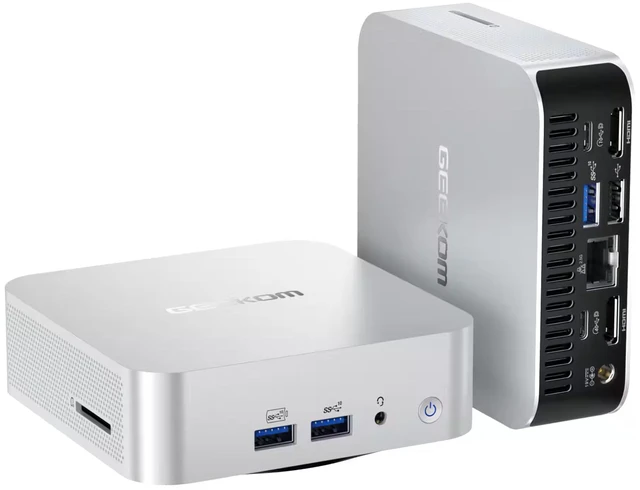

| Brand | GEEKOM |
|---|---|
| Series | A7 MAX |
| Model | GMA7MAXAI7450-321-US |
| Part Number | GMA7MAXAI7450-321-US |
| Type | Mini PC |
|---|---|
| Memory | 32GB DDR5 |
| Storage | 1TB |
| Graphics | AMD Radeon 860M |
| Power Supply | 120W, 19V-6.32A |
| Operating System | Windows 11 Pro |
| CPU Type | AMD Ryzen AI 7 450 |
|---|---|
| CPU Name | AMD Ryzen AI 7 450 |
| GPU/VGA Type | AMD Radeon 860M |
|---|
| Memory Capacity | 32GB |
|---|---|
| Memory Speed | 5600MHz |
| Memory Spec | 32GB DDR5, dual-channel, 5600MHz, up to 64GB (32GB per module) |
| Memory Slot (Total) | 2 |
| Memory Slot (Available) | 2 |
| Maximum Memory Supported | 64GB |
| SSD | 1 x M.2 2280 PCIe Gen4*4 SSD up to 2TB, 1 x M.2 2242 SATAIII SSD up to 1TB |
|---|
| LAN Speed | 100/1000/2500Mbps (2.5G RJ45 LAN) |
|---|---|
| WLAN | Intel Wi-Fi 7 |
| WiFi Generation | Wi-Fi 7 |
| Bluetooth | Bluetooth 5.4 |
| Rear USB | 5 x USB3.2 Gen2 Type A, 2 x USB4.0 Type C, 1 x USB2.0 Type A |
|---|---|
| Video Ports | 2 x HDMI 2.0, 2 x USB4.0 Type C |
| Front Audio Ports | 1 x 3.5mm headphone jack |
| Rear Audio Ports | 1 x 3.5mm headphone jack |
| RJ45 | 2 x 100/1000/2500Mbps (2.5G RJ45 LAN) |
| Dimensions (H x W x D) | 135*132*46.9mm |
|---|
| First Listed on Newegg | September 17, 2026 |
|---|
We want to ensure your holiday shopping this year is hassle-free. That’s why we’re automatically extending our return policies on almost every product! For purchases placed between November 1st, 2026 and December 31, 2026 you will have until January 31, 2027 to return your product.
The GEEKOM A7 Max is a compact Windows 11 Pro mini PC with an AMD Ryzen AI 7 450, 32GB of DDR5 memory, a 1TB SSD, and Radeon 860M graphics, suited to home-office work, multitasking, and everyday computing in a small footprint.
| Attribute | Value |
|---|---|
| Best For | Compact desktop computing with multitasking, expandable memory and storage, and multiple display connections |
| Processor | AMD Ryzen AI 7 450 |
| Graphics | Integrated AMD Radeon 860M graphics |
| Memory Configuration | 32GB DDR5 dual-channel memory at 5600MHz, with 2 slots available and support for up to 64GB (32GB per module) |
| Storage And Expansion | 1TB storage; supports one M.2 2280 PCIe Gen4 x4 SSD up to 2TB and one M.2 2242 SATA III SSD up to 1TB |
| Ports And Display Connectivity | 5 USB 3.2 Gen 2 Type-A, 1 USB 2.0 Type-A, 2 USB4 Type-C, and 2 HDMI 2.0 video ports; front and rear 3.5mm headphone jacks |
| Wired And Wireless Networking | Dual 2.5GbE RJ45 LAN ports, Intel Wi-Fi 7, and Bluetooth 5.4 |
| Power | 120W power supply, 19V / 6.32A |
| Operating System | Windows 11 Pro |
| Dimensions | 135 × 132 × 46.9 mm (H × W × D) |
| Model Identifiers | GEEKOM A7 MAX; model and part number GMA7MAXAI7450-321-US |
Q: GEEKOM A7 Max Ryzen AI 7 450 vs. A7 Max Ryzen 9 7940HS: which should I choose?
A: Choose the listed Ryzen AI 7 450 version if you want 32GB of dual-channel DDR5 included and the Radeon 860M. The Ryzen 9 7940HS A7 Max is a separate configuration reviewed with 16GB of memory and Radeon 780M graphics; choose it if that specific processor configuration is your priority. The reviews cover the 7940HS model, so they should not be treated as direct performance tests of the Ryzen AI 7 450 version.
Q: GEEKOM A7 Max vs. A8 Max: which is the better fit?
A: Choose this A7 Max configuration if you want its listed 32GB of dual-channel memory, Radeon 860M graphics, and Wi-Fi 7. Choose an A8 Max configuration if its available processor and storage options better match your setup; GEEKOM lists A8 Max models with Radeon 780M graphics, up to 64GB of memory, dual 2.5GbE, and Wi-Fi 6E.
Q: GEEKOM A7 Max vs. GEEKOM A8: which one takes up less desk space?
A: Choose the GEEKOM A8 if a smaller physical footprint is your priority; its listed dimensions are about 112 × 112 × 38 mm. Choose this A7 Max if you prefer the listed 32GB memory configuration, Radeon 860M graphics, and Wi-Fi 7 in a 135 × 132 × 46.9 mm chassis.
Q: Can this mini PC run two monitors?
A: The listed ports include two HDMI 2.0 ports and two USB4 Type-C ports with video output, so the PC has several monitor-connection options. The product information does not specify the maximum number of displays or supported resolution and refresh rate when multiple displays are connected; confirm those details if they are important to your setup.
Q: Is it suitable for everyday office work and video meetings?
A: Its Ryzen AI 7 450 processor, 32GB of DDR5 memory, 1TB SSD, and Windows 11 Pro make it a suitable desktop configuration for common office tasks, multitasking, and video-meeting software. The product information does not list a built-in webcam or microphone, so plan to use separate meeting peripherals if needed.
Q: Can I upgrade the memory or add more storage later?
A: The listed specifications support up to 64GB of DDR5 memory and describe two storage options: an M.2 2280 PCIe Gen4 SSD up to 2TB and an M.2 2242 SATA SSD up to 1TB. The listing also notes that component configurations may vary, so check the unit’s installed memory and available storage slot before buying parts.
Q: Is it practical to take this mini PC between work locations?
A: Its compact 135 × 132 × 46.9 mm size may make it easier to transport than a full-size desktop, but it is not a laptop: it needs a power outlet and an external display, keyboard, and mouse to use. It is most practical when those accessories are already available at each location or can be carried with it.


