here!
I’m your shopping assistant for PC builds, upgrades, and everything tech.
Got questions? Ask away!
Start a conversation
here!
I’m your shopping assistant for PC builds, upgrades, and everything tech.
Got questions? Ask away!
Start a conversation




Any questions? Ask CelesteSM will help you find out quickly.
We want to ensure your holiday shopping this year is hassle-free. That’s why we’re automatically extending our return policies on almost every product! For purchases placed between November 1st, 2026 and December 31, 2026 you will have until January 31, 2027 to return your product.
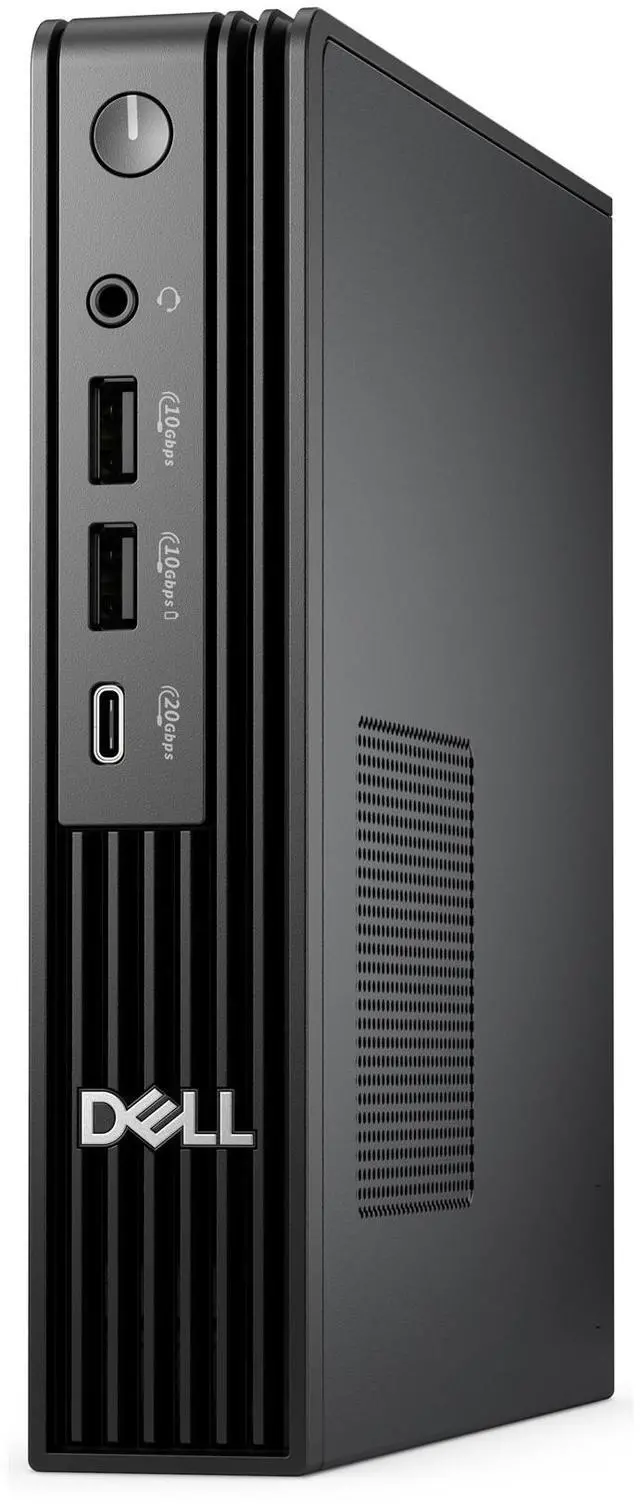
The Dell Pro Micro Plus QBM1250 is a compact business desktop with an Intel Core Ultra 5 235, 16GB DDR5 memory, a 512GB SSD, and Windows 11 Pro, suited to office work and business users who want a small-footprint PC.
| Attribute | Value |
|---|---|
| Best For | Business desktop use where a compact system running Windows 11 Pro is needed |
| Processor And Core Count | Intel Core Ultra 5 235 with 14 cores, a 13-TOPS NPU, and speeds up to 5.0 GHz |
| Graphics | Intel Integrated Graphics |
| Memory Configuration | 16 GB DDR5 (1 × 16 GB), up to 5600 MT/s, non-ECC |
| Storage | 512 GB TLC SSD |
| Operating System | Windows 11 Pro |
| Form Factor | Mini PC |
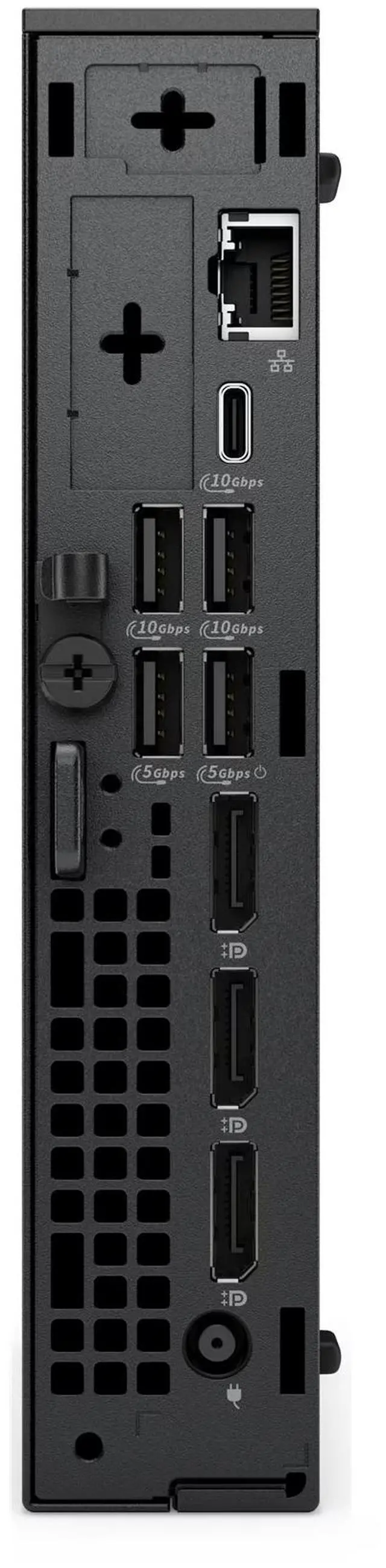
| Ports And Connectivity | HDMI, headphone, USB, Ethernet, and Bluetooth interfaces listed |
| Audio Output | Headphones and speakers |
| Brand | Dell |
Q: Dell Pro Micro Plus with Core Ultra 5 235 or Core Ultra 7 265: which configuration should I choose?
A: Choose the listed Core Ultra 5 235 configuration for a 14-core business desktop with 16GB memory and a 512GB SSD. Choose a Dell Pro Micro Plus with Core Ultra 7 265 if your work benefits from more CPU cores: that processor has 20 cores and boosts up to 5.3GHz, compared with 14 cores and up to 5.0GHz for the Ultra 5 235.
Q: Dell Pro Micro Plus QBM1250 or Dell Pro Micro QCM1250: which gives me more room to expand?
A: Choose the Pro Micro Plus QBM1250 for Dell’s higher processor options and broader storage expansion: Dell lists support for up to Core Ultra 9, two M.2 SSDs up to 2TB each, and optional RAID. The Pro Micro QCM1250 is a compact alternative with processor options up to Core Ultra 7 and two M.2 SSD slots, each supporting up to 1TB.
Q: Should I get this Dell Pro Micro Plus with Core Ultra 5 235 or step up to Core Ultra 9?
A: Choose the Core Ultra 5 235 configuration for a balanced business desktop with 14 CPU cores, 16GB memory, and a 512GB SSD. Consider a Dell Pro Micro Plus configuration with Core Ultra 9 when your workloads call for a higher processor tier; the QBM1250 platform supports Ultra 9 processors with up to 24 cores.
Q: Is this mini PC suitable for everyday office work and video meetings?
A: Yes. Its Intel Core Ultra 5 235 processor, 16 GB of DDR5 memory, 512 GB SSD, and Windows 11 Pro are suitable for typical office tasks, web use, and video meetings. It has integrated graphics rather than a listed dedicated graphics card, so it is better suited to productivity than graphics-intensive work.
Q: Can I connect more than one monitor?
A: The QBM1250 platform supports multiple displays and its manual lists three DisplayPort 1.4a outputs. The product listing warns that I/O configurations may vary, so check the ports on the exact unit before buying if your setup depends on a specific connection or monitor count.
Q: Can the memory be upgraded later?
A: The listed configuration has one 16 GB DDR5 memory module. Dell’s QBM1250 manual specifies two SODIMM slots and support for up to 64 GB, so memory upgrades are supported; confirm the exact unit’s configuration before purchasing additional memory.
Q: Does it come with a monitor?
A: No screen is included in the product specifications. Plan to use or purchase a separate monitor, and check that its connection matches the ports on your unit.
Q: Can I use the Dell Pro Micro Plus QBM1250 for a home lab?
A: It can suit a compact, small-scale home lab: a Reddit user included a QBM1250 with a Core Ultra 5 235 in a home-lab setup. This listing has 16 GB of RAM, so check whether that is enough for the virtual machines or services you plan to run.
Q: Can I add an external graphics card to the QBM1250?
A: Possibly, but do not assume this configuration supports it out of the box. A Reddit user discussed adding a Thunderbolt 4 module to a QBM1250 for an external GPU; this listing notes that component and I/O configurations may vary. Confirm the exact ports and module included before buying.
Q: Can I upgrade the processor later?
A: Do not count on a simple processor upgrade. A Reddit discussion about a QBM1250 raised processor compatibility and power-adapter questions, and the comments noted that cooling may also matter. Treat the listed Core Ultra 5 235 as the processor you are buying, and verify support and cooling requirements before considering a swap.
Q: Is the QBM1250 quiet enough to keep on a desk?
A: The available Reddit report is mixed and anecdotal: one owner described a QBM1250 variant as having continuously running, laptop-like fan noise. That report concerned a different processor configuration, so it does not establish how loud this Core Ultra 5 235 version will be.