
Your Browsing History


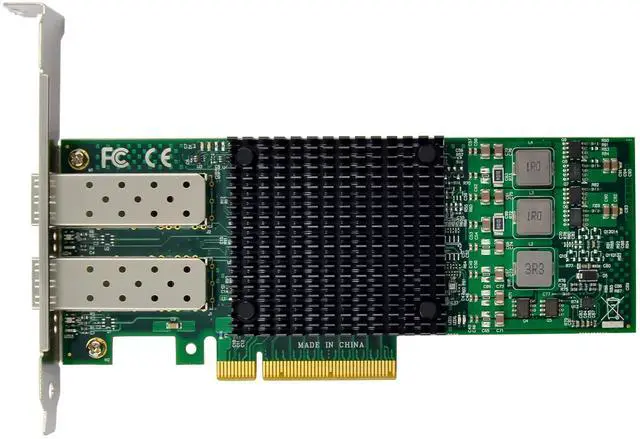



Key Performance Features
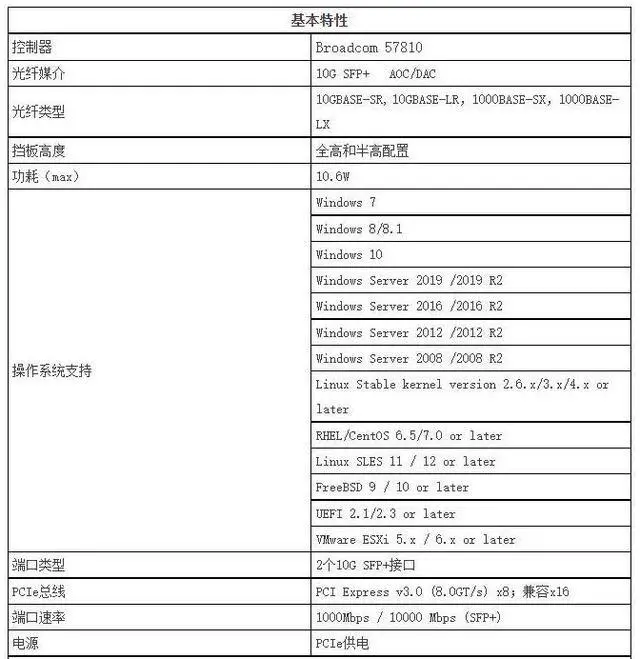
Compliant with PCI Express Revision 3.0 and backward compliant with PCIe2.0 and 1.1
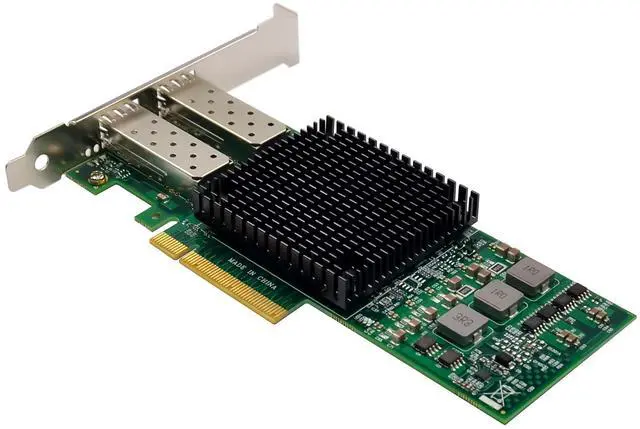
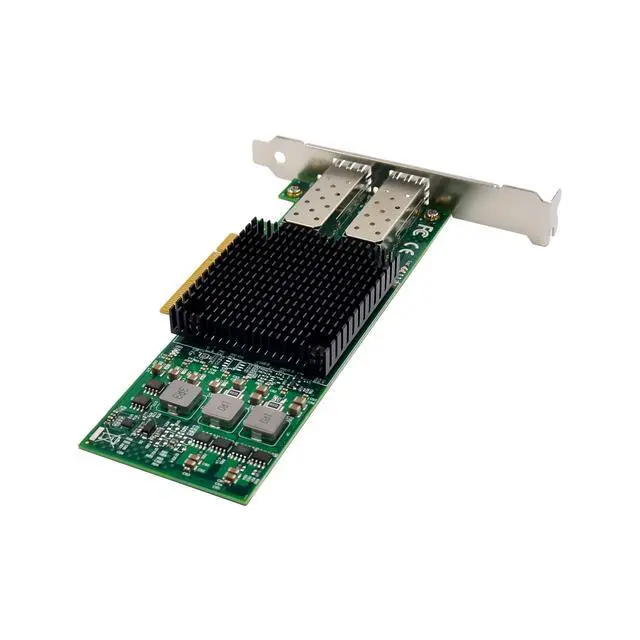
Dual-port 10Gbase-KR/SFF-8431(SFP+) interface for 1Gbps/10Gbps operation
Supports jumbo frames (also known as extended frames), permitting up to a 9K byte (KB) transmission unit (MTU) when running Ethernet I/O traffic.
Supports MSI and MSI-X.
Single-Root I/O Virtualization (SR-IOV) provides a mechanism to bypass the host system hypervisor in virtual environments providing near metal performance and server efficiency.
Support for I/O Virtualization support for VMware NetQueue and Microsoft VMQ help meet the performance demands of consolidated virtual workloads.
Support Checksum and Segmentation Offload capabilities
Supports IPv6, IPv6 uses 128-bit addressing allowing for more devices and users on the internet.
Support RSS capabilities, RSS enables packet receive-processing to scale with the number of available processors
Supports Precision Time Protocol-ready (PTP)
Support for NIC teaming helps IT administrators increase network fault tolerance and increased network bandwidth, The team of adapters can work together as a single virtual adapter.
Support for several different types of teaming enabling IT administrators to optimize availability, improve performance and help reduce costs.
The PCIe x8 Network Card is a validated, tested, and qualified solution,support for Server Integration
Each BCM57810 ships with a suite of operating system-tailored configuration utilities that allow the user to enable initial diagnostics and configure adapter teaming,
Support for scripted installations of teams in a Microsoft Windows environment allow for unattended OS installations.
Support Preboot eXecution Environment (PXE)
Support VMware NetQueue and Windows Hyper-V VMQ.
Support Insight Manager (SIM) and SNMP
Drivers for Windows XP/Vista/Win7 / Win server2003/Win8 / Win10 / Vista / Sever2008 / Sever 2012 / Linux2.2 and above
Package content
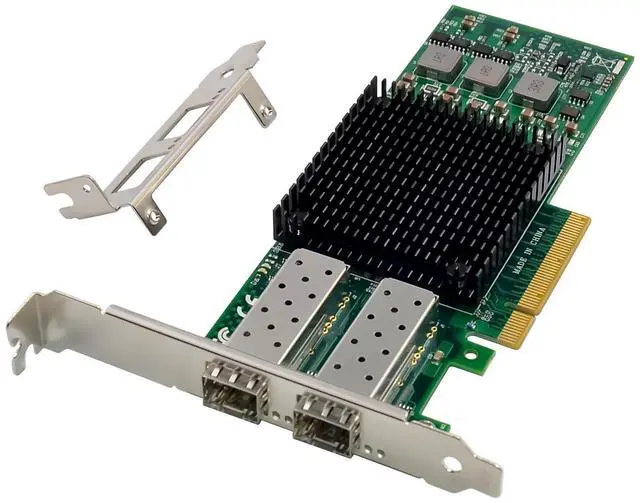
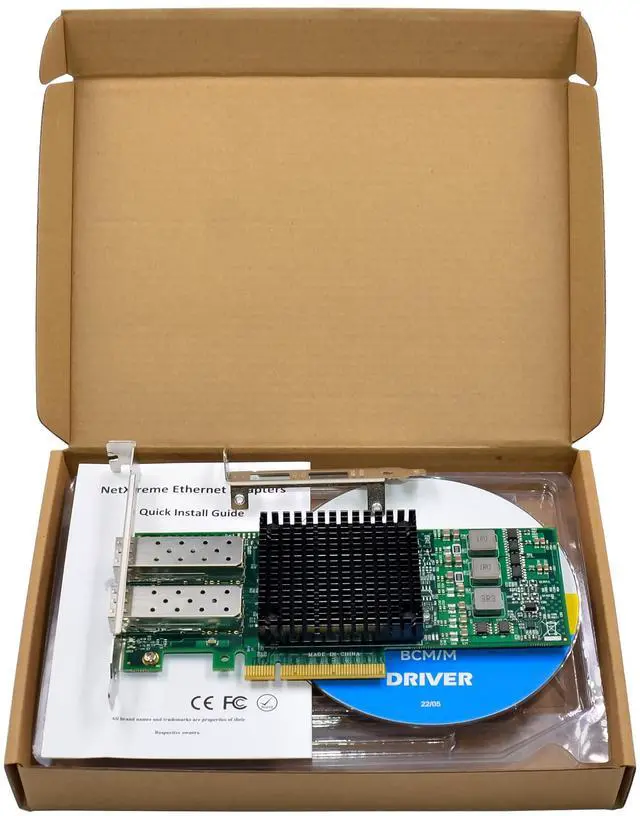
1 x PCIe x8 BCM57810 dual- 10G SFP+ Server NIC
1 x Users Manual
1 x CD
1 x Low profile bracket
Accessories
System Requirements
Linux, Windows XP/Vista/server2003/Win7/ Win-server2012/ Win-server2008/ Win8/Win8.1/Win-server2016/win10
One available PCI Express x8/x16 slot
Technical Specifications:
PCIe x8 Network Card technical Specifications
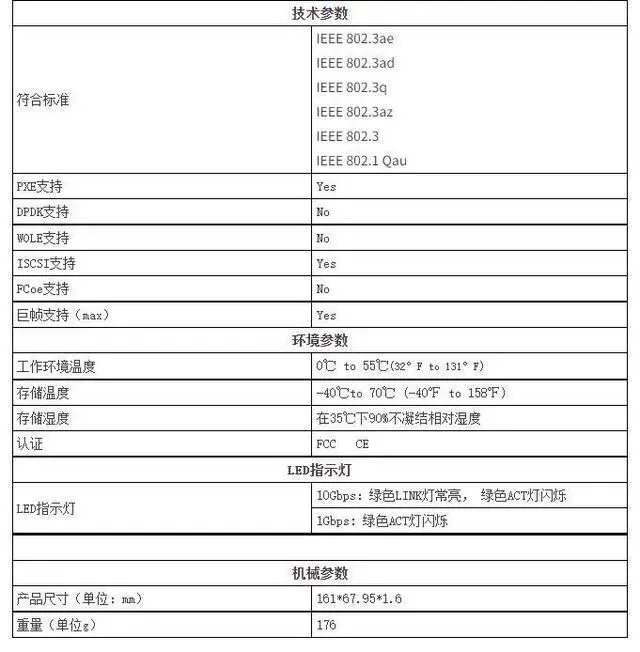
IEEE standard/ Network Topology IEEE802.3, IEEE802.3ae, IEEE802.3ap, IEEE802.3xx, IEEE802.3ad, IEEE802.1Qaz, IEEE802.1Qau, IEEE802.1Qbb, IEEE802.1Qbg, IEEE802.1Qbh
Data Transfer Rate: Delivers 20Gbps full duplex Ethernet transfer rate per port (40 Gbps per adapter)
Full duplex / Simplex: Support both Simplex & Full duplex operation in all operating speeds
Performance Enhancements Support RSS capabilities, RSS enables packet receive-processing to scale with the number of available processors
Performance Enhancements
PCIe x8 Network Card General Technical Specifications Supports MSI and MSI-X.
Support TCP/IP Stateless Offloading and TCP/IP Offload Engine (TOE)
Support Preboot eXecution Environment (PXE)
Supports IPv6, IPv6 uses 128-bit addressing allowing for more devices and users on the internet.
Interface Standard: PCI Express 3.0(8GT/S)
PCI Express Card Type: X8 Lane
PCI Express Voltage: 9W maximum
PCI Connector: Gold Finger: X8 Lane
Controller: Broadcom BCM57810
Holder: Metal Bracket
Environmental Specifications Operating Humidity:5%90%, non-condensing
Environmental Specifications
Operating system support: Operating Temperature:32°to 131°F (0°to 55°C)
Microsoft Windows XP, Vista,Win7, Server2003,Server 2008, Server 2008R2,Win8.x,Win10, and HPC Server 2008, 32 and 64-bit, Microsoft Windows Server Hyper-V, Red HatEnterpriseLinux 5.7 and 6.1, SLES 10 and 11, VMware 4.1u2 and 5.0u1, Solaris 10
Connectors: Dual SFP+ Port
Hardware installation
1.Turn off the computer and unplug the power cord
2.Remove the computer cover and the adapter slot cover from the slot that matches your adapter
3.Insert the adapter edge connector into the slot and secure the bracket to the chassis
4.Replace the computer cover, then plug in the power cord
5.Power on the computer
Install Drivers and software
Windows Operating Systems
Please select an installation file based on the product model and system type. You must have administrative rights to the operating system to install the drivers.
To install the adapter software for Win7, do the following steps:
1.insert the CD driver bound with Intel network driver into your CD-ROM drive:
2.if the Found New Hardware Wizard screen is displayed, click Next
3.select search for a suitable driver for my device(recommended)then click Next.
4.In the locate driver files window, click search for the best driver in these locations option and click browse to find the installation files, Press Next to continue to setup.
For Windows 7 32bit
TypeBroadcom\Broadcom NetXtremeII 10G\Windows\Windows_32\ DrvInst\setup.exe
For Windows 7 64bit
TypeBroadcom\Broadcom NetXtremeII 10G\Windows\Windows_64\ DrvInst\setup.exe
5.Follow the instructions in the install wizard to finish it
Installing Linux Drivers from Source Code
1.Install the source RPM Package.
2.Change the directory to the RPM path and build the binary drivers for your kernel
3.Install the newly built package (driver and man page)
4.Load the driver.
5.To configure the network protocol and address, refer to Linux-specific documentation
Support
More information and settings, please refer to the Adapter User Guides or you can contact us.