here!
I’m your shopping assistant for PC builds, upgrades, and everything tech.
Got questions? Ask away!
Start a conversation
here!
I’m your shopping assistant for PC builds, upgrades, and everything tech.
Got questions? Ask away!
Start a conversation

Any questions? Ask CelesteSM will help you find out quickly.


We want to ensure your holiday shopping this year is hassle-free. That’s why we’re automatically extending our return policies on almost every product! For purchases placed between November 1st, 2026 and December 31, 2026 you will have until January 31, 2027 to return your product.
The Thermaltake LCGS NE is a high-end gaming desktop built for players and power users who want fast 1440p to 4K gaming, strong multitasking, and ready-to-use premium hardware, including an Intel Core Ultra 7 270K Plus, GeForce RTX 5080 16GB, 32GB DDR5, and a 2TB NVMe SSD.
| Attribute | Value |
|---|---|
| Best For | High-performance gaming, VR, and multitasking workloads—equipped for AAA gaming and content creation with an Intel Core Ultra 7 270K Plus CPU, NVIDIA GeForce RTX 5080 16GB GPU, 32GB DDR5 memory, and a 2TB NVMe SSD |
| Processor And Core Count | Intel Core Ultra 7 270K Plus — 64‑bit 16‑core processor |
| GPU And VRAM | NVIDIA GeForce RTX 5080 with 16 GB VRAM on a PCI Express x16 interface; marked as VR‑ready |
| Memory Configuration | 32 GB DDR5 at 6000 MT/s (single 32 GB module), user‑upgradeable to 128 GB |
| Storage And Expansion | 2 TB M.2 NVMe SSD; no HDD and no optical drive |
| Cooling And Thermal | Liquid cooling with one CPU 360 mm radiator installed |
| Power And Efficiency | 1000 W power supply |
| Wired And Wireless Networking | Wi‑Fi 7 wireless and Bluetooth 5.4; Gigabit Ethernet (10/100/1000 Mbps) network interface |
| Audio Setup | 7.1‑channel HD audio |
| I/O And Ports | 4 front USB ports and 4 rear USB ports; no card reader, no LPT, no Thunderbolt 3 |
| Operating System And Software | Windows 11 (system is Windows 11 ready/installed) |
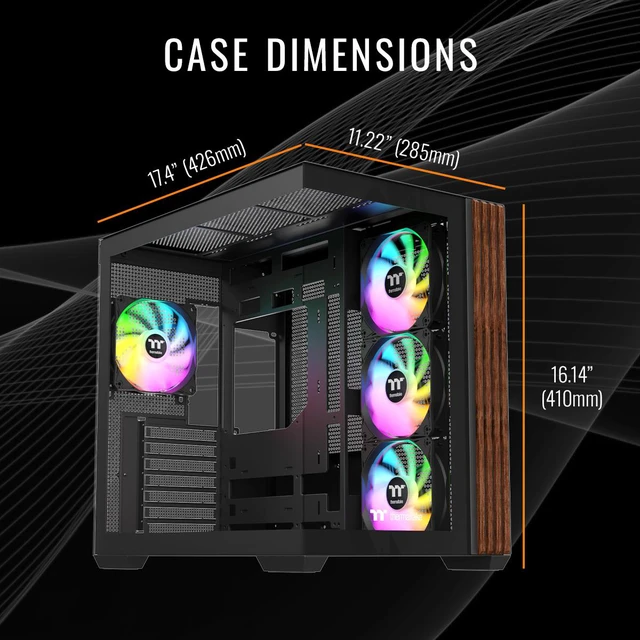
| Form Factor And Case | Desktop tower in Thermaltake black finish; monitor not included; chassis dimensions 20" x 18" x 22" (H x W x D) |
| Model Identifiers | Thermaltake LCGS NE — Model N38W-Z890-580-LCS (Part Number N38W-Z890-580-LCS); Release Year 2026; Intel Z890 chipset / Z890 motherboard |
Q: Should I choose this Thermaltake RTX 5080 desktop or a cheaper RTX 5070 Ti gaming PC?
A: Choose this Thermaltake system if your priority is stronger 4K gaming headroom, heavier ray tracing settings, and a higher-end overall platform with a 1000W ATX 3.0 power supply, 2TB SSD, Wi‑Fi 7, and a 360mm liquid cooler. Reviews and benchmark roundups consistently place the RTX 5080 about 8% to 16% ahead of the RTX 5070 Ti, with the larger gap typically showing up at 4K. A well-priced RTX 5070 Ti desktop is usually the more practical choice for 1440p-focused buyers, while this RTX 5080 configuration makes more sense when the goal is a longer-lived 4K-first prebuilt.
Q: Is this RTX 5080 desktop worth buying over an RTX 4080 Super desktop?
A: This Thermaltake desktop is the better fit if you want a newer-generation prebuilt with Blackwell features, 16GB of GDDR7, and somewhat higher native gaming performance than an RTX 4080 Super system. Independent reviews commonly show the RTX 5080 only modestly ahead of the RTX 4080 Super in traditional rasterized gaming, so the upgrade is most sensible when the full prebuilt package is competitive or when you specifically want the newer NVIDIA feature set and better 4K margin. An RTX 4080 Super desktop remains a rational alternative if it is meaningfully less expensive.
Q: Should I step up from this RTX 5080 prebuilt to an RTX 5090 gaming desktop?
A: Step up to an RTX 5090 desktop only if you are targeting the highest-end 4K or creator workloads and are comfortable paying a large premium for that last tier of performance. This Thermaltake RTX 5080 build is the more balanced choice for high-end gaming because it already includes 16GB VRAM, a strong cooling and power setup, and the class of GPU most buyers use for premium 4K play. Community discussion and pricing coverage repeatedly frame the RTX 5090 as a specialty option rather than the default recommendation, especially when total system cost matters.
Q: Is this desktop a better choice than a more portable gaming laptop?
A: Yes if performance is the priority. This Thermaltake desktop is the better choice for users who want sustained high-end gaming, easier future upgrades, and desktop-class cooling, power delivery, and component access. A gaming laptop is the better fit when portability matters more than peak performance. For buyers deciding between mobility and frame rate, this system clearly aligns with the performance-first side of that trade-off.
Q: Is this desktop a good fit for high-end 4K gaming and VR?
A: Yes. This configuration is suited for high-end gaming and VR because it combines an RTX 5080 16GB GPU, a 16-core Intel Core Ultra 7 processor, 32GB DDR5 memory, and liquid CPU cooling. The main trade-off is that it is a large tower desktop, so it is aimed at stationary gaming setups rather than portability or space-saving use.
Q: Can I upgrade the RAM or add more storage later?
A: Yes. Based on the provided specs, the system supports up to 128GB of DDR5 memory, and retail Q&A patterns for comparable prebuilt gaming desktops frequently focus on RAM and SSD expansion after purchase. For this Thermaltake model, the current 32GB is a strong starting point, but buyers who expect heavier multitasking, content creation, or larger game libraries may want to plan for future memory or storage upgrades.
Q: Does it have built-in Wi-Fi, or do I need Ethernet?
A: It has built-in Wi-Fi, so Ethernet is not required for basic use. This model includes Wi-Fi 7, Bluetooth 5.4, and Gigabit LAN. The decision trade-off is simple: Wi-Fi is convenient, while Ethernet is still the better choice for the most consistent low-latency gaming and large downloads.
Q: Who is this desktop best suited for?
A: This desktop is best suited for buyers who want a powerful prebuilt tower for gaming, VR, streaming, and heavier desktop workloads. It is less suitable for buyers who only need basic office work, web browsing, or a compact PC, because the hardware, cooling, and power supply are sized for high-performance use rather than entry-level or space-conscious setups.
Q: What are the main trade-offs versus a similar prebuilt from Alienware or CLX?
A: The main trade-offs are component transparency, upgrade expectations, and price positioning. Comparable retail Q&A pages often show buyers asking about the exact motherboard, GPU brand, cooling type, and future expandability. For this Thermaltake model, the published specs are strong on the essentials: RTX 5080, 32GB DDR5, 2TB NVMe, 360mm liquid cooling, Wi-Fi 7, and a 1000W Gold PSU. The practical unknown, as with many prebuilts, is that listings do not always guarantee the exact add-in board brand or every internal part detail unless the seller states it explicitly.
Q: Is this Thermaltake RTX 5080 desktop worth buying if I mainly want a high-end gaming PC?
A: It makes sense if you want a ready-to-use 4K-class gaming desktop with current high-end parts, large storage, and no need to build your own system. The main trade-off is value: Reddit discussions around RTX 5080 prebuilts repeatedly question whether similar gaming performance can be achieved for less money, especially if you are comfortable building or comparing alternatives. Buy it for convenience and full-spec performance, not because prebuilts are usually the cheapest path.
Q: Who is this desktop best suited for?
A: This desktop is best suited for buyers who want high-end gaming performance, VR support, strong multitasking headroom, and a large out-of-box feature set. Its 32GB DDR5 memory, 2TB NVMe SSD, RTX 5080 16GB, Wi-Fi 7, and 1000W Gold PSU make it a better fit for enthusiasts, creators with moderate GPU-heavy workloads, and users planning long gaming sessions than for casual players or budget-focused buyers.
Q: What are the main trade-offs of choosing this prebuilt instead of building a similar PC yourself?
A: The main advantages are convenience, preassembly, Windows included, and a balanced spec sheet with strong cooling and power delivery. The trade-offs discussed most often are higher total cost, less control over exact component brands, and uncertainty about service experience compared with self-building. This system is a practical choice if you value time and simplicity more than maximizing price-to-performance.
Q: Is 32GB RAM and a 2TB SSD enough for this class of gaming desktop?
A: For most buyers, yes. A 32GB DDR5 configuration is already appropriate for modern AAA gaming, multitasking, and general creator use, and a 2TB NVMe SSD is enough for Windows plus a substantial game library. The limitation is that the included memory is listed as a single 32GB module, so buyers who care about memory configuration or want to optimize later may want to verify upgrade plans; the platform supports expansion up to 128GB.
Q: Is this a good choice if I want an upgrade-friendly RTX 5080 prebuilt?
A: Yes, it appears reasonably upgrade-friendly for a prebuilt because it uses a Z890 platform, a 1000W ATX 3.0 Gold power supply, standard desktop form factor, liquid CPU cooling, and memory support up to 128GB. That said, buyers on Reddit often recommend confirming the exact motherboard, GPU, RAM layout, and other part brands before purchase, because prebuilt value and upgrade flexibility depend partly on those implementation details.