You’re seeing this ad based on the product’s relevance to your search query. If you are a seller and want to participate in this program click here to learn more.
Any questions? Our AI mode will help you find out quickly.
Try me now
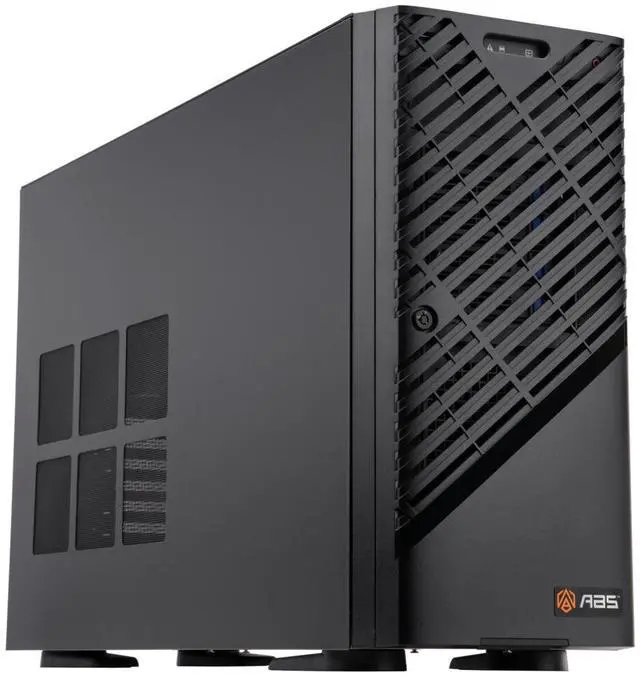
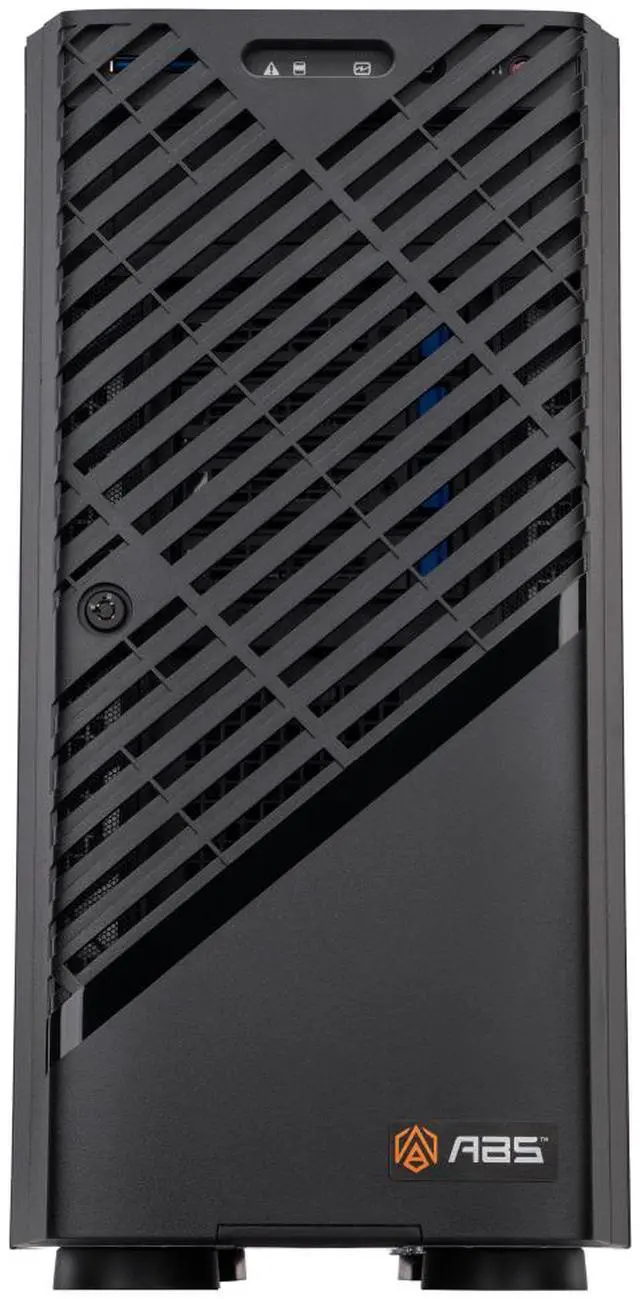
ABS Zaurion Duo Ruby Tower · Dual-GPU Platform
Built for Two.
AMD Ryzen Threadripper PRO 7975WX + 2x NVIDIA RTX PRO 6000 Blackwell Max-Q
Same server-pedigree sTR5/WRX90 CPU platform, same 128 GB of DDR5 and
5.84 TB of installed SSD storage as this chassis lineup's single-GPU
configuration — but with a second GPU. Two independent NVIDIA RTX PRO 6000 Blackwell
Max-Q cards give you 192 GB of aggregate VRAM for multi-GPU training,
distributed rendering, and large-scale data modeling.
192 GB Aggregate VRAM2x Max-Q GPUsUbuntu ReadyAssembled in USA · TAA
2x 96 GB
GDDR7 GPUs, 192 GB aggregate
128 GB
DDR5, ECC Registered
5.84 TB
SSD storage installed
2×10 GbE
+ MLAN management
2000 W
80 PLUS Gold PSU
AI Silicon Spotlight · Hardware First
What This Pairing Actually Buys You
A server-pedigree CPU platform feeding two independent GPUs, built for workloads that need more than one card:
GPU · 2x NVIDIA RTX PRO 6000 Blackwell Max-Q
192 GB Aggregate VRAM, Two Ways to Use It
Two independent 96 GB GPUs — 192 GB aggregate, not a single unified pool. Split a model across both, or run each independently.
Max-Q's 300W-per-card design1 trades peak single-GPU performance for the efficiency and density that make a two-GPU tower possible on one 2000 W supply.
Up to four isolated MIG instances per GPU1 — concurrent workloads or users, each with dedicated resources and guaranteed quality of service.
Blackwell 5th-gen Tensor Cores with FP4 accelerate agentic and generative AI on each card at architecture-native speed.
CPU · AMD Ryzen Threadripper PRO 7975WX
One Socket, Two GPUs Fed
sTR5 socket on the WRX90 chipset2 — a server-derived workstation platform with the PCIe lanes to run two dual-slot GPUs at full bandwidth.
6x PCIe 5.0 x16 slots mean both GPUs run at full Gen5 bandwidth, with lanes to spare for future expansion.
8-channel DDR5 memory keeps both GPUs supplied with data without the CPU becoming the bottleneck.
ECC memory support and workstation-grade reliability bring server-class RAS features to long, multi-GPU training runs.
Two GPUs, Two Strategies
Two Ways to Scale
The listing's own use cases point to two different ways to put a second GPU to work:
1
Split One GPU, Many Ways (MIG)
Partition either GPU into up to four fully isolated instances, each with its own memory, cache, and compute — concurrent workloads or users on one card, with guaranteed quality of service.
2
Combine Both GPUs, One Big Job
Split a single large model or dataset across both GPUs for multi-GPU training, multi-instance inference, or distributed rendering — workloads too large for one 96 GB card alone.
Same Platform, One More GPU
One GPU or Two?
This chassis lineup offers the identical CPU, memory, and storage with either one or two GPUs — here's what the second GPU buys:
This Config
GPUs2x RTX PRO 6000 Max-Q
Aggregate VRAM192 GB
System Memory128 GB DDR5
Storage2 TB + 3.84 TB
Single-GPU Tier
GPUs1x RTX PRO 6000
Aggregate VRAM96 GB
System Memory128 GB
Storage2 TB + 3.84 TB
Same AMD Ryzen Threadripper PRO 7975WX, same memory, same storage, same Gigabyte MH53-G40
platform — the second GPU is the only variable. Compare options on this listing.
Room to Scale
Two Slots Used, Four Available
This configuration populates 2 of the platform's 6 PCIe 5.0 x16 slots — there's room for more:
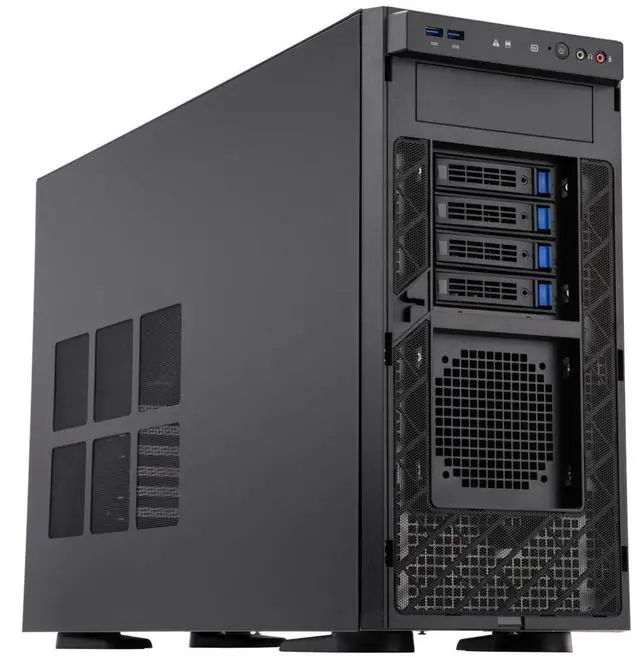
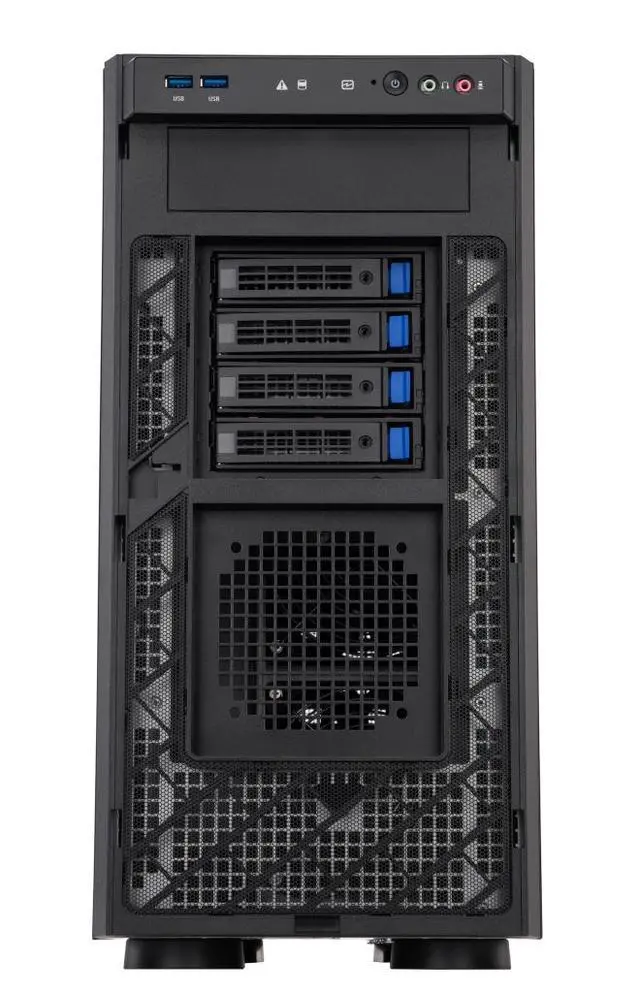
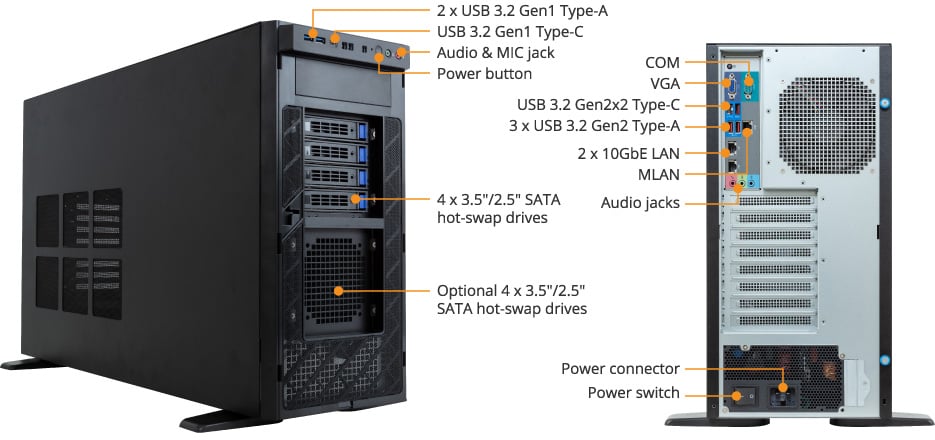
Front & rear I/O — official ABS product diagram for this platform.
Front: 2× USB 3.2 Gen1 Type-A + 1× USB 3.2 Gen1 Type-C, power button, audio/mic jack,
and 4× 3.5″/2.5″ SATA hot-swap bays installed (4 more optional — 8 total
possible). Rear: dual 10Gb/s LAN (Broadcom BCM57416) plus a dedicated MLAN
management port, USB and audio connectivity, and the 2000 W power inlet.
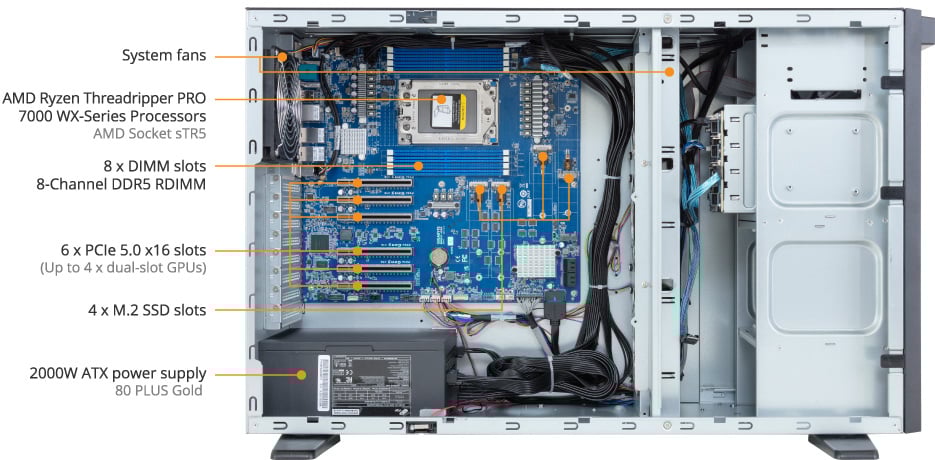
Inside the platform — official ABS product diagram for this platform.
8× DIMM slots on 8-channel DDR5 (2 populated), 6× PCIe 5.0 x16 slots
rated for up to 4× dual-slot GPUs (this config populates 2 of them), and 4× M.2 SSD slots
with only one populated by the 2 TB OS drive.3 Two GPUs in, two more slots of headroom left.
Usage Scenarios
Five Jobs, Two GPUs
The listing's own AI Features, translated into workloads that lean on multi-GPU scale:
AI Development
Accelerate AI development and inference workloads, and build agentic AI applications.
Data Science
Accelerate your data pipelines.
AI-Driven Rendering & Graphics
Deliver stunningly realistic designs and simulations with speed and precision.
HPC
Accelerate scientific breakthroughs with enhanced accuracy.
Video Content & Streaming
Boost performance for live media and video pipelines.
Scene photos are AI-generated illustrations of typical deployments, not photographs of this exact product.
Optional VRAM Expansion
Fine-Tune Even Larger Models with Phison aiDAPTIV+
An optional add-on that offloads GPU memory to flash, reducing the VRAM full fine-tuning actually requires:
Target Model Size
VRAM Needed (Without aiDAPTIV+)
VRAM Needed (With aiDAPTIV+)
~13B
120–200 GB
32 GB
~34B
250–350 GB
96 GB — either of this workstation's GPUs
~70B
500–700 GB
192 GB — this workstation's two GPUs, combined
Full fine-tuning without a larger multi-GPU server
Lower hardware cost, simpler deployment
Faster path to AI adoption
Phison aiDAPTIV+ SSD is an optional add-on and is not included by default. VRAM figures are vendor-published estimates for full fine-tuning.
Full Configuration
As Configured
ZRP7975WX-RP60002M
CPU
AMD Ryzen Threadripper PRO 7975WX — sTR5 socket, WRX90 chipset2
What's different between the Max-Q GPUs here and the standard RTX PRO 6000 Blackwell on other configs?
Max-Q is a lower-power, higher-density version of the same GPU family — about 300 W per card. Its own published figures (3511 TOPS AI performance, 333 TFLOPS RT, 110 TFLOPS single-precision) are lower per-GPU than the standard card, but this configuration runs two of them.
Is the 192 GB of VRAM one big pool or two separate 96 GB GPUs?
Two independent 96 GB GPUs — 192 GB aggregate, not a single unified pool. Split a model across both, or run each independently, including MIG-partitioning either card.
What's different between this config and the single-GPU tier?
The CPU, 128 GB DDR5 memory, and 2 TB+3.84 TB storage are identical to this chassis lineup's single-GPU tier. This configuration adds a second Max-Q GPU for 192 GB aggregate VRAM instead of 96 GB.
How much room is there to add more GPUs?
6× PCIe 5.0 x16 slots rated for up to 4× dual-slot GPUs; this configuration populates 2 of them.
Does it come with an AI agent framework or local LLM pre-installed?
Not by default. OpenClaw and a Qwen 3.5 27B+ local LLM package are optional add-ons configured at order time.
Is it eligible for government / public-sector purchasing?
It is TAA compliant and assembled in the USA, with compliance documents available for purchase review.
Assembled in USA
TAA Compliant
192 GB Aggregate VRAM
Build to Order flexibility
1. NVIDIA-published figures for the RTX PRO 6000 Blackwell Max-Q specifically (3511 TOPS FP4 sparsity, 333 TFLOPS RT, 110 TFLOPS single-precision, up to 4 MIG instances per GPU) — these differ from the standard (non-Max-Q) RTX PRO 6000 Blackwell used on other configurations in this lineup.
2. AMD-published architecture features for the Threadripper PRO WX-Series (sTR5 socket, WRX90 chipset). The "up to 96 CPU cores" figure sometimes cited for this CPU family is a lineup-wide ceiling across multiple WX-Series SKUs, not a per-SKU spec for the 7975WX.
3. Slot counts and the 4x dual-slot-GPU rating are the Gigabyte platform's published capability on the sTR5 socket, not a claim beyond this SKU's shipped configuration — this unit ships with two GPUs on a single 2000 W PSU; adding more GPUs would require a PSU upgrade.
ABS Zaurion Duo Ruby ZRP7975WX-RP60002M · Gigabyte W773-H5D-AA01 platform (sTR5 socket) · Optional components and software are configured at time of purchase.
AI Development: Accelerate AI development and inference workloads, and build agentic AI applications. Data Science: Accelerate your data pipelines. HPC: Accelerate scientific breakthroughs with enhanced accuracy. AI-Driven Rendering and Graphics: Deliver stunningly realistic designs and simulations with speed and precision. Video Content and Streaming: Boost performance for live media and video pipelines. Game Development: Drive new possibilities for game development with AI.
Processor
CPU Type
AMD Ryzen Threadripper PRO 7975WX
Number of CPU Cores
32-Core Processor
# of Processors Installed
1
Memory
Installed Memory Size
128GB
Memory Type
DDR5
Max Memory Capacity
1TB
Number of Memory Slots
8
Storage
SSD (Installed)
OS SSD: 2TB M.2 Data SSD: 4TB SSD
Graphic Controller
Servers_Graphic Installed
2x NVIDIA RTX Pro 6000 Blackwell MaxQ
Graphic Type
NVIDIA RTX Pro 6000 Blackwell MaxQ
Video Memory
96 GB GDDR7
Software
Operating System
Ubuntu
Power
Power Characteristics
Single 2000W ATX 80 PLUS Gold power supply
Features
Features
GIGABYTE W773-H5D-AA01 GPU Workstation: Supports up to 4 x Dual slot Gen5 GPUs Single AMD Ryzen™ Threadripper™ PRO 7000 WX-Series Processors 8-Channel DDR5 ECC RDIMM, 8 x DIMMs AMD WRX90 Chipset 2 x 10Gb/s LAN ports via Broadcom® BCM57416 4 x M.2 slots with PCIe Gen5 x4 interface Up to 8 x 3.5"/2.5" SATA bays 6 x PCIe Gen5 x16 slots Single 2000W ATX 80 PLUS Gold power supply