

Your Browsing History
- Free 30-day Returns
$24.99


Meet Your Seller



Telmax OnCue Prompter Remote for All Devices Running Oncue #OPR
- Telmax OnCue Prompter Remote for All Devices Running Oncue
+
+
Overview
Specs
Reviews

Any questions? Our AI beta will help you find out quickly.
Try me now
OnCue Prompter Remote!
The OnCue Prompter Remote is a Bluetooth Remote Control that is ideal for running both OnCue Prompter and OnCue Prompter Lite.
OnCue Prompter is a new kind of Teleprompter App for iPhone's and iPad's designed to run iPhone, iPad, and LCD teleprompters and is loaded with features like rich text editor, count down, looping, Bluetooth/wifi networking, and being able to be controlled by a game controller.
OnCue Prompter and OnCue Prompter lite will works with any iCad Bluetooth game controller in game mode but what sets it apart is that it has been successfully tested and was used as the testing prototype during OnCue Development.
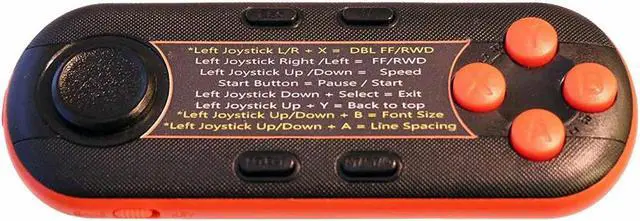
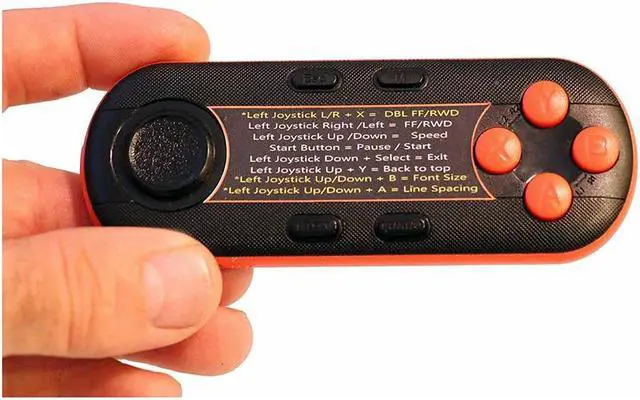
In addition it has a printed set of commands on the faces of the remote that show how to used the button pad to control OnCue. All of the white text commands work with OnCue Prompter Lite and the White and Yellow commands work with both OnCue Prompter Full Version and OnCue Prompter Lite.
To use the remote it must be in Game Mode with is set by a small button on the side of the remote.
To Sync the remote you only need to hold down the A button until the red LED start to blink and then look for the remote in your Bluetooth settings.
The remote will only control OnCue Prompter and OnCue Prompter Lite in the scrolling window. The Controller has no influence of any of the other views at this time.
It requires two AAA batteries that are not included.
The OnCue Prompter Remote is a Bluetooth Remote Control that is ideal for running both OnCue Prompter and OnCue Prompter Lite.
OnCue Prompter is a new kind of Teleprompter App for iPhone's and iPad's designed to run iPhone, iPad, and LCD teleprompters and is loaded with features like rich text editor, count down, looping, Bluetooth/wifi networking, and being able to be controlled by a game controller.
OnCue Prompter and OnCue Prompter lite will works with any iCad Bluetooth game controller in game mode but what sets it apart is that it has been successfully tested and was used as the testing prototype during OnCue Development.
In addition it has a printed set of commands on the faces of the remote that show how to used the button pad to control OnCue. All of the white text commands work with OnCue Prompter Lite and the White and Yellow commands work with both OnCue Prompter Full Version and OnCue Prompter Lite.
To use the remote it must be in Game Mode with is set by a small button on the side of the remote.
To Sync the remote you only need to hold down the A button until the red LED start to blink and then look for the remote in your Bluetooth settings.
The remote will only control OnCue Prompter and OnCue Prompter Lite in the scrolling window. The Controller has no influence of any of the other views at this time.
It requires two AAA batteries that are not included.
Warranty & Returns
Warranty, Returns, And Additional Information
Warranty
- Please contact the Seller directly for warranty information. Warranty information may also be found on the Manufacturer's website.
- CONTACT
Return Policies
- Return for refund within: 30 days
- Return for replacement within: non-replaceable
- This item is covered by Adorama Return Policy
Manufacturer Contact Info
- For a directory of all our manufacturers, please click below.
- Manufacturers Directory
LOADING...