

Your Browsing History

Newegg Trade-In loading

Sponsored Products




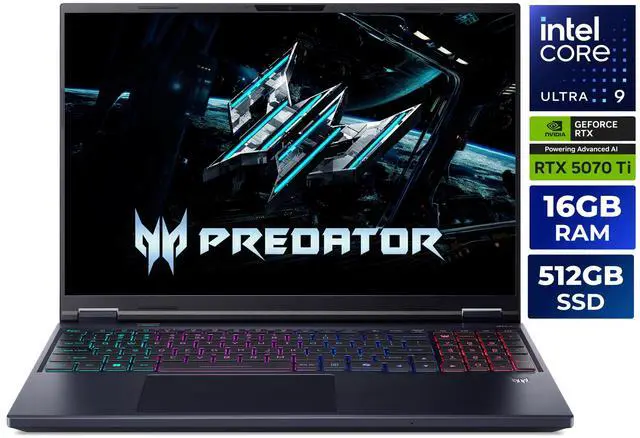
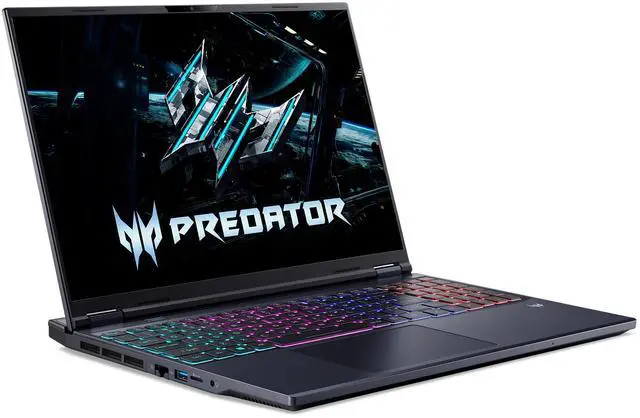
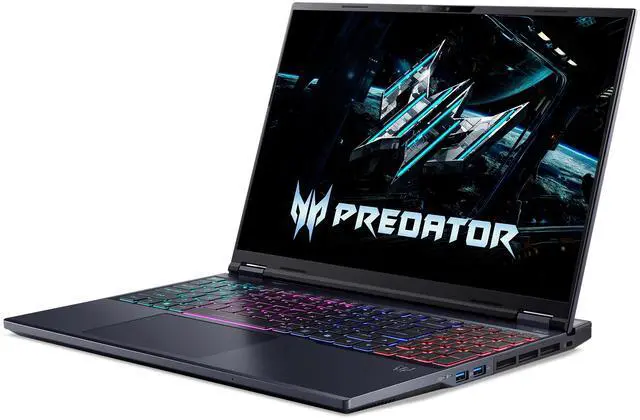



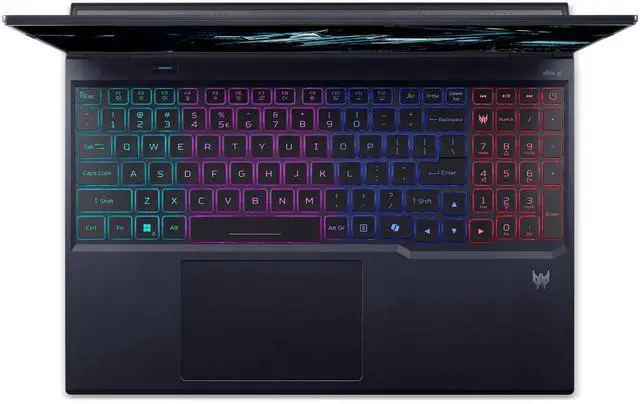
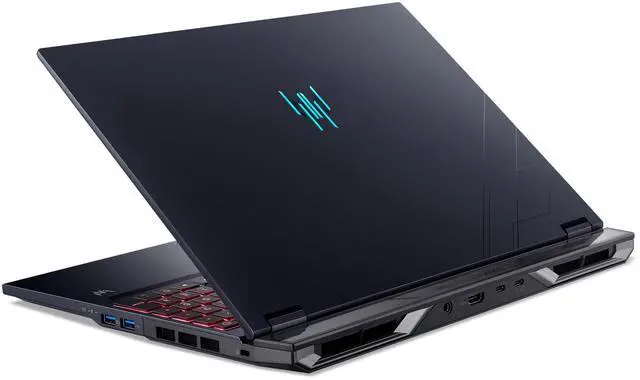
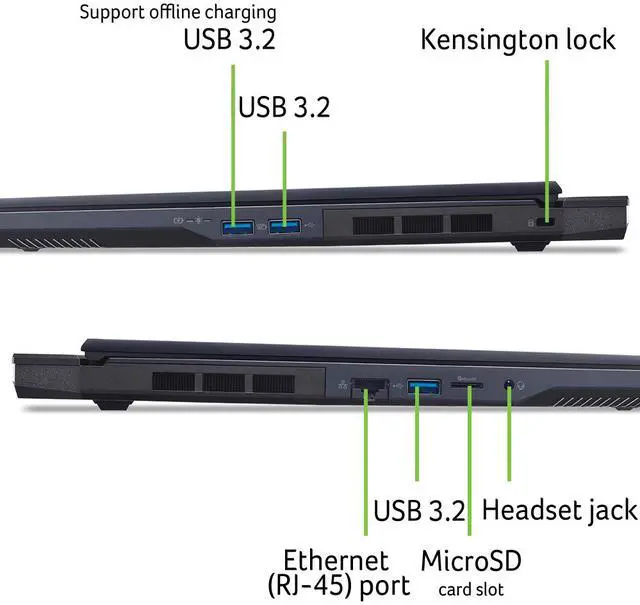
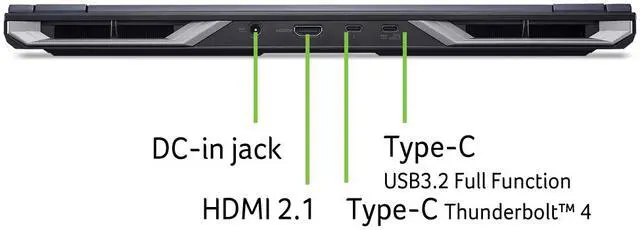


Acer Predator Helios Neo 16 AI - Intel Core Ultra 9 290HX Plus - Nvidia RTX 5070TI 16GB Memory - 512GB SSD - Windows 11 Home (NH.U44AA.004 )
Free game w/ purchase, limited offer
- Intel Core Ultra 9 290HX Plus
- Nvidia RTX 5070TI
- 16GB RAM
- 512GB SSD
- 16.0" 2560 x 1600
- Windows 11 Home



Combo Up Savings Up To $210+
The more you add, the more you'll save!+
+
Overview
Specs
Reviews
See all Q & A 
Any questions? Our AI mode will help you find out quickly.
Try me now
Warranty & Returns
Warranty, Returns, And Additional Information
Warranty
- Limited Warranty period (parts): 1 year
- Limited Warranty period (labor): 1 year
- Read full details
Return Policies
- Return for refund within: 15 days
- Return for replacement within: 15 days
- This item is covered by Newegg.com's 15-Day Return Policy.
- Read full return policy for details.
Manufacturer Contact Info
- Manufacturer Product Page
- Manufacturer Website
- Support Phone: 1-800-816-2237
- Support Website
- View other products from Acer America
LOADING...
Learn about this product
The Acer Predator Helios Neo 16 AI is a 16-inch gaming laptop with an Intel Core Ultra 9 290HX, GeForce RTX 5070 Ti Laptop GPU, and a 240Hz 2560x1600 IPS display, making it a strong fit for gamers and creators who want high-refresh QHD+ visuals in a desktop-replacement notebook.
Recommended For
- Desktop-replacement gamers who mostly play plugged in and want a 16-inch 240Hz QHD-class screen with a high-wattage RTX 5070 Ti for fast-paced games at home or in a dorm.
- Buyers who want gaming performance first but still need upgrade headroom later, especially those likely to add more RAM or a larger SSD after purchase.
- Students or hybrid users who move between rooms or campuses but want one machine for gaming, coding, and heavier coursework, and are comfortable carrying a near-6 lb laptop plus a large power brick.
- Entry-level creators and streamers who benefit from a color-capable 16:10 display, strong CPU/GPU mix, Ethernet, HDMI, and multiple USB ports for editing, capture gear, and external displays.
Real-World Use Scenarios
- Playing current AAA games at the laptop’s native 2560x1600 usually means high settings with smooth frame rates, and DLSS or similar upscaling is often useful if the goal is to stay closer to the 240Hz panel’s upper range.
- Using it for esports titles like Valorant, Counter-Strike, or Fortnite is a practical fit for players who want high refresh gameplay; the 240Hz screen is most useful in lighter competitive games where frame rates can run much higher than in cinematic AAA releases.
- Editing 4K video, working in Blender, or handling large Photoshop projects is realistic for this class of laptop, but the 16GB RAM and 512GB SSD in this specific configuration are likely to feel limiting sooner than the CPU or GPU in heavier creator workflows.
- Using it as a desk-based main PC for gaming, streaming, school, and everyday work is one of the most believable use cases, especially if you plan to stay plugged in and want laptop flexibility without giving up Ethernet, HDMI 2.1, and multiple USB ports.
- Running long gaming sessions is feasible, but real-world owner discussions suggest heat and fan noise are part of the experience under load, so it fits better for users who game with headphones or are willing to tune power profiles for cooler, steadier performance.
Spec Summary
| Attribute | Value |
|---|---|
| Best For | Gaming and power users who want a high-refresh 16.0" WQXGA IPS screen plus a 24-core Intel Core Ultra 9 CPU and NVIDIA GeForce RTX 5070 Ti (12 GB GDDR7) for gaming, content creation, and AI-assisted workflows |
| Processor And Core Count | Intel Core Ultra 9 290HX Plus (Series 2) 24-core (8P+16E) processor with 40MB L2 and 36MB L3 cache |
| GPU And VRAM | NVIDIA GeForce RTX 5070 Ti Laptop GPU with 12 GB GDDR7 dedicated video memory |
| Display Spec | 16.0" WQXGA (2560 x 1600) IPS non-touch display with 240 Hz refresh rate |
| Memory Configuration | 16 GB DDR5 (8 GB x 2) @ DDR5-6400, 2 total memory slots (0 available), expands up to 64 GB |
| Storage And Expansion | 512 GB NVMe SSD with a microSD card reader; no optical drive |
| High Speed I O | Multiple USB ports (including USB-C 3.2 Gen 2 with DisplayPort alt mode and up to 100W charging), USB 3.2 Gen 2 and Gen 1 ports, headphone/line-out jack with high-impedance headset support |
| External Display And Docking Fit | Supports external displays via DisplayPort over USB-C and HDMI 2.1; USB-C also supports up to 100W charging suitable for docks and single-cable setups |
| Battery And Power | Lithium-ion 92 Wh battery with 330-watt AC adapter included |
| Wired And Wireless Networking | Killer DoubleShot Pro with Killer Ethernet E3100G (up to 2.5 Gbps), Killer Wi-Fi 6E AX1675 (2x2 MU-MIMO on 2.4/5/6 GHz) and Bluetooth 5.4 |
| Webcam And Privacy | FHD IR webcam (1920 x 1080) with Blue Glass and Acer's TNR temporal noise reduction for improved low-light imagery |
| Keyboard And Control | Precision touchpad supporting Windows gestures and keyboard with mode button and media control function keys |
| Audio Setup | Two built-in stereo speakers, DTS:X Ultra audio with smart amplifier modes, TrueHarmony tech and high-SNR DAC (2.1 Vrms) plus Acer PurifiedVoice with AI noise reduction and dual built-in microphones |
| Portability | Thin-and-light gaming laptop measuring 14.05" x 10.85" x 0.53"-1.05" and weighing 5.95 lbs |
| Special Features | Includes Copilot+ PC AI features and is listed as Virtual Reality Ready |
| Model Identifiers | Acer Predator Helios Neo 16 AI (PHN16-I71-905P), Part Number NH.U44AA.004, Abyssal Black, Windows 11 Home |
Reference Q&A
Q: Should I buy the Acer Predator Helios Neo 16 AI with RTX 5070 Ti or step down to an RTX 5060 gaming laptop?
A: Choose the Predator Helios Neo 16 AI if you want more headroom for 1600p gaming, heavier ray tracing, or longer useful life from the GPU. Across Notebookcheck's comparison data, RTX 5070 Ti Laptop results are typically well ahead of RTX 5060 Laptop results, often by roughly 20% to 45% depending on the test and power limits, and the 5070 Ti model also brings 12GB of VRAM instead of the 8GB commonly seen on RTX 5060 laptops. An RTX 5060 laptop is the more practical choice if your priority is lower cost and you mainly play at 1080p.
Q: Is this Acer Predator Helios Neo 16 AI worth choosing over the thinner Helios Neo 16S AI?
A: Yes if you care more about sustained performance than thinness. Community comparisons consistently point out that the standard Helios Neo 16 AI runs a higher-power RTX 5070 Ti configuration than the thinner 16S AI, which makes it the better fit for long gaming sessions or heavier GPU workloads. The 16S AI is the better match if you value a slimmer chassis and more travel-friendly design over maximum sustained GPU power.
Q: How does the Predator Helios Neo 16 AI compare with an ASUS ROG Strix G16 with RTX 5070 Ti?
A: These two laptops are usually close in core gaming class, so the decision is more about design priorities than a simple winner. The Predator Helios Neo 16 AI is the stronger pick if you want a 16-inch 2560x1600 240Hz panel and a more straightforward performance-first configuration at this spec level. The ROG Strix G16 is often positioned as a more premium alternative with stronger overall platform tuning in some configurations, but that can come with higher pricing depending on the exact model. If the prices are similar, compare RAM, SSD size, display, and GPU power limit before deciding.
Q: Should I move up from this RTX 5070 Ti model to an RTX 5080 gaming laptop?
A: Move up to RTX 5080 if you specifically want more margin for ray tracing, heavier 1600p or 4K external-monitor gaming, or a longer-term high-end setup. Notebookcheck's cross-GPU testing shows the RTX 5080 Laptop pulling meaningfully ahead of the RTX 5070 Ti Laptop in demanding titles, especially with ray tracing enabled. Stay with the Predator Helios Neo 16 AI if you want a more balanced spend and your main target is high-settings gaming on the built-in 1600p display.
Q: Is this a better buy than a portability-first 16-inch gaming laptop like the ASUS ROG Zephyrus G16?
A: Yes if your priority is sustained gaming performance and upgrade-friendly internals, not carrying the lightest system. The Predator Helios Neo 16 AI sits closer to the desktop-replacement side of the category, while the Zephyrus G16 is built more around a thinner, lighter premium design. Pick the Acer when you want stronger performance focus for long gaming sessions; pick a Zephyrus-style system when mobility, lower weight, and a slimmer footprint matter more day to day.
Q: Is 16GB RAM and a 512GB SSD enough, or should I plan to upgrade?
A: For gaming and everyday work, 16GB RAM is usable today, but it is the main constraint on a high-end RTX 5070 Ti laptop. This model ships with 2 x 8GB DDR5 and supports up to 64GB, so a memory upgrade is a sensible plan if you expect heavy multitasking, newer AAA games, content creation, or long-term use. The 512GB SSD is also workable, but many buyers of comparable gaming laptops ask about adding storage because modern games fill space quickly. In short: it is fine to start with, but this configuration makes more sense if you are comfortable upgrading RAM and possibly storage later.
Q: Is this a good choice for travel, commuting, or using as a work laptop away from a desk?
A: It can handle work tasks easily, but it is not an ideal travel-first laptop. At about 5.95 pounds with a 330W charger, it is closer to a desktop replacement than a portable office machine. Its 16-inch 2560 x 1600 display, full performance hardware, webcam, Wi-Fi 6E, and 2.5Gb Ethernet make it strong for mixed gaming and productivity, but buyers looking for frequent flights, all-day battery, or light bag carry will usually prefer a thinner and lighter model. This is better for users who mostly work at a desk and occasionally move it, not for constant mobile use.
Q: Is it good for note-taking, meetings, school, and office work, or is it overkill?
A: Yes, it will handle office work, classes, video meetings, and multitasking very well, but it is more power than most people need for those tasks alone. The Core Ultra 9 processor, 16-inch high-resolution display, FHD IR webcam, and Wi-Fi 6E make it fully capable for productivity. The trade-off is that you are paying for gaming-class graphics, higher weight, and a large charger even if your main use is documents, browser tabs, Zoom, and note-taking. It fits users who want one machine for both work and high-end gaming; it is less sensible for buyers who only need a general school or office laptop.
Q: Who is this laptop most suitable for?
A: This laptop is best for buyers who want strong gaming performance and also need a capable 16-inch productivity system. It suits users playing modern AAA games, doing heavier multitasking, or using GPU-accelerated apps, and who do not mind a thicker, heavier chassis. It is less suitable for buyers prioritizing low weight, quiet coffee-shop use, or long unplugged sessions. In practical terms, it is a fit for gamers, power users, and students or professionals who want one machine for both play and demanding work.
Q: Should I choose this over a thinner alternative like the ASUS ROG Zephyrus G16?
A: Choose the Acer if you want a more traditional performance-focused gaming laptop and are comfortable with a heavier chassis and likely upgrade path from 16GB RAM. Choose a thinner alternative like the Zephyrus G16 if portability, premium design, and easier day-to-day carrying matter more. The main trade-off pattern seen across comparable retail Q&A is performance-and-value versus portability-and-refinement. For a desk-first buyer, the Acer makes more sense; for a mobility-first buyer, the thinner class is usually the better fit.
Q: Is the Acer Predator Helios Neo 16 AI worth buying if I want strong gaming performance without paying for a flagship model?
A: It makes the most sense for buyers who want a high-end GPU and fast 16-inch 1600p/240Hz display, but do not need premium extras like a thinner chassis, larger SSD, or more RAM out of the box. Based on repeated Reddit discussion, the main reason people consider this model is value-for-performance. The trade-off is that this specific configuration starts with only 16GB RAM and a 512GB SSD, so some buyers will need upgrades sooner than with competing 32GB/1TB variants.
Q: Who is this laptop best suited for?
A: This model is best suited for users who primarily want a desktop-replacement gaming laptop that can also handle demanding school or work tasks. The Core Ultra 9 processor, RTX 5070 Ti Laptop GPU, 16-inch 2560x1600 IPS display, and 240Hz refresh rate make it a better fit for gaming, content creation, and heavy multitasking than for light everyday use. It is less suitable for buyers who prioritize low weight, long unplugged runtime, or silent operation.
Q: Is the Helios Neo 16 AI a good choice for travel, classes, or everyday portable use?
A: Only if performance matters more than portability. At 5.95 lb with a 330W charger, this is closer to a portable gaming workstation than a light campus or travel laptop. It can work for mixed gaming and productivity use, but buyers who carry their laptop daily may find the size, weight, and power setup less convenient than thinner 16-inch alternatives.
Q: What are the main trade-offs or common concerns buyers should know before choosing it?
A: The main trade-offs are heat, fan noise under load, and mixed user reports on quality-control or firmware-related issues. Reddit discussion repeatedly focuses on temperatures, loud Turbo-mode acoustics, and occasional concern about BIOS, USB-C, display, or shutdown issues. That does not mean every unit has problems, but it does mean this is a model where buyers should expect gaming-laptop thermals and should buy from a seller with a solid return or support policy.
Q: Should I plan on upgrading the RAM or storage soon?
A: Possibly yes. For current gaming and heavier multitasking, 16GB RAM and a 512GB SSD are usable but modest for this class of laptop. This model has two memory slots, ships with 8GB x 2, supports up to 64GB, and uses NVMe storage, so it is a better fit for buyers who are comfortable upgrading later than for buyers who want a fully equipped setup on day one.