GAOMON M10K Drawing Tablet
Merchant Video
Large Digital Canvas
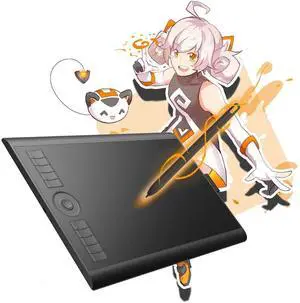
Whether you're sketching, illustrating, or designing, GAOMON M10K drawing tablet with working area of 10 x 6.25 inches offers a comfortable and large canvas for your artistic expression.

Battery-free Stylus
The battery-free stylus AP31 delivers a responsive and fluid drawing experience, simulating the feel of traditional art pencils. 2 side buttons can be programmable to adjust brush size, switch between tools, or zoom in and out.

Customize Your Own Workflow
M10K graphics tablet is equipped with 10 customizable hot-keys and 1 touch wheel, allowing you to personalize your workflow and access your favorite shortcuts with ease. You can focus more on your art and less on navigating through menus.

Bulit-in Pen Loop
M10K art tablet is designed with a pen loop on the side that is able to hold your pen in place. No worry about loosing your stylus any more.
Compare Similar Drawing Tablets
How to know if your computer or laptop is compatible with GAOMON M10K2018 drawing tablet?
Kindly note that the tablet works with Windows 7 or later, macOS 10.12 or later.
How to know if my mobile phone or tablet is compatible with GAOMON M10K2018 drawing tablet?
Your phone or tablet must be Android 11-14 and should have OTG function.
What to do if your drawing tablet cannot connect with the computer?
1. check if your computer runs Windows 7 or later, macOS 10.12 or later. 2. Unplug and replug the USB Cable. 3. Try with another computer. If all the method mentioned above cannot fix the issue, the tablet is broken. We will help you replace it.
What to do if your drawing tablet cannot connect with the GAOMON driver?
1. check if the driver version donwloaded is correct. 2. Unplug and replug the USB Cable. 3. Try with another USB cable. 4. Try with another computer. If all the method mentioned above cannot fix the issue, the USB cable is broken.
How to use the GAOMON M10K2018 drawing tablet?
1.connect the M10K to your computer with USB cable. 2.download the driver from our website: www.gaomon.net/download. kidly note: When the diver icon becomes orange , which means the driver has already recognized the tablet then you can use.

GAOMON M10K Drawing Tablet
Merchant Video
Large Digital Canvas
Whether you're sketching, illustrating, or designing, GAOMON M10K drawing tablet with working area of 10 x 6.25 inches offers a comfortable and large canvas for your artistic expression.

Battery-free Stylus
The battery-free stylus AP31 delivers a responsive and fluid drawing experience, simulating the feel of traditional art pencils. 2 side buttons can be programmable to adjust brush size, switch between tools, or zoom in and out.

Customize Your Own Workflow
M10K graphics tablet is equipped with 10 customizable hot-keys and 1 touch wheel, allowing you to personalize your workflow and access your favorite shortcuts with ease. You can focus more on your art and less on navigating through menus.

Bulit-in Pen Loop
M10K art tablet is designed with a pen loop on the side that is able to hold your pen in place. No worry about loosing your stylus any more.
Compare Similar Drawing Tablets
![]() GAOMON M10K | ![]() GAOMON M10K PRO | ![]() GAOMON Pro 19 | ![]() GAOMON WH851 | ![]() GAOMON PD2200 | ![]() GAOMON M106K PRO | ![]() GAOMON S620 |
|---|---|---|---|---|---|---|
| Customer Reviews | ||||||
| — | — | — | — | — | — | — |
| Price | ||||||
| — | — | — | — | — | — | — |
| Working Area | ||||||
| 10 x 6.25 inch | 10 x 6.25 inch | - | 8 x 5 inch | - | 10 x 6.25 inch | 6.5 x 4 inch |
| Digital Pen | ||||||
| Battery-free ArtPaint AP31 | Battery-free ArtPaint AP32 | Battery-free G-Pro Pen | Battery-free AP519 | Battery-free Pen AP32 | Battery-free ArtPaint AP32 | Battery-free ArtPaint AP32 |
| Tilt Support | ||||||
| ? | ? | ? | ? | ? | ? | ? |
| Programmable Express Keys | ||||||
| 10 Press Buttons+1 Touch Dial | 10 Press Buttons+1 Touch Dial | - | Intuitive Dial+8 Shortcut Keys | 8 Touch Buttons | 12 Press Buttons+16 Soft Keys | 4 Press Buttons |
| Pen Pressure | ||||||
| 8192 | 8192 | 16384 | 16384 | 8192 | 8192 | 8192 |
| Connectivity | ||||||
| Micro USB | Micro USB | HDMI, USB-C | Micro USB | HDMI, USB-A, DC | Mini USB | Micro USB |
| OS Support | ||||||
| Windows, Mac & Android | Windows, Mac & Android | Windows , Mac , Android, Linux | macOS 10.12,Windows 7 or later | Windows , Mac OS | Windows, Mac & Android | Windows, Mac & Android |
| Extra Accessories | ||||||
| tablet bag, pen sleeve, 8 nibs | pen sleeve, 8 pen nibs | drawing glove, nibs... | / | drawing glove, nibs... | pen sleeve, 8 pen nibs | pen sleeve, 8 pen nibs |
How to know if your computer or laptop is compatible with GAOMON M10K2018 drawing tablet?
Kindly note that the tablet works with Windows 7 or later, macOS 10.12 or later.
How to know if my mobile phone or tablet is compatible with GAOMON M10K2018 drawing tablet?
Your phone or tablet must be Android 11-14 and should have OTG function.
What to do if your drawing tablet cannot connect with the computer?
1. check if your computer runs Windows 7 or later, macOS 10.12 or later. 2. Unplug and replug the USB Cable. 3. Try with another computer. If all the method mentioned above cannot fix the issue, the tablet is broken. We will help you replace it.
What to do if your drawing tablet cannot connect with the GAOMON driver?
1. check if the driver version donwloaded is correct. 2. Unplug and replug the USB Cable. 3. Try with another USB cable. 4. Try with another computer. If all the method mentioned above cannot fix the issue, the USB cable is broken.
How to use the GAOMON M10K2018 drawing tablet?
1.connect the M10K to your computer with USB cable. 2.download the driver from our website: www.gaomon.net/download. kidly note: When the diver icon becomes orange , which means the driver has already recognized the tablet then you can use.