




 here!
I’m your shopping assistant for PC builds, upgrades, and everything tech.
Got questions? Ask away!
Start a conversation
here!
I’m your shopping assistant for PC builds, upgrades, and everything tech.
Got questions? Ask away!
Start a conversation Hot Seller Hot Seller


| Brand | Viture |
|---|
| Part Number | 300951 |
|---|
| First Listed on Newegg | August 27, 2026 |
|---|
We want to ensure your holiday shopping this year is hassle-free. That’s why we’re automatically extending our return policies on almost every product! For purchases placed between November 1st, 2026 and December 31, 2026 you will have until January 31, 2027 to return your product.
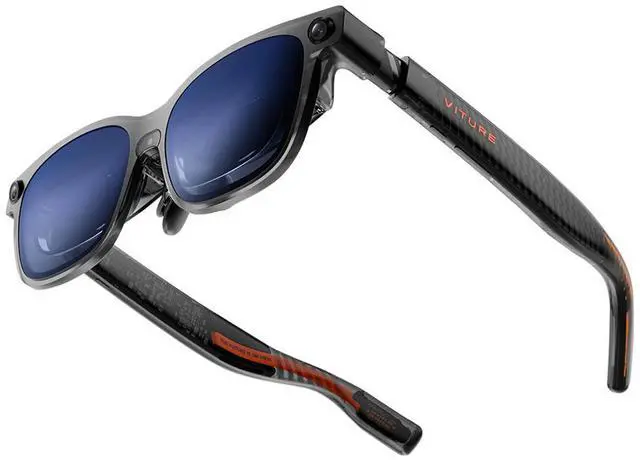
The Viture Luma Ultra is a USB-C XR glasses headset with Micro OLED displays at 1920 × 1200 per eye and a 120 Hz refresh rate, suited to users who want a sharp, smooth personal display with compatible Android, iOS, Windows, or macOS devices.
| Attribute | Value |
|---|---|
| Best For | People seeking XR glasses in a wearable display format |
| Model And Brand | Viture Luma Ultra, part number 300951 |
| Physical Characteristics | 83 g; regular size with a rectangular shape |
| Package And Included Items | One item in one box; includes a user manual. Package measures 9.398 × 12.2936 × 20.8026 cm and weighs 0.73 kg |
| Battery Information | Batteries are not required or included; battery cell type is listed as other than listed |
Q: Should I get the VITURE Luma Ultra or Luma Pro?
A: Choose the Luma Ultra if you need room-aware 6DoF tracking, hand gestures, or its brighter display; those spatial features require a compatible setup. Choose the Luma Pro for a similar 1200p, 120Hz viewing experience at a lower tier if head-tracked 3DoF is sufficient. The Ultra is an upgrade for spatial use, not a necessary upgrade for everyone watching or gaming on a virtual screen.
Q: VITURE Luma Ultra or XREAL One Pro for work and gaming?
A: Choose the Luma Ultra if you want 1200p-per-eye resolution, higher stated brightness, or 6DoF spatial features with a compatible setup. Choose the XREAL One Pro if you prefer its wider 57° field of view and built-in 3DoF tracking. The One Pro’s tracking is 3DoF, while the Luma Ultra’s 6DoF features depend on compatible software or accessories.
Q: Is the Luma Ultra worth it over the regular VITURE Luma?
A: The Luma Ultra is the better fit if you need its brighter display and room-aware 6DoF features with a compatible setup. The regular Luma is the more practical choice if your main use is viewing a screen through USB-C and you do not need those spatial features. Compare the current prices before buying, since the extra features may not matter for basic video or gaming use.
Q: VITURE Luma Ultra or VITURE Beast for a bigger virtual screen?
A: Choose the Beast if a wider 58° field of view and larger virtual canvas are your priority. Choose the Luma Ultra if you want 6DoF spatial tracking and hand gestures with a compatible setup; the Beast’s listed tracking is 3DoF. The Ultra’s listed field of view is 52°, so it gives up some width for its spatial features.
Q: Will these glasses work with my phone or laptop?
A: The listed operating-system compatibility includes Android, iOS, Windows, and macOS, and the glasses connect over USB-C. Compatibility also depends on the specific device and whether its USB-C port supports video output, so check your device’s specifications before buying.
Q: Can I use the glasses as a screen for laptop work?
A: They may suit laptop tasks that work well on a personal display: the listing specifies 1920 × 1200 resolution per eye, a 120 Hz refresh rate, and Windows and macOS compatibility. The listing does not confirm support for multiple virtual monitors, so verify the features you need for your workflow.
Q: Are these suitable for travel?
A: They may be useful for viewing content from a compatible phone or laptop while traveling, but the listed USB-C connection means you should plan to connect a host device. The product information does not specify battery life or standalone operation.
Q: Can I use them if I wear prescription glasses?
A: The provided product information does not specify prescription-lens support or an included prescription insert. If you need vision correction, confirm compatible prescription options for this exact model before purchasing.
Q: Will the Luma Ultra work with my device, and do I need extra accessories?
A: Check that your device can send video over USB-C; a USB-C port alone may not be enough. Reddit users report that some spatial features depend on compatible software, and some setups—such as Switch use—may need a dock. Requirements vary by device and feature, so confirm your exact setup before buying.
Q: Is the Luma Ultra a good choice for computer work?
A: It may suit users who want a portable virtual-screen setup, but it is not a guaranteed monitor replacement. Reddit reports are mixed: some users say the display works for coding, while others describe blurry text, setup problems, or difficulty using multi-screen software. Results depend on the computer, connection, software, and personal comfort.
Q: Are the Luma Ultra good for watching movies while traveling?
A: They can provide a personal screen when connected to a compatible phone or other device, but they are not a standalone media player. Reddit users report both successful travel viewing and streaming-service or DRM limitations, so check that your preferred device and viewing apps work with the glasses before relying on them for travel.
Q: Can the Luma Ultra replace a VR headset?
A: Not for every VR use. The supplied product information describes USB-C-connected displays, and Reddit users discuss using them as a large screen as well as encountering limitations with spatial features. Consider them a wearable display rather than a self-contained VR headset unless your intended setup supports the specific spatial functions you need.


