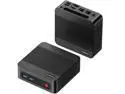
BOSGAME E7 Mini PC Windows 11 Pro, Intel Core 3 100U (6C/8T up to 4.7GHz), 16GB DDR4 512GB NVMe SSD, Dual RJ45 LAN, WiFi 6, Triple 4K Display, Business Home Desktop Computer
  •  
  • $389.00 –
  • $1,099.00
  • $1,099.99
  • Free 30-day Returns
  • Top Rated
    4.6 (14 seller ratings)

    Shipped by Newegg

    Price alert
    Shop it at NeweggBusiness.

    Meet Your Seller

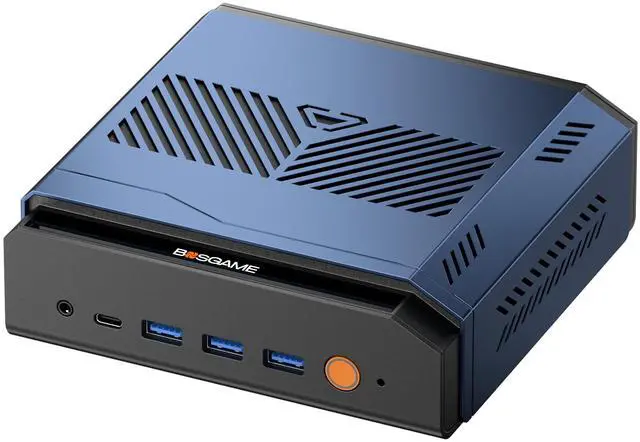
    BOSGAME DeskMini M7 Slim Mini PC Intel Core Ultra 9 285H|32GB DDR5 | 1TB NVMe SSD, Dual 2.5G LAN, Thunderbolt 4 | OCulink | Quad 8K Display, Windows 11 Pro Intel Arc 140T Graphics

    Limited time offer, ends 11/17 By BOSGAME DIRECT

    (20 from bosgame.com) Write a Review
    • Intel Core Ultra 9 285H/Intel Arc 140T/32GB DDR5/1TB SSD
    • AMD Ryzen Al 9 HX 470/AMD Radeon 890M/32GB DDR5/1TB SSD
    • Intel Core Ultra X7 Processor 358H/Intel Arc B390/64GB LDDDR5X/1TB SSD
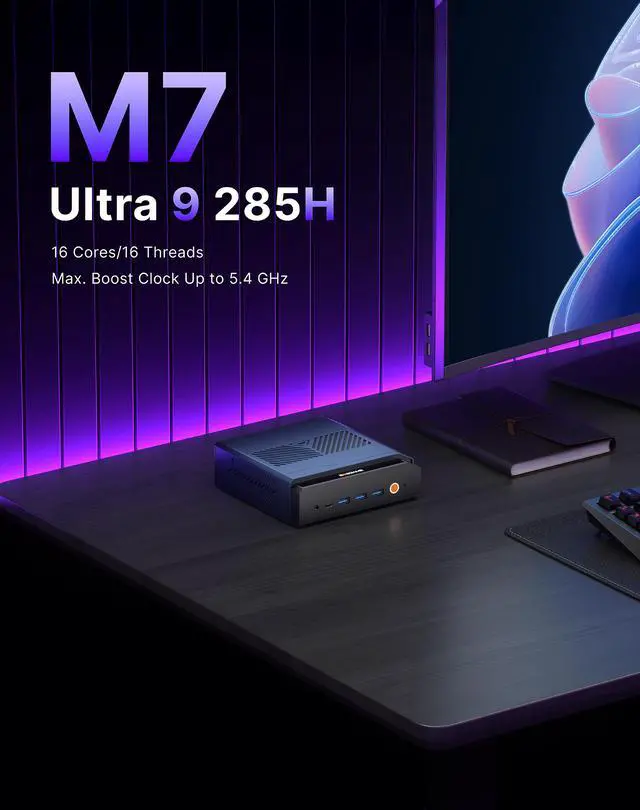
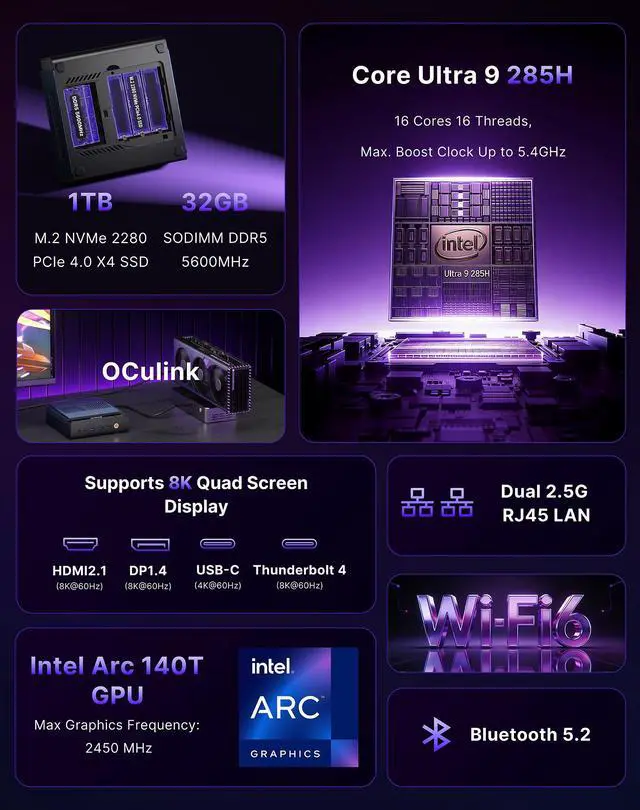
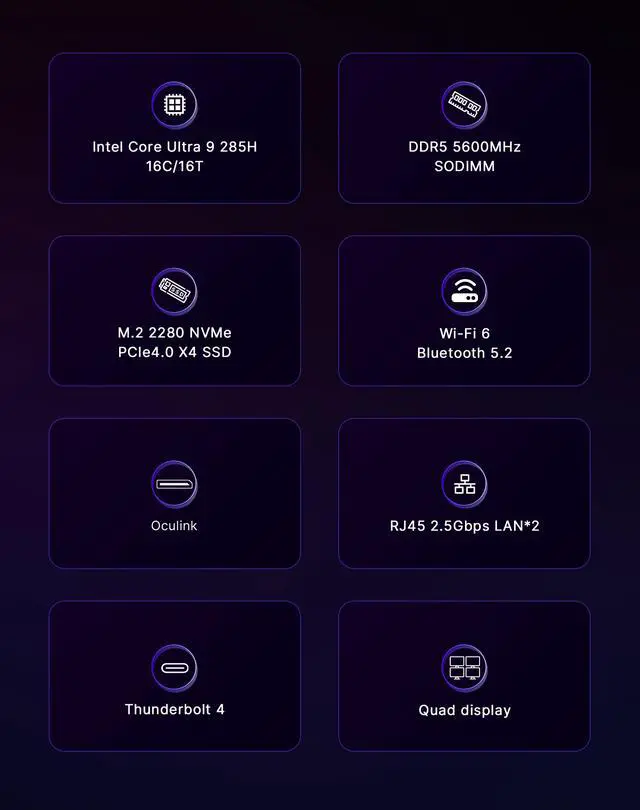
    • Unleash Next-Gen Performance Powered by the 16-core Intel Core Ultra 9 285H (up to 5.4GHz), Intel Arc 140T GPU, and 13 TOPS NPU. Tackle 8K video editing, 3D modeling, AAA gaming, and AI workloads with ease. 32GB DDR5 5600MHz (expandable to 128GB) + 1TB PCIe 4.0 SSD with dual M.2 slots (up to 8TB each) deliver blazing speed and massive storage.
    • Scale Up with OCulink eGPU Support The dedicated OCulink interface (PCIe 4.0 x4) lets you connect an external high-end GPU, instantly turning this compact machine into a full-fledged gaming rig or pro workstation. Whether chasing high FPS or accelerating renders, this mini PC grows with your needs.
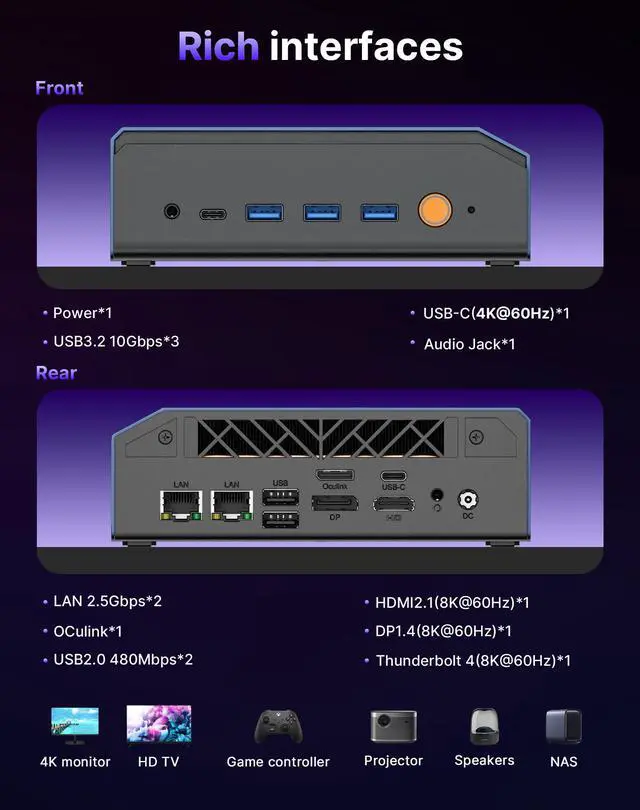
    • Immersive Quad 8K Displays Drive four independent 8K@60Hz monitors via HDMI 2.1, DP 1.4, Thunderbolt 4, and full-function USB-C. Perfect for traders tracking real-time data, designers expanding their canvas, or programmers managing multiple environmentsmultitasking redefined.
    • Blazing-Fast, Enterprise-Grade Connectivity Dual 2.5Gbps Ethernet for lag-free wired networking, Wi-Fi 6 + Bluetooth 5.2 for seamless wireless, and Thunderbolt 4 (40Gbps) for ultra-fast transfers. Full USB ports eliminate donglesconnect everything, right out of the box.
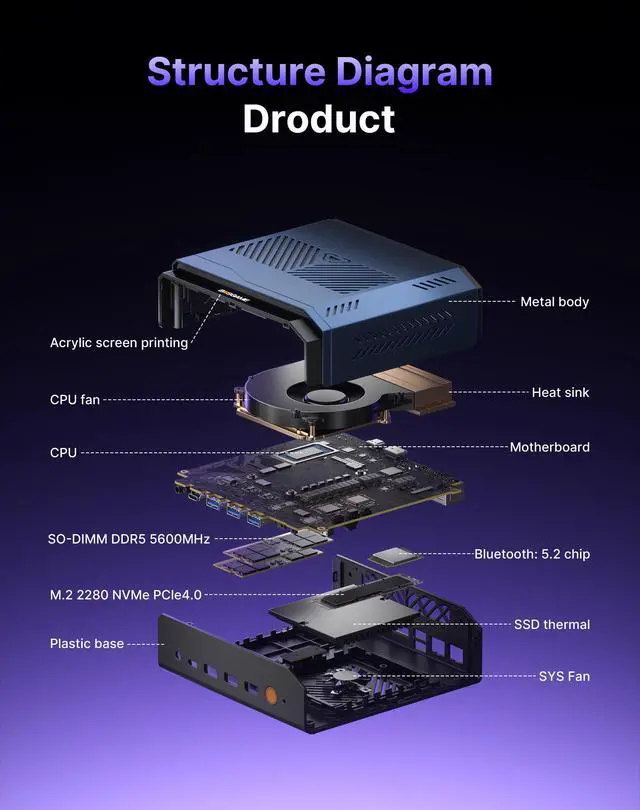
    • Silent Cooling, Built for 24/7 Reliability Premium metal chassis with advanced dual-fan cooling and large heat sinks ensures whisper-quiet operation even during marathon gaming or overnight renders. Compact, durable, and engineered for round-the-clock performancepower that fits any desk.
    +
    +
    Overview
    Specs
    Reviews (20)
    See all Q & A

    Any questions? Ask CelesteSM will help you find out quickly.

    CPU

    Intel Core Ultra 9 285H  

    GPU

    Intel Arc 140T (Max Graphics Frequency 2450 MHz)

    AI NPU

    Intel Al Boost (NPU peak TOPS (Int8): 13 TOPS)

    RAM

    32GB DDR5(SODIMM x2,up to 128GB)

    SSD

    1TB  M.2 2280 NVMe PCle4.0 x4(Include)

    Operating System

    Windows 11 Pro

    Other Features

    WOL Auto Power on

    Core Ultra 9 285H
    Rich interfaces
    Highly efficient heatdissipation
    High Capacity HighPerformance
    Extended upgrade tosupport Oculink
    Supports 8K Quad Screen Display
    Ultra HD 8K 6OHz
    for Office,Photo Editing,Meeting,Games,Education,Home Theater
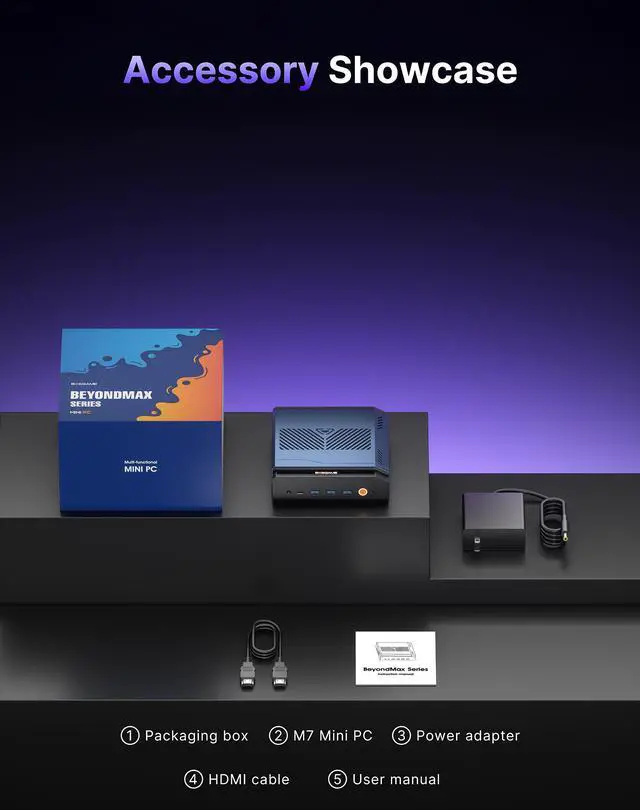
    Accessory Showcase

    BOSGAME M7 Mini PC Powered by the 16-core Intel Core Ultra 9 285H (up to 5.4GHz), Intel Arc 140T GPU, and 13 TOPS NPU, it handles 8K editing, 3D modeling, AAA gaming, and AI workloads with ease. Equipped with 32GB DDR5 (expandable to 128GB) + 1TB PCIe 4.0 SSD (dual M.2 slots, up to 8TB each) for blazing speed and massive storage.


    Full Connectivity: OCulink (PCIe 4.0 x4) for external GPU support; quad 8K@60Hz display output via HDMI 2.1, DP 1.4, Thunderbolt 4, and USB-C; dual 2.5G LAN, Wi-Fi 6, and Bluetooth 5.2 for enterprise-grade networking; Thunderbolt 4 (40Gbps) plus multiple USB ports for flexible expansion.


    Cool & Reliable: Premium metal chassis with advanced dual-fan cooling ensures silent 24/7 operation.


    Worry-free Warranty:Comes with a 1-year limited warranty,tarting from the date of the purchase. All defects due to design and workmanship are covered.

    Warranty & Returns

    Warranty, Returns, And Additional Information

    Warranty

    • Please contact the Seller directly for warranty information. Warranty information may also be found on the Manufacturer's website.
    • CONTACT

    Return Policies

    Manufacturer Contact Info

    LOADING...

    The BOSGAME DeskMini M7 is a compact mini PC with an Intel Core Ultra 9 285H, Intel Arc 140T graphics, 32GB DDR5 memory, and a 1TB NVMe SSD, suited to creators and power users handling multitasking, productivity, and graphics workloads who want the option to add an eGPU through OCulink.

    Recommended For

    • Linux developers and technical users who compile code, run CPU-heavy tasks, and multitask: independent Linux testing found strong single-core responsiveness and competitive results in several processor benchmarks.
    • Desk-based users building a multi-monitor workspace for data, design, or office applications: the M7 has multiple display outputs, and a hands-on Linux review tested it with several monitors.
    • Compact-workspace users who want fast CPU performance for everyday desktop work and media-rich multitasking without a tower: testing of the M7 found strong processor throughput in a mini-PC-sized system.
    • DIY gamers or creators who want a compact PC now and are prepared to add an external GPU later: the M7 includes OCuLink, which BOSGAME positions for eGPU expansion.

    Real-World Use Scenarios

    • For a workday with many browser tabs, large spreadsheets, video calls, and productivity apps open at once, the M7 should provide a responsive desktop experience; independent testing of another mini PC with the same processor found strong CPU performance.
    • For a desk setup that keeps code, reference material, dashboards, or design tools visible on separate monitors, the M7 can serve as a compact multi-display workstation. BOSGAME lists support for four displays; confirm your monitor resolutions and connection requirements before setup.
    • For photo editing and occasional video projects, the M7 is a compact option for editing and multitasking without a full-size desktop. Reviews of systems with the same processor report capable creative-work performance, but intensive effects, long renders, or high-resolution editing may take longer than on a workstation with a discrete GPU.
    • For casual PC gaming, older titles, or lighter games, the M7 can provide playable integrated-graphics performance, especially if you adjust resolution or graphics settings. Testing of another Core Ultra 9 285H mini PC characterized its gaming performance as suitable for light gaming, rather than demanding games at high settings.
    • For someone who wants a small everyday PC now but may need more graphics performance later, the M7’s OCuLink connection provides an eGPU upgrade path. A compatible external GPU setup can take over graphics-heavy gaming or rendering, but requires a separately purchased GPU and enclosure and is not as simple as using the built-in graphics.

    Spec Summary

    AttributeValue
    Best ForA compact desktop for AI-assisted productivity, creative workloads, and multitasking, with support for external GPU expansion
    Processor And AI AccelerationIntel Core Ultra 9 285H with a built-in 13 TOPS NPU for local AI workloads
    Memory Configuration32GB DDR5 memory running at 5600MHz
    Storage1TB SSD
    Wired And Wireless Networking2.5 Gigabit Ethernet, Wi-Fi 6, and Bluetooth 5.2
    Audio Setup2-channel audio

    Reference Q&A

    Q: BOSGAME M7 vs P3 Plus: which should I choose?

    A: Choose the BOSGAME M7 if you want its 16-core Intel Core Ultra 9 285H platform, Arc 140T graphics, 32GB DDR5-5600 memory, Thunderbolt 4, and OCuLink eGPU connection. The P3 Plus is an alternative built around an AMD Ryzen 7 7840HS and Radeon 780M graphics; choose it if that Ryzen-and-Radeon configuration better matches your needs. The M7’s CPU performance has also been tested in Linux benchmark workloads.

    Q: Should I get the BOSGAME M7 or the P6 Neo for a mini PC with integrated graphics?

    A: Choose the BOSGAME M7 for its Core Ultra 9 285H processor, Intel Arc 140T graphics, and 32GB DDR5-5600 configuration. The P6 Neo offers a Ryzen 7 6800H, Radeon 680M graphics, 24GB DDR5 memory, and a 1TB SSD. Both are compact systems with integrated graphics; the M7 is the fit for buyers prioritizing its Intel platform and listed memory configuration.

    Q: BOSGAME M7 vs P4 Ultra: which is a better fit for a more demanding setup?

    A: Choose the BOSGAME M7 for its Core Ultra 9 285H processor, 32GB DDR5-5600 memory, Intel Arc 140T graphics, Thunderbolt 4, and OCuLink eGPU connectivity. The P4 Ultra uses a Ryzen 7 7730U with 16GB DDR4 and a 1TB SSD. Its Ryzen configuration is an option for everyday desktop use, while the M7’s listed platform and expansion connections suit users planning more intensive workloads or external-GPU expansion.

    Q: Can it run several monitors for a work setup?

    A: The listed specifications say the M7 can drive four independent displays at up to 8K/60Hz using its HDMI 2.1, DisplayPort 1.4, Thunderbolt 4, and full-function USB-C outputs. Check that your monitors and cables support the connections and resolutions you plan to use.

    Q: Can I upgrade the memory and storage later?

    A: The M7 comes with 32GB of DDR5 memory and a 1TB NVMe SSD. Its listed specifications say memory is expandable to 128GB and its two M.2 slots support drives up to 8TB each; confirm drive compatibility before purchasing an upgrade.

    Q: Is it suitable for office work, multitasking, and video meetings?

    A: Yes. Its Core Ultra 9 processor, 32GB of memory, 1TB SSD, and Windows 11 Pro are suited to office applications, browsing, and multitasking. It is a mini PC, so plan on using a separate monitor, keyboard, and mouse; the provided specifications do not identify a built-in webcam or microphone.

    Q: Can it handle gaming or demanding graphics work?

    A: It has integrated Intel Arc 140T graphics, and the listed OCuLink interface supports adding an external GPU. The provided specifications do not establish game-specific performance, so results for demanding games and graphics workloads will depend on the software, settings, and whether an eGPU is used.