

Your Browsing History


Andrew H.
Joined on 08/18/05
0
0
product reviews
- 6
Super Satisfied

TOSHIBA Satellite Pro 14.1" Intel Core 2 Duo P8600 2GB Memory DDR2 800 Windows Vista Business with XP Pro downgrade media S300M-S2142
Pros: At first I thought it came loaded with a bunch of bloatware, but it's mostly Toshiba apps and some are even useful. Lighter than I thought it would, other techs have commented on it too. Good processor, can't complain about onboard video since it's for work. RDP is a real graphics hog :-p It can play Starcraft on lunchbreaks just fine. Keyboard feels right, touchpad is ok, no problems with the fingerprint reader and nice for not having to remember rotating passwords. Battery life is good, and if you lower the brightness it seems to last forever. Has all the ports I would ever need.
Cons: Ordered a matching stick of RAM from provantage, took 5 weeks for them to tell me that they were no longer manufacturing it. Ended up just buying a pair of G.Skill from newegg. Lack of documentation for this specific model is a pain.
Overall Review: I'm a field service tech and I purchased this for that reason. I love the 14" frame, very lightweight but provides plenty of desktop space at a decent resolution. I kept Vista for now because I was curious how it would run on a laptop, not that bad :) Runs better with 4 GB of RAM, with 2 it kept locking up my web database ticket system. Overall great machine, would recommend it to anybody for the price it was at, and even now it's not that bad a deal.
6/1/2009See more detail
Nice
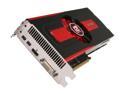
PowerColor Radeon HD 7950 3GB GDDR5 PCI Express 3.0 x16 CrossFireX Support Graphics Card AX7950 3GBD5-2DH
Pros: Haven't found a game it can't run at Max settings yet. The stock cooler rarely needed to ramp up, and when it did I wasn't too bothered. I didn't try to OC on the stock cooler, but I'm sure you could. I installed an EK FC7950 and now all I hear is the occasional sweet sound of a creek nearby. OC's very easily, running 1000 core and 1500 memory without moving temps more than a few C. Haven't tried taking it further, I don't want to torch it yet.
Cons: I got it closer to launch, before the price drop. The original shroud clashed with my tubing and MB color scheme, so I got some touch up blue paint and covered the red, it was awesome.
Overall Review: .I went with the PowerColor because my previous setup of 2 x PowerColor 3870's lasted until I now. They seem to be of good quality, never had to talk to support.
5/8/2012See more detail
Sailing the digital seas!
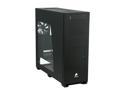
Corsair Obsidian Series 800D CC800DW Black Aluminum / Steel ATX Full Tower Computer Case
Pros: This thing was a dream to work in. Nothing feels flimsy, the seams on all the panels matched up nicely. I love the release mechanism for the side panels, so easy to put on/take off. Cable management features almost perfect. The finish on the front panel just looks awesome, too bad I have the inside stuffed with water cooling gear so I have the window facing out to show that off.
Cons: It would be nice to see modular drive bays, seems like you have to pop some rivets if you want to rearrange the inside. Mod's I've seen online seem to point to this being for structural integrity reasons, which makes sense because this thing is solid. Also could have used a smidge more space behind the motherboard. I had to take extra care to run the cables as flat as possible in the back or else the side panel would bulge slightly. Neither of these are major enough to make me regret or even 2nd guess the purchase.
Overall Review: While it is one of the more expensive cases you'll see, I really feel like you get what you pay for. It's the type of case that can dominate a room, and not because it's obnoxious like your more "artistic" models. The window provides the perfect picture of all the internals, while still letting you hide the more unsightly parts(who wants to see the back all the drive bays?) Definitely worth the extra 100-150 bucks if you're sick of flimsy "high-end" gaming cases.
4/23/2012See more detail
ESXi Home Lab
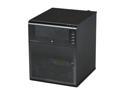
HP ProLiant N40L MicroServer Server System AMD Turion II Neo N40L 1.5GHz 2-Core 2GB (1 x 2GB) DDR3 1 x 250GB LFF SATA 658553-001
Pros: - Nice form factor for tucking away if you're worried about looks. Construction seemed satisfactory, awesome slideout MB tray worked perfectly. - I don't have a way of testing power draw ATM, but with one fan and an AMD chip I imagine it's pretty efficient. With the stock 250GB drive I can't distinguish it from ambient noise. Might change when it's stuffed with 2 TB drives. - Hardware seems to be supported OK in ESXi 5, NIC included.
Cons: Not a lot I would change with it - Dual NIC would have been great.
Overall Review: Installed ESXi 5 onto a USB stick plugged directly on the MB. Plan on using this as a NAS, serving up iSCSI to another microserver I haven't purchased yet. Will install FreeNAS right on it and blow away the ESXi, just wanted to see if it was compatible for home lab. All in all I would recommend this to anybody with the desire for a flexible home storage solution or looking for a cheap and effective VMware home lab.
2/15/2012See more detail
Can't beat it for the price
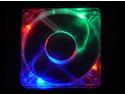
APEVIA CF12SL-4C Multi-Color LED Crystal Multicolor LED Case Fan
Pros: When I'm buying cheap stuff like this I can't stand it when I pay just as much for s&h as I do the product, so free shipping is definitely a bonus. I had 6 80mm's to go along with the 3 120mm's that came with my CM690, I decided that the 80's were too high pitched and weren't really doing the trick. 4 more of these guys later my 3870's dropped from 60 - 50 at idle, and under normal COD4/Crysis load's they went from 80 - 65.
Cons: I still think 50 idle is too high for my cards, but I don't think that is the fault of these fans, just bad stock cooling from Powercolor. I'm considering putting the Arctic Cooling Accelero on both of them because the enclosure that is on them now is actually prohibiting airflow to the cards heatsink.
Overall Review: Yea, when you put a bunch of these in a mesh case it's going to be loud. I'm not looking for a silent media PC though, so it doesn't bug me. Also, I didn't have a lot of trouble installing these. If you know how to operate your standard Phillips head screwdriver you shouldn't have any problems.
3/6/2008See more detail
Great case for the buck
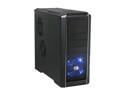
Cooler Master RC-690-KKN1-GP Black SECC/ ABS ATX Mid Tower Computer Case
Pros: The styling is very relaxed and doesn't remind me of cheap movie props. Inside was very roomy, and comes with some pretty nice tooless installation features. I really liked the PCI slot screwless system. Some complained that they were too flimsy but I had no qualms about it. In my old full tower my 3870's would make contact with the drives, but the sideways mounting really opens up the bottom. I like the way the bottom PSU opens up the case because I can shove the extra power cords in the HD rack. Has a row of screw holes on the inside for storing extra's.
Cons: I did have to do a little cutting because the bracket for the HD blocked the IDE and molex connector, nothing that any PC builder should be worried about. The old 80mm fans I had laying around are really loud when I put 6 of them in the top 2x120mm slots, so I promptly ordered some more 120's.
Overall Review: Make sure to get a 80x80x15 for the slot behind the mobo, regular 80's are too fat. They packed a lot of nifty features into an affordable case, it's hard to ask for much more.
2/29/2008See more detail