

Your Browsing History


Todd A.
Joined on 11/23/12
0
0
product reviews
- 10
Solid Monitor with Minor Defect
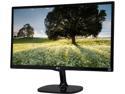
LG 24MC57HQ-P Glossy Black 23.8" 5ms Widescreen IPS Multi-Tasking Monitor DFC 5,000,000:1 (1000:1) HDMI 1920 x1080 w/ 4-screen Split
Pros: Lightweight and thin, would do great on a triple monitor mount. Has VESA support, which is a plus. The stand seems solid, and the monitor doesn't seem to wobble. The joystick styled, single button control for the monitor settings is fast and easy to learn. You don't accidentally hit other buttons that you cannot see because they are too small. Colors pop and seem vivid, contrast is high, and lots of settings to adjust the picture. The LED on the monitor can be turned off, which is much better than some other monitors.
Cons: Within about one inch of the bottom of the screen, about 1/3rd from the left, there is a slight discoloration on the screen when an all black background is shown. It's oval shaped almost a little yellow in tint, but it isn't noticeable in game or on the bottom taskbar in Windows 10.
Overall Review: It's a solid monitor at a good price, and is a major upgrade from my old VGA 4:3 16" monitor I had in the past. If you see this on sale, it's a great buy!
11/30/2015See more detail
Works
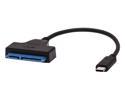
Rosewill RCW-608 USB Type C to SATA Adapter Cable for 2.5" SATA SSD HDD, Support SATA III / II / I and UASP
Pros: I waited years before finally buying one of these and I wish I did it sooner. This is fast (for USB 2.0), feels sturdy, and everything is laid out well. The rubber "bumpers" are a nice bonus for the HDDs too. One for a 3.5", another for a 2.5" drive.
Cons: It isn't 3.0, but I knew that going in.
Overall Review: Would recommend for those who work on a lot of HDDs out of the case, file recovery, etc.
1/23/2016See more detail
Sexy
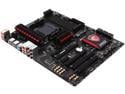
MSI Gaming 970 Gaming AM3+/AM3 AMD 970 and SB950 SATA 6Gb/s USB 3.0 ATX AMD Motherboard
Pros: - Looks. The board has a well thought out design. It feels study in the hand, not like it will snap or bend. The gold capacitors near the audio area look great on the black motherboard. Heatsinks are giant and look cool. - UEFI is standard now, and MSI has done a great job implementing it. Features are easy to access, and the BIOS flash screen just looks cool. - Connectivity is certainly not limited on this board, and the red ports look really nice on this system.
Cons: I wish this board had a button on the back, so I could push it and on the next reboot it would go to the BIOS. My intel Z series board from MSI has this. MSI has a lot of drivers on their website that do not work with Windows 10, or are older than Windows 10. A lot of them aren't necessary.
Overall Review: I'm yet to overclock it, but I will update this review when I do. MSI is yet to fail me, and I put one of their boards in every build I make.
1/23/2016See more detail
Noisy but Powerful
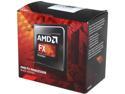
AMD FX-8320 - FX-8000 Series 8-Core 3.5 GHz (4.0 GHz Turbo) Socket AM3+ 125W Desktop Processor - FD8320FRHKBOX
Pros: I have this in a new PC. and it certainly isn't the bottleneck. Seems fast, and if games can take advantage of all 8 cores, they run fast.
Cons: The CPU fan is noisy, and if MSI Control Center isn't launched the fan defaults to 100%. AMD systems make for great space heaters in the wintertime.
Overall Review: Haven't been able to push it all the way yet, as the GPU and HDD are still bottlenecking the system. I will update this review with how far I could overclock it once the build is finished.
1/23/2016See more detail
It's RAM
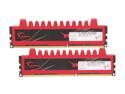
G.SKILL Ripjaws Series 8GB (2 x 4GB) 240-Pin PC RAM DDR3 1600 (PC3 12800) Desktop Memory Model F3-12800CL9D-8GBRL
Pros: Threw it into a new build and it powered on and worked.
Cons: Heat sinks may be too tall for some people, and I doubt that they will seriously help with overclocking.
Overall Review: G.skill makes good stuff at a great price point. I'm yet to have any of their products fail me after years of usage.
1/23/2016See more detail
Way more power than expected
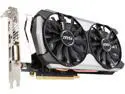
MSI GeForce GTX 960 4GB GDDR5 PCI Express 3.0 SLI Support ATX Graphics Card GTX 960 4GD5T Titanium OC
Pros: - Efficiency. This card doesn't consume much power, yet I can play Metro Last Light maxed out at 1080p and get a great framerate. I believe it's in the 40s. - Looks. The card looks cool, and the back of the PCB is wrapped in a flat black metal instead of being exposed. - Silent. Even when I am pushing this card as hard as it can go, I can't hear it over the stock Intel CPU cooler on my Pentinum. - Price/Performance. I got this card when it was on sale, about $40 less than it is right now. I am yet to send in the rebate, but in the past, the rebate process has been easy and completed within two or three weeks. That makes it a steal with the FPS games I play (Crysis, Metro, CS, Bioshock). - MSI Afterburner. I love this tool, the graphs that can break away so I can monitor performance over time, and the easy overclock interface. It looks a little...funky, but it's still a reliable tool. Doesn't seem to consume many resources.
Cons: I couldn't change the LED color with Nvidia's tool, or make it fade in and out, but that doesn't bother me.
Overall Review: This card is shoved into a Silverstone Raven 1, which is a mini ITX case with room for a full sized GPU. It fit perfectly, and my case temperatures have not risen more than a degree or two Celsius under full load. I have one 120mm intake fan pushing air on to the intake fan closest to the IO ports, and the GPU stays under 65C. It's a great card. I would recommend this to friends, and I already have friends who have bought this card to SLI it.
1/23/2016See more detail