

Your Browsing History


Steven R.
Joined on 09/25/02
0
0
product reviews
- 8
Nice solid mobo with reasonable legacy features
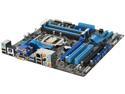
ASUS P8H67-M PRO/CSM (REV 3.0) LGA 1155 Intel H67 HDMI USB 3.0 Micro ATX Intel Motherboard
Pros: * Reasonably priced * Sufficient PCI and PCIe slots * RS232 serial header available if you want it * A boatload of USB2 headers * A couple USB3 ports * Gigabit LAN port * Sandy Bridge ready * Four RAM slots * Lots of SATA ports, including 6Gbit, plus a PATA port * DVI, HDMI, *and* VGA video ports * HTPC-type HDMI and S/PDIF jacks built-in * Has the word "corporate" in the specs, which makes you feel better about buying it for an office
Cons: * None
Overall Review: I bought a couple of these as part of a Newegg system bundle for medium-duty office systems (with a quad-i5 SB), and have been quite happy. I like that it has a reasonable complement of modern and legacy ports available in case you need them;USB3, 6G SATA, 2xPCIe16, plus an external PS/2 port, the header for a RS232 serial port, if you want to route it to the case, a couple of PCI slots, a VGA output, and a PATA port. I only ended up using the RS232 port (with a Startech PCI bracket/cable Newegg sells for under $10), but it's nice that the others are there in case I need to sue something old and crusty. The BIOS has lots of features without you actually needing to mess with them to get it working (there's both an "easy" and "advanced" mode), and it's nice to be able to point to the word "corporate" and "stable" in the specs to make yourself feel better about buying it for a business. Also, has a ridiculous number of USB headers inside, plus home-theater outputs (HDMI, S/PDI
8/15/2011See more detail
Decent cheap case
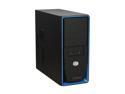
Cooler Master Elite 310 RC-310-BKR2-GP Black with blue front panel Steel Body / ABS plastic front bezel ATX Mid Tower Computer Case 420W Power Supply
Pros: * Cheap * Doesn't look ridiculous in an office environment * Includes basic power supply * Fairly easy to mount mobo * Comes with plenty of screws
Cons: * Power supply only has one SATA power cable, and it's too short to reach the 3.5" bays
Overall Review: I got a couple of these as part of a bundle with an ASUS "corporate stable" motherboard for some office computers, and I'm happy enough with it. It isn't embarrassing to have it under an office users' desk (unlike some of the overly flashy gaming-style cases, which look silly in an office), and the blue highlight stripe on the front is a nice touch. It's built relatively cheaply, but is quite solid for the price, and I had no trouble with the standoffs or mounting screws. The power supply is the weakness. The good part is that it has one, which makes life easy, and is great given how cheap it is. Didn't seem to have any trouble with a 4-core i5 SB, either. Unfortunately, the power supply only has a single SATA power cable, and it is WAY too short--you can hook it to the optical bay, but you can't then also reach a hard drive down in the 3.5" bays. Meaning that you'll have to either mount your HD in an optical bay with an adapter or get a Molex-SATA adapter to power the HD.
8/15/2011See more detail
Nice basic tray
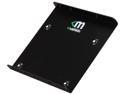
Mushkin Enhanced MKNSSDBRKT2535 2.5" to 3.5" drive adapter bracket
Pros: - Minimum use of material - Nice finish - Comes with screws - Recessed screws on bottom - Relatively cheap - Positions the drive off-center, so the connectors end up where they're supposed to be
Cons: - Shallow - As with most of these, you can't mount it from the bottom, only the sides
Overall Review: Comparing this with the similarly-priced Nippon Labs HDB-250, its advantages are that it positions the drive off center, so if your use case requires the SATA and power connectors to be in the standard location they will line up, the holes on the side for mounting seem to be closer to the standard pattern for a 3.5" drive, and the screws on the bottom are recessed, so it does better if you need it to sit flush or slide against something. The disadvantages are that it's not as heavy duty, very shallow, and not very long, and it costs a couple bucks more. It also has a smooth powder coated finish compared to the other tray's rough finish. On balance I prefer this one to the alternative.
4/7/2014See more detail
Beefy tray, centered drive
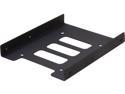
Nippon Labs HDB-250 2.5" HDD/SS Metal Bracket Black Color
Pros: - Heavy galvanized steel, feels very beefy - Comes with screws - Notch under the edge of the drive makes getting at cables easier - Cheap
Cons: - Drive is centered rather than positioning the connectors where they would be in a 3.5" drive - Screws aren't quite flush with the bottom
Overall Review: Comparing this sled with the somewhat similar Mushkin drive bracket, its advantage is that it's heavier-duty, a bit longer (depending on where the mounting holes in your case are), and a little cheaper. Disadvantages are that the screws aren't quite flush with the underside, and the drive sits centered on the bracket rather than offset to one side, so if your use case expects the connectors to be in the standard location for a 3.5" drive (for example, in a sled, or with cables "aimed" at one side of the drive) this one simply won't work. It also has a textured finish, where the Mushkin's is smooth powder coating. On balance, I prefer the Mushkin.
4/7/2014See more detail
Solid Laptop
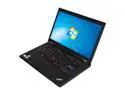
ThinkPad T Series 15.6" Intel Core i5-2520M 4GB Memory DDR3 1333 Windows 7 Professional 64-bit T520 (423946U)
Pros: * Nice build Quality * Sleek looking without being overly flashy * Interesting nubby trackpad texture * Reasonable price for the quality
Cons: * Relatively low-resolution screen * Only one USB port on the rear despite lots of room, and the two side ones are both on the left * Not as solidly built as my MBP, but then almost nothing is and it costs about half as much
Overall Review: I'm happy with this laptop for what I needed it for--the control system for a scientific piece of hardware being sold as a package. It's sleek, attractive, professional looking, and well-equipped for the price. It's not a 4-core i7 monster, and only has Intel graphics, but it's a solid machine at a <$1K price point. I'm just cheesed about the location of the USB ports--I really wanted ones in the back, but there's only one there and the other two are over on the left side instead of the right. Given how much room there is on the back (it's a big, flat, smooth surface due to the hinge design), it would have been nice to have at least one more port back there somewhere.
8/15/2011See more detail
Perfect for ASUS Corporate Stable Mobo
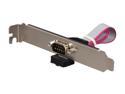
StarTech.com PLATE9M16 9 Pin Serial Male to 10 Pin Motherboard Header Slot Plate Adapter
Pros: * Converts a motheboard serial header to a usable external port on cases with no ports built-in. * Long enough cable to reach from far side of mobo to PCI bracket area * Cheap
Cons: None!
Overall Review: I bought some systems build around the ASUS "corporate stable" motherboard, and we still have some serial hardware laying around. Since the motherboard has a RS232 header available, I wanted a simple passthrough to get an external port rather than buying an entire separate serial card. This nice little guy does the trick for cheap, and has a long enough cable to reach from the Asus' port (on the far inside top corner of the board) down to the PCI slot area; other similar brackets didn't have long enough cables (and/or cost more than an entire serial card).
8/15/2011See more detail