

Your Browsing History


MATTHEW V.
Joined on 10/05/02
0
0
product reviews
- 32
Blazing fast budget chip
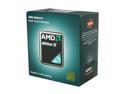
AMD Athlon II X3 455 - Athlon II X3 Triple-Core 3.3 GHz Socket AM3 95W Desktop Processor - ADX455WFGMBOX
Pros: Great value for the $, plenty fast for gaming when paired with the right GPU
Cons: The fourth core on mine unlocked but was unstable, but I knew that was a gamble
Overall Review: If you're buying this, try to get an AM3+ mobo with upgrade support to bulldozer down the line
6/27/2011See more detail
Good travel mouse for someone with small hands *updated

Microsoft Wireless Mobile Mouse 4000 - Graphite (D5D-00001)
Pros: Works on every surface I tried it on (regular mouse pad, the couch, my pants, shiny coffee table, glossy finish table at Panera bread). Enough range and sensitivity to play games from my HTPC 6 feet away (using a stiff-back mousepad sitting on the couch itself)
Cons: Some others here have stated battery life issues, I haven't had it long enough to notice this, I am still using the battery it came with and I bought it about a month ago. Not quite daily usage, though, so YMMV
Overall Review: Bought this to replace the mini-optical wireless mouse I had been using for years that was plagued by extremely short range. The last straw for me was it wouldn't work on the glossy table surface at Panera bread. The bluetrack tech in the WMM4000 works. Update 5/6/2016: I am on my second of these now (the first died out of warranty with a common issue - the 'nano transceiver' overheats and kills itself, MS support says they are uniquely paired to each mouse, so have to replace the mouse and transceiver as a pair. The replacement mouse I purchased still tracks very well, BUT an additional issue has cropped up that the rubber on the mouse wheel is coming apart and has a visible seam, which protrudes and gets hung up sometimes when scrolling. Based on the first mouse dying and the second mouse having a wheel defect shortly into its life, I have adjusted my original review from 5 eggs to 3. When this one dies, I will not get another, if I can find something better.
5/6/2016See more detail
Even better than I had hoped
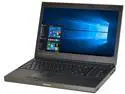
DELL Precision 15.6" Intel Core i7-3720QM 8GB Memory Windows 10 Pro 64-Bit M4700
Pros: -Powerful quad core still holds its own compared to more recent Intel chips (especially compared to the low wattage SKUs in ultrabooks) -Dedicated GPU with 2GB of video ram -Can upgrade RAM to 32GB easily -Only a couple dents on the front of the laptop (the edge that contains the latch release button), no other visible impairments; the lid still closes and latches properly, etc. -Very clean, as if someone air-dusted it then took rubbing alcohol to the surfaces. -Battery reports in good health (not diminished capacity)
Cons: -Hard drive was a 5400 RPM refurb; not an issue for me because I put an SSD in it. -This is a large heavy laptop, but I knew that going in
Overall Review: I am sure the situation may vary from unit to unit, but the item description said 1366x768 screen, the one I got was a full HD (1920x1080) panel. The GPU in the unit I received was also a notch above (K2000M instead of K1000M). And I was worried it might not come with the 180W power brick that is necessary to fully power the unit. My concerns were unfounded, in fact I received a 240W brick. I did not even know Dell made power bricks for that wattage. Even the RAM was in the 'correct' slots under the keyboard, leaving the easy-to-access slots underneath available for upgrading. Would've been nice if the hard drive was 7200 RPM if not installing an SSD.
11/22/2017See more detail
Works better than I hoped for *updated*
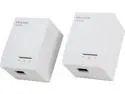
TP-LINK TL-PA6010KIT AV600 Powerline Adapter Starter Kit, Up to 600Mbps, Gigabit Ports, Plug and Play, Power Saving
Pros: Negotiates link at gigabit speed. Speedtest.net results for my cablemodem Internet connection are the same as a real Cat-6 Ethernet connection. No issues with streaming video, online multiplayer games, TeamViewer remote access, or my VPN for work.
Cons: Plug seems to fit a bit loosely, but this may be the fault of my home's outlets, rather than the TP-LINK units themselves. One of the Ethernet cables included with one of the kits (I bought 2 kits from Newegg) was defective.
Overall Review: I bought 2 of these after reading a review roundup online, fully expecting that I might encounter issues if I used them on circuits that were 'too far apart' in my 2 story house (3 usable levels including the finished basement) which was built in 1978. I was pleasantly surprised when I did not run into any snags.<br><br>I have one unit connected to my router in my utility room in the basement, another connected to my desktop PC which is also in the basement, and a third connected to my home server on the main floor of the home. I have hosted online multiplayer games as well as played games on external servers while the rest of the family was watching Netflix or Sling TV, and encountered no issues with maintaining a stable connection with sufficient speed for my purposes.<br><br>I plan to use the 4th unit to connect my wife's desktop computer (which currently uses wi-fi) in our bedroom next. Update 5/6/2016: I went ahead with adding a 4th adapter on the 2nd floor (2 levels up from the basement where the cable modem and router are). Things started to get not so rosy, so I have dinged one egg off my original review. These devices report gigabit ethernet speeds to the OS, but they obviously can't provide that (nor do they claim to). However, using a throughput testing utility from the PCs that are using the powerline adapters, I found I was intermittently experiencing substantial (5-10%) packet loss. My current less-than-optimal solution to this problem is to use a third party utility to limit upstream bandwidth in Windows to be under 5Mbps, thus making these now perform slower than wi-fi. Thankfully this has fixed my packet loss issues which were making online gaming a very frustrating experience, but I wish it was not necessary. Also wondering if I forced them to run at 100Mbps half duplex might also solve the problem and yield more performance than my current solution, but, at the moment, I would rather have something that works, even if it's not the fastest.
5/6/2016See more detail
Bandwidth starved, but acceptable performance in spite of it
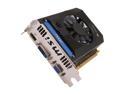
MSI GeForce GT 640 1GB DDR3 PCI Express 3.0 x16 Graphics Card N640GT-MD1GD3
Pros: Reasonable value for the money; not much point buying a cheaper card with even worse performance. Gets ~8700 PPD in Folding@home (stock clocks)
Cons: Memory clock of card I received is 667 MHz (1333 effective) DDR3, this is 25% slower than the GT 640 reference design, making the bandwidth-limited situation even worse!
Overall Review: Hopefully I get the rebate. Also hoping I can bump the RAM to at least get closer to reference speeds...
2/5/2013See more detail
Solid budget case
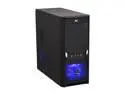
RAIDMAX Tornado ATX-238BP Black SECC ATX Mid Tower Computer Case 450W Power Supply
Pros: Price. Included PSU is better than some. Ample 5.25" external and 3.5" internal bays
Cons: Almost had to take out rear fan when trying to mount the IO shield, but I made it fit, just barely. Only USB 2.0 front ports, but I wouldn't expect otherwise in this price range
6/27/2011See more detail