

Your Browsing History


Jesse M.
Joined on 05/07/05
0
0
product reviews
- 28
A steal
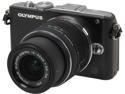
Olympus PEN E-PL3 Black 12.3MP Digital Camera with 14-42mm Lens
Pros: This is a very good camera; it has the same specs as the E-PM1 (which I also have), but has a tilt screen and more control buttons, so it is more versatile and much easier to use. Olympus has newer models with higher specs, so this one has been deeply discounted by various vendors for months. I guess that it is no longer manufactured and is a clearance item, while the E-PM1 (whose only relative virtue is slightly smaller size) remains at a higher price. The lens itself has a retail price of about $300. This camera takes great photos and beautiful video, even in rather low light. The Micro 4/3 system is a design shared by Olympus and Panasonic; there are lots of very good lenses and accessories available and essentially all of them are interchangeable throughout both lines. Olympus tech support has been fairly good. Unless you already know that you need higher performance, you will probably find that this camera serves you well.
Cons: Micro 4/3 lenses and accessories are not cheap. (You might think of buying some if you get this camera.) I really miss having a viewfinder; it is an optional module that I have not bought yet. The video is beautiful, but it is choppy if the camera is moving quickly or too much of the background is moving.
12/5/2013See more detail
Refurb
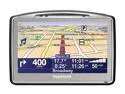
TomTom Go 720 RFB 4.3" GPS Navigation with Built-In Bluetooth
Pros: Good location accuracy; detailed maps; quick route recalculation; the community collaboration on map corrections is presumably useful.
Cons: Voice volume is hard to adjust (thru GUI). Sometimes poor choices for routes. My unit might have suffered from incomplete refurbishment; it tended to reboot almost every time I used it, and then to forget the destination. Tech support had me clear flash memory (TomTom utility they gave me) reinstall all the software and run disk utility. When that failed they had me format the device and download & reinstall 2GB of maps. Now, after 1 day of further use, Windows does not recognize the device.
Overall Review: I have not yet used other nifty features, like traffic reports. The documentation covers several models, and sometimes it is not clear what features are available, and how to use them; getting this straight would require an effort that I have not yet made.
12/30/2008See more detail
Good enough

GIGABYTE - 17.3" FHD - Intel Core i7-4700MQ - NVIDIA GeForce GT 750M - 8GB Memory - - Windows 8.1 ()
Pros: Good hardware package.Specs met my requirements at a good price. 8 GB RAM in single stick = one open slot (see cons). Room for 2 HDD and one mSATA. I generally like the keyboard (not yet used to the layout, especially of Delete and arrow keys) and the backlighting. Screen is satisfactory - I have not measured color fidelity et c., but no defective pixels and viewing angles are quite usable and it is vastly better than the 4 year-old laptop it replaces.
Cons: Painfully skimpy documentation. Almost everything on this machine is undocumented, and the few pages they do provide are readable but not professionally edited. The memory is Transcend, but I cannot find any dealer with an 8GB item with this brand, so I don't know how or when I can upgrade. Comparable memory sticks are about $120 each, but I would not mix them. Difficult touchpad, and it is undocumented, so it may have features I don't know about. Occasional weirdness with naming files to be saved, where, after typing some characters, the whole string gets highlighted and then the next keystroke replaces and deletes everything highlighted. (This error can be reversed with Ctrl-Z) In the corner by the heatsink the bottom cover is difficult to remove and to replace -- it is thin in that spot and feels fragile, and the tabs don't release or connect nicely. When I reassemble the bottom plate, I put the screws back and leave the corner misaligned and it settles in after a while.
Overall Review: It took incredibly long for manufacturers to ship laptops with Windows 8.1, and I waited so as to avoid upgrade hassles. When this one finally came out, it looked like a relatively good deal. I am not too sure about comparisons: newegg.com today fails to show this computer under my search criteria. (This is not unusual for Newegg, unfortunately.) Gigabyte tech support answers emails in about one day and is fairly responsive on telephone. I put an Apple logo on the cover and saved $1500.
4/21/2014See more detail
Useless

iolo System Mechanic - Download
Pros: None. I do not know what it is supposed to do; I got bundled with some other software I wanted. But it cannot be made to work.
Cons: It absolutely does not work unless your Internet Explorer is version 9 or older. First I installed it from my regular user account in Windows and used my admin password to authorize installation. Then it did not work, and it took me several days to get an email response from tech support telling me to remove and re-install it. Second, after re-installation, it did nothing. Occasionally it displayed a horizontal bar in the lower right corner of the desktop, but no message and no interactivity. When the program was started manually, the program's window showed several error messages, and there was no way to resolve them or to get the program to do anything. Tech support replied after two days telling me to roll Internet Explorer back to version 9. I rejected this advice and posted more questions on my ticket. After a few more days, finally, they tell me that the program cannot work unless Internet Explorer is 9 or older. IE 10 was released in October 2012 and IE 11 in December 2013. Apparently this company is not doing any development for at least 15 months.
1/13/2014See more detail
lumpen proletariat

Microsoft Windows Small Business Server Essentials 2011
Pros: Lots of nice features
Cons: Not for a typical small business; as all those who praise it say, you need to be "educated," so you might not be able to do it yourself. I have not bought this 2011 version; I had 2003 version, and it was really not even beta quality. It seemed like an orphan. Based on that experience, I think there is probably some truth in the complaints here, and maybe the snooty putdowns are from MS trolls. I suffered with SBS for several years until a flood destroyed the server, and I would not reinstall it.
Overall Review: An example that may remain relevant, the SBS 2003 installation script gave several points where one could make a choice. If you did not accept the default, the next screen said you could not proceed, nor could you go back to change your choice -- had to reinstall from bare metal every time. Before starting installation and configuration, I bought the current SBS book from MS Press that seemed most targeted to noobs like me (and other books, too), and the MS book did not address any of the issues I had with the software. The MS knowledgebase was so vast, so seldom was relevant, and usually so hyper-technical, that there was practically no use in trying it.
5/21/2012See more detail
Not a good sharpener
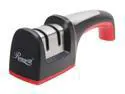
Rosewill 2-Stage Manual Knife Sharpener - RHKS-11001
Pros: Easy to use. It is probably useful for getting a uniform angle on the tip of curved blades (which I've never been able to measure or to estimate precisely on sharpening stones) but I am not really impressed. If you don't know how, or if you otherwise cannot sharpen knives, this device may be of some value. It has been many years since I used a sharpening gizmo, so I cannot compare it to anything except a plain sharpening stone or plain diamond hone, and it is not as good.
Cons: It does not get blades very sharp; not as sharp as I keep them with a simple stone. The wheels in the gizmo I got are aligned at angles, so that the stone makes contact on the two sides at different distances from the "base" (the correct 4-letter word begins with b and ends with t -- Newegg rejects it as "improper and unsuitable for submission... obscene and/or potentially offensive language") of the blade -- closer to the left side on the coarse wheel and closer to the right side on the fine wheel. Also the points of contact are recessed from the shell of the sharpener, so you cannot get the entire blade sharpened.
Overall Review: I have emailed Rosewill about the peculiar alignment of the wheels - maybe it is a defect in this unit - (and about other issues) but no time for response yet. As others have noted, please note again: there are NO INSTRUCTIONS in or on the box. The box tells you only not to sharpen serrated blades or scissors, not to run the blade back-and-forth and not to submerge the sharpener in water.
2/22/2012See more detail