

Your Browsing History


Jordan O.
Joined on 04/16/12
0
0
product reviews
- 10
Top notch quality
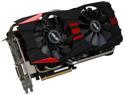
ASUS GTX780-DC2OC-3GD5 G-SYNC Support GeForce GTX 780 3GB 384-Bit GDDR5 PCI Express 3.0 HDCP Ready SLI Support Video Card
Pros: faster, quitter, sexier, and more sturdy than my msi tfiii 7950 (and that's saying a lot. I loved that card). Looking at the pictures doesn't do this beast justice, its a work of art. It will max out any game on the market @1080p.
Cons: Nvidia still hasn't fixed the issue with 1080p monitors over HDMI. still doesn't default full rgb,hence nerfing the colors on your monitor. There was a simple fix by doing a registry hack, but be warned if you have never owned an NVidia card before. This doesn't count as an egg off because ASUS out did themselves with this card, and NVidia's driver problems should blemish this.
Overall Review: pair this with an fx 8350 and be happy gamer :)
4/8/2014See more detail
After RMA works as intended
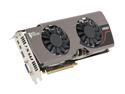
MSI Radeon HD 7950 3GB GDDR5 PCI Express 3.0 x16 CrossFireX Support Graphics Card R7950 Twin Frozr 3GD5/OC
Pros: +Mine has a 7970 PCB, Over clocks like a beast +looks sexy +looks very sexy +stays cool under stress +7950 = best bang for your buck GPU that I have ever seen released in terms of current power, and having a future proof card (if there ever was such a thing, this is it) because of it extreme memory performance and 3gb of gddr5. Most gpus that lose their potency in game is due to not enough vram or too slow of vram or if it doesn't support the current dx (insert number here) because vram lag is the worst lag because if your card has 1 gb vram, and the game is running at 60 fps and using 900mb of vram, as soon as you go over the 1gb of vram, your frames will TANK HARD. Dx 9 lasted for 7 years in its prime, and is still supported today. DX 11 is the new DX 9. Look for this 3 GB of vram to be sufficient for at least 4-5 years. You'll be running games at high to ultra for the next 3 years EASY, then if you can live with medium-low settings, your looking at this thing lasting you 7+ years. and all this for $300...
Cons: - fans get loud after 65% - I had to rma mine due to premature fan failure after just 3 months of usage and a loose heatsink. RMA took only 3 weeks even though I had to ship it cross country.
Overall Review: My temps after playing an hour of BF3 are roughly 66-71 C with fans hitting no louder than 55%. Mind you, this is in a mid tower case (which is well ventilated, but that only gets you so far) where this card is so long, that the hot air that it pumps out gets caught underneath the dvd drive bay, and recirculated back into the card. So, if this thing was in a full tower case, you should be running about 5-10C cooler. Im not complaining what so ever though. 70 C with only 55% fan speed means I cant even hear the card over case fans, and 70C isn't even hot for this GPU. They can comfortably handle 85-90C.
4/5/2013See more detail
Sleek, affordable, and feature rich

Acer S235HLbii Black 23" 5ms HDMI*2 Widescreen LED Monitor 250 cd/m2 ACM 100,000,000:1 (1000:1)
Pros: This thing looks absolutely amazing. No, its not an ips monitor but its borders are no clunky. +offset and modern design. +matte screen +adjustable screen tilt that doesn't feel cheap +affordable +23" 1080p perfect specs here +2 hdmi connections acer hits another home run with an affordable and feature rich product.
Cons: -collects dust fast on its surface -collect finger prints easily -no remote and navigating the settings is not easy -no speakers
Overall Review: This is the best value in a monitor that I have ever seen in terms of build quality, features, and looks. Amazing deal, if you are gamer/hd streaming enthusiast looking to enter the FULL hd world, look no further than this.
4/5/2013See more detail
First personal build, i love it
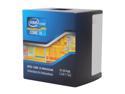
Intel Core i5-3570K - Core i5 3rd Gen Ivy Bridge Quad-Core 3.4GHz (3.8GHz Turbo) LGA 1155 77W Intel HD Graphics 4000 Desktop Processor - BX80637I53570K
Pros: I built my first pc last month because my friend and I are making the switch to pc gaming. This review is going to be a compare and contrast review between my rig and his. I am using this chip because I wanted to not have to upgrade for a long time and get good ocing out of my machine. My friend got an fx 8350, which was at the time a little cheaper. He went with the amd platform for upgrading and because he thought the cpu was better than mine. Well, I wanted to prove him wrong! So, we tested, with fraps, BF3, skyrim, and Rift (we both have 680's). In BF3 we tested mp. We stay together and with the same squad. We frapped for an entire 64 player game. Lo and behold.... he beat me by about 25 fps... granted, we were both averaging well over 60. Next was skyrim. We tested a battle that takes place when the norns overrun a town in the second main quest line. I beat him this time by about 29 fps. Again, granted, we both achieved over 60. In Rift we stayed partied up and did a rift world event where about 40 people aoeing and all that good stuff. I was able to achieve playable frames at 30, where he was down around 19. That was the one time were you could tell a difference in playability. So, all in all, im very satisfied with my rig and glad I purchased intel, my friend will tell you the same thing with his amd rig. We have yet to test multitasking while gaming, however I fear I will lose that test due to no hyper threading and him having access to 8 physical threads. I have come to the conclusion that it is truly apples and oranges when comparing the two.
Cons: This thing gets hot... 22nm is efficient but at the cost of your case temps. Not as good in bf3 as my friends amd chip :/ no real upgrade path, but I really don't need one for a while anyway.
11/28/2012See more detail
Fantastic, best cpu on the market for BF3
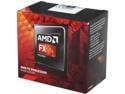
AMD FX-8350 Black Edition Vishera 8-Core 4.0 GHz (4.2 GHz Turbo) Socket AM3+ 125W FD8350FRHKBOX Desktop Processor
Pros: 8 cores, it will do anything you ask of it. Yes, its single threaded performance isn't the best, but do you need to the best? no, here is why. Multithreaded performance is much more important. I can run my anti virus, 13 tabs in my browser, download a new game, Skype, vent, teamspeak, stream hd video and have rift (a terribly optimized single threaded game) playing. with all of this, I hit only about 40% cpu utilization and lose no performance in rift. The bottleneck actually tends to be my 8 gb of ram. Also, the fx 8350 will out perform any intel cpu within $200 of its price range in games like BF3, mw3, and Crysis. Especially in BF3, in multiplayer, the fx 8350 will pull 30+ fps over an i5 3570k, both at stock. Now granted, they will both achieve over 100 fps when paired with a 7970 or 680, but intel's benches will pull that junk on amd all day if you let them. BF3 MULTIPLAYER should be in the benchmarks.. not the singleplayer. PS if youre worried about your power bill, turn off your lights when youre done using them..
Cons: You will need a larger psu to pair this will a high end gpu to give you OCing head room. Stock heat sink is loud, but adequate Pro tip- when monitoring your temps, only look at the core temp not cputin temp, there will be 8 core temps. Cputin is inaccurate. AMD's temps are not to be read in the same fashion as intel. AMD's core temp is rated at about 65C. So when people say that they are hitting in the 60's on the stock heatsink on the stock settings, they are looking at the cputin and not core temps. Core temps are almost always 20c lower than the cputin. So, those people actually do have headroom to OC on the stock heatsink.
Overall Review: fx 8350 MSI Twin frozr 7950 NZXT Phantom 410 asrock fatal1ty 8gb gskill @1600 (soon to be 16 thanks to the fx 8350) hyperx 3k 90 gb Seagate barracuda 500 gb thermaltake 630w 80+ psu (this psu is FANTASTIC, look it up on newegg its in the $70 range. Best psu for the money. Bar none)
11/28/2012See more detail
Amazing

RAZER DeathAdder RZ01-00151400-R3U1 Black Wired Optical Precision Gaming Mouse - 3.5G Infrared Sensor
Pros: -Very Comfortable -3500 DPI is more than i will ever use (i use ~1800 atm) -Very Responsive -Use the two side buttons in all of my games -Blue LED, and nice soft finish
Cons: -after about 2 years the soft finish of the mouse will begin to degrade. My dad has been a proud owner of the non 3.5g version for years. Other than that, none.
Overall Review: -SIDE NOTE: Buy a nice mouse pad to go along with this mouse so you can experience its full awesomeness
7/10/2012See more detail