

Your Browsing History


Michael W.
Joined on 06/20/09
0
0
product reviews
- 8
Stately and Quiet
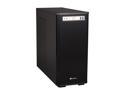
Corsair Obsidian Series 550D Black Aluminum / Steel ATX Mid Tower Computer Case
Pros: * Tool-less design * Nearly every opening is covered by a magnetic dust filter. * Quieter than average * Keeps things cool inside despite being insulated * Beautifully understated exterior, beautifully clean interior.
Cons: * "Quiet", not "silent" * Except for beautiful brushed-aluminum front, the exterior of the case is a rough-textured plastic. If you set something dusty on top, the dust gets into the "pores" and leaves lighter spots in the otherwise black exterior. While the spots can't be simply wiped away, a damp cloth makes short work of them.
Overall Review: This is the second machine I've built with this case. The first was a server for a construction company without a server room. The server was to be placed in an office connected to a dusty warehouse. The quiet operation was appreciated by the office staff, and the magnetic dust filters keep the expensive parts clean while being easy enough for any of the staff to clean regularly. In this environment, the case was completely inaudible. The second build was for my home work/gaming PC. In this environment, the case fans are audible. However, all it takes is the white noise of the furnace blower to completely drown out any sound from the case. This is a giant step up from my previous case. The tool-less design is great. Even the optical drive simply snaps in when it is aligned properly. My only complaint was the method of securing a 2.5" drive (like an SSD). This will require 4 small screws to attach the drive to the 3.5" plastic shelf. Not exactly 'tool-less" at that point... but the tray does slide in and out without any additional tools. There are plenty of places to route cables, and with a bit of effort the inside of your case can look so clean that it almost looks like the components aren't connected at all. This does wonders for airflow, which is especially important in an insulated case. If you're going to use this as a gaming case, the most important recommendation I would make is to use a GPU with a blower-style fan, and not an axial fan. I know, axial fans are supposed to be quieter, and this is a "quiet" case. The problem is that axial fans blow a lot of heat inside the case, which means they end up spinning faster... as does your CPU fan, and any other fans controlled by your motherboard. All those fans running at high speed are going to be a lot louder than one GPU blower spinning at a moderate speed. If you absolutely must use a GPU with an axial flan, I'd recommend adding a quiet PCI slot case fan to help get that heat out back where it belongs. Overall, great case!
2/1/2014See more detail
You get what you pay for.
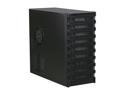
Rosewill R901-P BK Triple 120mm Cooling Fan, Mesh Design Front Panel, ATX Mid Tower Computer Case
Pros: Fits well in a budget. Lots of airflow Okay looks. Filters for air intakes.
Cons: Poorly engineered. You'll likely have to move the top fan, as it gets in the way of the PSU. Luckily there is a port on the side where you can move the fan to (make it blow outward), but this is not optimal for airflow. The HD cage is the biggest con. You have to take off both sides and the front to get it out. Not a big deal when you're first building, but if you add another hard drive (or install a longer video card), you'll have to remove all those pieces just to get the cage out. Then, since there are connections built into the front panel, you'll also have to unplug those connections from the MoBo, or be very careful how far you move the front panel while you're moving the cage. The HD cage also has it's own fan (a pro), but you'll have to unplug this from the MoBo as well. Oddly, the HD cage fan is the only one that can be plugged into (and thus controlled by) the motherboard. Finally, it would have been nice to have a separate LED to show when the computer is slee
Overall Review: You get what you pay for. It is a pain to work with, but it does the job it's intended to do. If they would have moved the top fan just 1 inch, they'd have earned another egg.
9/20/2009See more detail
Great for gaming & Folding
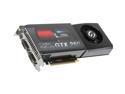
EVGA 896-P3-1257-AR GeForce GTX 260 Core 216 Superclocked Edition 896MB 448-bit GDDR3 PCI Express 2.0 x16 HDCP Ready SLI Supported Video Card
Pros: Great value. Getting 60 FPS in AA3 on highest settings @ 1680x1050 except when looking long distances through fog, where it's more like 50 FPS. The Folding@Home GPU client is capable of about 8k PPD on this card. Currently I'm being held up by their server being too busy to accept completed work units. Venting to the outside is pretty standard on high-end cards, but still a pro.
Cons: A little long -- some cases you'll have to move a hard drive cage.
Overall Review: I know Nvidia says their chips are made to run at 90 or 100 degrees C, but I still don't like to see the chip go over 70 when under full load -- mainly because the card radiates heat throughout the rest of the case when it's running this hot. I, like many others, manually set the fan to a higher speed, but I only went to 50%. This keeps everything at acceptable temperatures.
9/20/2009See more detail
Great RAM!
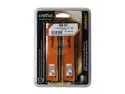
Crucial Ballistix 4GB (2 x 2GB) DDR3 1333 (PC3 10600) Dual Channel Kit Desktop Memory Model BL2KIT25664BA1336
Pros: Stable! Low latency. Price
Cons: I had to set the timings & voltage manually in BIOS... not much of a con really, put some people may not think to do this, and cheat themselves out of great performance.
Overall Review: This RAM has worked flawlessly @ 1.8V and 6-6-6-20 timings, as per the specifications. I only wish I could find the sub timings somewhere on Crucial's website.
9/20/2009See more detail
Rockin
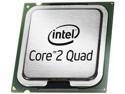
Intel Core 2 Quad Q9550 - Core 2 Quad Quad-Core 2.83 GHz LGA 775 95W Desktop Processor - BX80569Q9550
Pros: Quad core, 12 MB L2 cache & VT make for a great virtual machine experience. I also use it for Folding@Home with the SMP client. I can get about 2000 PPD stock. Stepping E0.
Cons: Mine runs hot. Will be looking to replace stock cooler soon.
Overall Review: Quite happy overall. I play AA3 frequently, and I see about 50% CPU usage, which is distributed very well over all 4 cores.
9/20/2009See more detail
Great PSU!
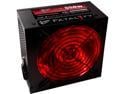
PC Power & Cooling Fatal1ty Gaming Series 550 Watt 80+ Semi-Modular Active PFC Performance Grade ATX PC Power Supply (OCZ550FTY)
Pros: Modular Lots of power on 12v rails Heavy! (Either it's got a plutonium core, or it's really solidly built)... Quiet
Cons: Wish I could shut off the LED. I don't need the flash, just the power, thanks.
Overall Review: Great PSU. Has more amps on the 12v rail than several higher watt PSU's from competitors -- and let's face it, you're going to need the power on the 12v rail. Modular plugs are very nice for keeping your case uncluttered, which translates to better airflow.
9/20/2009See more detail