

Your Browsing History


Massimo P.
Joined on 08/02/05
0
0
product reviews
- 10
Outstanding
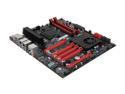
EVGA Z77 FTW 151-IB-E699-KR LGA 1155 Intel Z77 SATA 6Gb/s USB 3.0 Extended ATX Intel Motherboard
Pros: -So many features that it screams quality -Four-way SLI capable (Make sure your case accommodates it) -It is an EVGA product. In my opinion the highest quality products out there -Tons of on board four-pin fan connectors for the quietest and most efficient cooling -Three separate BIOS -Many more features to point out, worth reviewing full specs on EVGA's Website and Newegg's board review below.
Cons: Considering this is as good a four-way SLI board as you will find; if you do choose to go that route as I did, you will lose access to the USB 3.0 internal connector as well as the internal sound pin-out for the front of your case as the video cards will not otherwise fit. This is one area where particularly with the USB 3.0 port, ASRock has come up with a much better solution. What happened EVGA?
Overall Review: I've been building high-end PC's forever and frankly, I am surprised at some of the negative reviews. This, like all other EVGA boards is outstanding. I acquired mine directly from EVGA as at the time they had the best price, and while with other brands I generally test each board before installing it, true to form, this one fired right up when I first turned on my build which was after it was completely assembled and ready to put back on the case's side covers. I have lost track of how many EVGA boards I have used and I can only think of two occasions where an RMA was required and in one case, it was my fault because I damaged the pins in the CPU socket which while EVGA charged for, they still covered the board under warranty. Other than that, I’ve only had one board fail during the burn-in period and they replaced it without having to run through any hoops and to top it off, you can call EVGA tech support 24/7 and within a matter of minutes, talk to a live person that not only knows what they are talking about, but actually speaks-are you ready? English! And if they are unusually backed up, you can leave your telephone number and they will call you back. I do not recall ever waiting for more than 10 minutes before someone called back. Can you even envision such an experience from ASUS? I have discarded ASUS boards because I quickly realized that the odds of resolving an RMA before Intel came up with a new CPU were slim to none. Just in case, I do not work for EVGA, I am simply an enthusiast that wants value for his money. EVGA cannot do wrong in my eyes if reasonable in my expectations. My guess is that most of the people that have had as many problems as they claim, it is likely because they are in over their head or are upset at the vendor because the box arrived crushed. I consider myself as being very particular and demanding. Is EVGA perfect? Not by a long shot, but they are a serious organization that does focus on quality, performance and customer care like no other. In a market so competitive, they will always have my business because inexpensive does mean cheap. EVGA is not inexpensive but you get your bang for the buck and I am happy to see that they have gone into producing other peripherals. I am disappointed that Newegg has chosen to no longer sell this excellent motherboard as I feel if they did it as a result of the ratings; they threw out the baby with the bath water.
3/24/2013See more detail
Price was right. But just so.
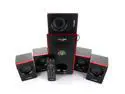
Acoustic Audio AA5103 800W 5.1 Channel Home Theater Surround Sound Speaker System
Pros: The price was really good for the specs and the items actually looks pretty good.
Cons: I guess I am spoiled because I am still using an antique Logitech 5.1 and it is so much better in the quality of the sound and the ranges, that I gave this one to my grandkid. He doesn't know any different and loves it.
Overall Review: I would only recommended if your expectations aren't what the specs may lead you to think. Or if you have already used a comparable Logitech system that in the end, was less money than this one and have had it for 15 years. I guess that makes the Logitech the real bargain after all.
3/8/2016See more detail
Thoughts for NA
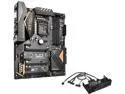
ASRock Z170 Extreme6+ LGA 1151 Intel Z170 HDMI USB 3.1 USB 3.0 ATX Intel Motherboard
Pros: Hi NA, I have been into PCs since the mid 1980s and frankly, I have lost track of how many PCs I have built over the years. Because I am in the construction business which, can be stressful, I found the "hobby" of building PCs to be enough of a departure from my daily life that it has been easy to find satisfaction from it. That being said, I have had more than my shares of frustrations along the way. But I also learned valuable lessons. One of the first, is to never, ever assemble any PC int a final product without first making sure that the motherboard will boot and post. Something that you can easily do with the motherboard still in the box.
Cons: As a matter of preference, I purchase exclusively EVGA motherboards. Over the years I have purchased several and can only recall having one failure and it wasn't a DOA, but rather following a couple of years of use and was replaced by EVGA under warranty. To the best of my knowledge, EVGA has he best technical support in the industry. That alone makes it my brand of choice and for the reasons that I believe ASUS is the exact opposite, while I can't deny they have innovative boards, I have purchased one too many to ever consider buying one ever again. But on those occasions when I have purchased an ASR board, they have proven to be quite reliable. However, as a matter of principle, even with an EVGA board, before I do anything at all when building a PC, I test them to make sure they boot and run successfully through all the posting procedures. With the board sitting in the box, insert a stick of memory, install the CPU (You don't even need to use a CPU cooler if you don't want to...), hook up a monitor to a built in video port or if not included with board, have an inexpensive GPU handy and insert it in the correct slot; plug in your power supply and boot the board. in seconds, you should be able to access the BIOS. If you don't, the board has some problems and stop. If it posts, you are good to go.
Overall Review: ASR makes good boards and while their technical and customer support is nothing like EVGA's, they are responsive and EVGA's support is an anomaly. But ultimately, there are many preventive actions available when building a PC, that will avoid the experience you had.
11/2/2015See more detail
I'm confused...
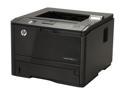
HP LaserJet Pro 400 M401n (CZ195A) Up to 35 ppm 1200 x 1200 dpi Monochrome Laser Printer
Pros: For me, this has proven to be a great printer. It is inexpensive when compared to my first HP LaserJet II, or my LaserJet 4 that I've had for probably 15 years and is used daily and abundantly. The last time I ran a printout, it showed over 150,000 pages and all I have ever done, is use HP toner only, keep it clean and away from people that walk around with cups of coffee that end up spilling them into the printers as they do on their keyboards.
Cons: None thus far. I purchased this printer within weeks of HP putting it on the market as it reminded me of my faithful LaserJet 4. Will it last that long?
Overall Review: I've been operating my business from before the "cat's meow" was having an Epson DOT Matrix (This will throw a previous reviewer for a loop that, although claims to be of average technical expertise, did not know what "monochrome" meant and purchased the printer in any case. Now, is this lack of technical expertise, or an issue with the English language?). Over the years, I have purchased a number of HP printer of differing ilks, and I cannot ever remember one of them breaking other than from endless use and a finite reasonable life. I only made sure that whether toner cartridges or ink, that they were legitimate HP product and kept them clean (An occasional use of an air can does wonders). I am certain no one cares about reading my opinion as to why they may have had any issues, and I am not interested in even going there. I will, however, say this much; in my lengthy experience with HP printers, should I ever need a printer, I will assess my needs and buy an HP intended to meet them. I am certain there are other great brands out there, but for me there is only one way to go. Whether the 400 will last as long as my 4, I do not know. But I am confident it will serve me well through its useful life and longer than intended. Incidentally, I do not work for HP nor do I have any affiliation with them. My business is concrete.
12/24/2013See more detail
Very Good
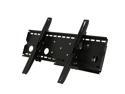
BYTECC INC BT-3260TSX-BK 32"-60" Full Motion TV wall mount LED & LCD HDTV up to VESA 600x400 max load 175 lbs Compatible with Samsung, Vizio, Sony, Panasonic, LG and Toshiba TV
Pros: Its multi-directionality
Cons: It will support large screen televisions and still offer the ability to pull out, push in, swing up , swing down as well as to the right or left. Well built, and reasonably priced--especially when on sale.
10/1/2013See more detail
Excellent
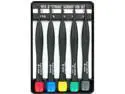
BOXER TOOLS TP-5 5pc Tamperproof / Security Torx Screwdriver Set
Pros: Very good high quality tools. A must have for anyone that builds his own PC's
Cons: None so far
Overall Review: I did not realize these tools, by Syba, were available through New Egg at such excellent prices
5/2/2013See more detail