

Your Browsing History


Barron A.
Joined on 08/28/01
0
0
product reviews
- 7
Decent Keyboard
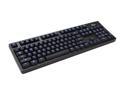
Rosewill RK-9100 - Illuminated Mechanical Gaming Keyboard with Cherry MX Blue Switches
Pros: Switches: The Cherry MX "Blue" switches are lovely with their clicky noise. I love the audible feedback. The switches are accurate as mechanical switches tend to be. It seems the Cherry MX switches have become the go-to standard for mechanical switch keyboards. Backlighting: The back lighting is really cool. The back lighting emanates from behind the keys, as well as illuminates the character of each key. Ability to adjust back lighting brightness is nice - 4 steps of brightness. The most bright setting is eye-bleeding blue (super bright) and frankly too bright for me - I have to tone it down a bit. The mode button allows 3 modes - 1.) WASD and directional (arrow) keys only backlit, 2.) all keys except 10 key backlit, or 3.) all keys backlit. Special keys, NUM LOCK, CAPS LOCK, SCROLL LOCK, are not backlit in blue. Instead, when they are turned on, they are lit up with a green light, which is also very bright. This is an interesting choice to distinguish these keys from others (not sure why). Finish: The matt finish is nice, and understated. Keyboard is heavier than most, but not by much. Has a real solid feel. Ergonomics: The key's touch surface are not flat, like a laptop keyboard, rather they are depressed enough to detect one key from another just by feel. On the back are two stands, capped in rubber, where the keyboard can be tilted. If not in use, the keyboard remains flat. If flat, the keyboard rests on rubber feet to keep the keyboard stationary on hard surfaces. Large backspace button, large ENTER key. Function key (Used to toggle backlight mode, or brightness) is on the right lower, and out of the way. Features: Does NOT require drivers of any kind - true plug and play. Inclusion of a USB2.0 hub on the keyboard itself is a nice touch. Ports are in the back of the keyboard, not the side. FUNCTION buttons include macro keys for invoking email, or web browser, multi-media controls, volume, and mute. Allow for 6 keys to be pressed at same time. It seemed like I was able to get more than 6 at a time (testing only). Some programming tasks require CTRL+SHFT+R+W chords, but I have never seen 6 (or more) at one time before.
Cons: Switches: Not as much tactical feel as I would have liked, but this is not the fault of the keyboard manufacturer, or this particular model. I selected the model with Blue switches because of the audible click. Other "flavors" of the Cherry MX switches likely have more pressure required to fully depress a key and provide a tactical feel to ensure the key was actually pressed, not inadvertantly. Backlighting: Some keys have more than one glyph. For example, the numeric key 1 (Both above the QWER, and in the 10 key) has additional information printed on it. The 1 key above QWER also has the punctuation charcter "!". The 1 key in the 10 key also includes the word "End". In both cases, these extra glyphs are not backlit. This is true for all the number keys having extra glyphs aside from the actual number itself. The FUNCTION keys (i.e., F1, F2, etc.) have extra glyphs not backlit. Neither the backslash \ or the forward slash / charcters are backlit. I use these frequently, and hard to find in the dark. Finish: When laying the keyboard flat, the keyboard rocks, as if it were not flat. I prefer to have the keyboard tilted towards me when I type, so I have elevated the feet at the back of the keyboard. This has resulted in no rocking of the keyboard, and it is very stable, so no really worries, but nonetheless I would not have expected a warped keyboard frame. Very minor complaint. Rocking was very minor, but noticeable. Ergonomics: The keys are plastic. A rubber like coating on the touch surfaces would have provided a bit more "traction". I have seen this in other keyboards, and I really like the feel. Features: Would have been nice to have a high quality analog knob to control volume, and to have the USB hub be USB3.0, instead of USB 2.0
Overall Review: I really like this keyboard. I am an adult, but a kid at heart. The back lighting is really neat, and I get all kinds of comments from my children's friends - so it must be cool! :) This keyboard works very well, and is very accurate - no mistyped keys (unless I am super-sloppy). It has a great feel and I believe with the audible clicks, my typing speed has improved. Like Rex Reed (Of the Gong Show) I never give 5 stars unless absolutely stellar product. Had this had a volume knob, and USB 3.0 hub, no frame warp, and rubberized keys, I would have gladly given 5 stars. That would be my ultimate keyboard.
10/20/2012See more detail
Its OK
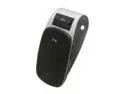
Jabra Drive Bluetooth In-Car Speaker for Music and Calls Black
Pros: Small and compact. Built in clip for visor.
Cons: not quite loud enough, and small speaker results in poor audio quality. Stupid USB power connector (expected to be used in a car right??? Isn't that why they call it the Jabra Drive???) I want power to be hard-wired to the car's fuseblock, but the USB power adapter provided made this difficult and bulky.
Overall Review: It auto turns off, after which I need to move a physical switch to off, then back to on to turn back on. This is frustrating, and dangerous if driving. A better design would be to allow the device to have a mode where it is always on, or to allow it to go to sleep but easy to wake. Its usable, but not great. Two stars is accurate.
1/1/2013See more detail
Its OK
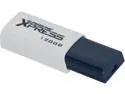
Patriot Supersonic Xpress 128GB USB 3.0 Flash Drive PSF128GXPUSB
Pros: It has a lot of capacity Price point was attractive compared to others
Cons: Slow writes - especially for a USB 3.0 device.
Overall Review: I have a fairly competent system, and I am seeing 12MB/s write speeds consistently. I guess that's a little bit more than half the theoretical max.
6/17/2014See more detail
Works well.
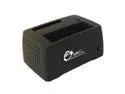
Siig SC-SA0D12-S1 Superspeed usb/sata hdd dock
Pros: solid. Fast, has a rubber-like coating. Plug and play. Works as advertised. Convenient. Use with 2GB drives. Has never failed to work with a drive (see fan issue in Cons area).
Cons: fans go out after about 6 months. Sleeve bearings start to squeal. I have multiples of these and they are all going bad. I have seagate drives that run hot and need the cooling, but I also have western digital that run cool, don't need fan. So I just take the bottom off the device, reach in and unplug the fan, put the bottom back on. No more squeal. Hesitant to use with hot Seagate drive. Cant take it apart to replace fan, looks like on/off button is glued on which is in the way of separating the case to get to the fan.
Overall Review: The on/off button is on the side. Sometimes when pressing I knock the whole thing over. Scared I may end up damaging a drive. Better option would have been to put the button on the top. Need to insert the drive in the top so downward pressure is already expected. Wish it had ability to support two drives simultaneously. I also have the USB 2.0 version, which allows 2 drives simultaneously. Go figure, slower bus speed, more drives :S
2/21/2013See more detail
Everything A-OK
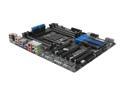
GIGABYTE GA-X79-UD5 LGA 2011 Intel X79 USB 3.0 Extended ATX Intel Motherboard
Pros: Nice board - USB 3.0, Firewire, Onboard audio, Gb Ethernet, 3 video cards capable, 8 memory slots, supporting DDR3 2133. A ton of SATA ports. Many USB 2.0 ports. Been using for over a month now. Stock speeds - not overclocked. CPU fan automatic speed depending on heat - silent, hardly moves - this thing runs cool at stock speeds. Arrived with latest BIOS already installed. Purchased from Newegg. BIOS supports UEFI.
Cons: Price a bit steep. Only 2 USB 3.0 ports. Since USB 3.0 is backwards compatible with USB 2.0, why not make all USB ports USB 3.0 capable??? BIOS GUI is a bit weird, but its OK... Memory slots are close to CPU (memory I purchased had cooling fins on top - intersected with cooler - had to remove - they were held on by screws, not glued on, so easy removal) (can't really blame the board because the cooler was too low, or the memory was too tall - memory wants to be close to the cpu for performance) Trying to get bootable RAID installed on intel chipset was a pain, but I finally got it, and it has been completely stable.
Overall Review: I would recommend. I would buy again. My Configuration: Board: GA-X79-UD5 CPU: Intel Core i7-3930K Sandy Bridge-E 3.2GHz (3.8GHz Turbo) LGA 2011 130W Six-Core Desktop Processor BX80619i73930K CPU Cooler: Noctua NH-D14 SE2011 140mm and 120mm SSO CPU Cooler Memory: CORSAIR DOMINATOR GT 16GB (4 x 4GB) 240-Pin DDR3 SDRAM DDR3 2133 Desktop Memory Model CMT16GX3M4X2133C9 Disk: (2) Striped: SAMSUNG 830 Series MZ-7PC256B/WW 2.5" 256GB SATA III MLC Internal Solid State Drive (SSD) Video: (2) XFX Double D Black Edition FX-777A-ZDB4 Radeon HD 7770 GHz Edition 1GB 128-bit GDDR5 PCI Express 3.0 x16 HDCP Ready CrossFireX Support Video Card Power Supply: Antec High Current Gamer Series HCG-750 750W ATX12V v2.3 / EPS12V v2.91 SLI Certified CrossFire Certified 80 PLUS BRONZE Certified Active PFC Power Supply
11/13/2012See more detail
Does not support 125w 6 core CPU
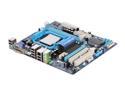
GIGABYTE GA-MA78LM-S2H AM3/AM2+/AM2 AMD 760G HDMI Micro ATX AMD Motherboard
Pros: Solid board - no reliability issues at all. Heavy board, lots of copper. Lots of built in peripherals - i.e. gigabit networking, DVI output, etc.. Dual Bios
Cons: Only two memory slots. Only one PS2 port - pick a mouse, or a keyboard, but not both unless you have a dongle (or you use USB devices - USB is built in) Does not support 125w 6 core 3.2ghz AM3 cpu. Gigabyte website states support for AM3, but not this particular chip. Probably due to need for more than 95w of power....
Overall Review: Had this board for a long while (over a year) with a 2 core CPU - very solid combination. I purchased the 1090T AMD 6 core 3.2ghz cpu as an upgrade. Did not post out of the box. I upgraded the bios to the most recent version - F15. Posts now, but only sees one CPU. Checked Gigabyte website - this CPU is not supported, but Gigabyte advertises support for AM3 cpus. Beware - read the fine print...
11/12/2010See more detail