
Your Browsing History
 Holiday Shipping Details & Extended Holiday Returns Holiday Shipping Details & Extended Holiday Returns

Joined on 09/19/11
So far works like a charm
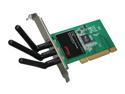
Pros: This card is cheap and seems to work well. The connection appears to be stable. I've so far had no problems with it. For me, a big point is that it plugs and plays in Windows 7 (you do not have to use the software on the CD - in fact, I recommend you don't) and it also works natively in Linux (Ubuntu 11.10). It simply works first time upon boot.
Cons: None so far that I can directly attribute to the card. I would recommend not pushing the back end of a PC up against the wall as that limits the signal strength. However, at the time of writing, you get a free antennae extender (worth 10 bucks) which would mitigate against this.
Overall Review: Cheap and does the job. I've had this for 4 months and so far so good. I recommend this card.
Stunning tablet
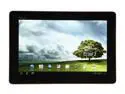
Pros: I have had it for a little over a week but have fallen totally in love with it. It is really lightweight and very thin - it makes holding and using it nothing but a joy. The screen is very nice. The screen can be set to a very high brightness setting to allow reading outside. I haven't tested it in very bright sunshine yet but so far it has passed the outdoor tested very well. The upgrade to ICS from Honeycomb was painless and smooth. Took approximately 10 minutes to complete. The version of ICS with the Prime is about as stock as you can get, but the tweaks Asus have added are perfect and bloatware has been kept to a minimum. The tablet is responsive, the battery life is good. Both the Wifi and Bluetooth work flawlessly. I know early adopters have expressed problems with Wifi but no such problems with for me. (More on this below.)
Cons: The only real negative with the tablet is the sound - there is just one speaker on one of the short sides of the tablet. For me this isn't a problem, but do not expect high quality stereo playback with a good base response from the inbuilt speaker. The sound reproduction through headphones is, of course, very good.
Overall Review: I spent a long time wondering: 1) if I needed a tablet; 2) if the TFP was the tablet for me. In the end I convinced myself I did need a tablet and that the TFP was the best option for me. I spent a lot of hours researching the technology in the tablet and decided it was the best out there. I have not been disappointed and use the tablet daily. With regards to the wifi, as I mentioned above I have had no trouble with it. Some early adopters have had some problems but I believe that was largely due to faulty wifi antennae rather than the design of the tablet. The wifi router in my building is somewhere I do not have access to. I don't know exactly where it is, but I know it is on the floor above so the signal probably has to go through the floor and a wall. I used speedtest.net to check the internet speed on my Galaxy Nexus phone, the tablet and my now aging laptop from different places in my home - all three devices gave the same numbers. Wifi is not an issue at all.
Exceptional monitor!
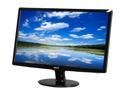
Pros: I bought this last year when building my new PC. I had a limited budget and thought the only component I could afford to skimp on was the monitor. I was unsure how good it was going to be but I'm not disappointed at all. The contrast is great, the brightness is very good. It is very thin, light and elegant. There is a lot of real estate on the screen and games look pretty sweet. I am happy with it!
Cons: It isn't HD, but you knew that already.... The only gripe I have with the monitor is the location of the menu buttons, which is on the underside of the bottom bezel. But once the monitor is set up you will never really need to use the buttons and menu.
Overall Review: For the money I find it difficult to find fault. Some have complained about the brightness of the power on LED, but I don't find that a problem at all. If you manage to pick one of these up in the Newegg sales for around $100, then you've got yourself an absolute bargain.
Very good keyboard
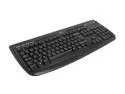
Pros: The keyboard is a good size with large backspace and enter keys. the multimedia keys just work which is nice. The main keys are 1.3 mm square. In total, the keyboard is approximately 46 cm wide by 20 cm deep. The keyboard's multimedia keys are also compatible with Linux (Ubuntu and Kubuntu 11.10) out of the box. A lot of people have been complaining that the keyboard is not a standard layout. That is partially correct - it is not a standard US keyboard layout. It is, however, a perfectly standard UK keyboard. For me, this isn't a problem - I am a Brit living in America and, like you being used to your US layout, I'm rather attached to the UK layout. For some of the common problems people have encountered, please read my "other thoughts" below.
Cons: None. If you are British and/or have the correct keymapping selected in your operating system.
Overall Review: someone said the "pipe" was missing. it isn't; it is next to the left shift key. As for the key labels not matching what is output to the screen, that is perfectly normal behaviour. When a keyboard key is depressed an electronic signal is sent to the computer and that signal is interpreted by the OS. In Windows you can change the keyboard layout by going to Control Panel -> Region and Language -> Keyboards and Languages. If you have a US keyboard the keyboard layout should be set to US. If you have a UK keyboard you will need to change this setting to the standard UK layout. If you don't do that, signals sent to the computer will be interpreted to have come from a US layout and thus produce the "wrong" characters, e.g. Shift-2 producing @ instead of ". If, of course, you know where the keys "should" be, ignore the letters on the keys and type.
Cheap speakers; nice sound
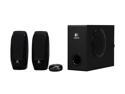
Pros: I bought these as I've used very good Logitech speakers in the past. I'm not disappointed this time around. They are plenty loud enough for me in my cavernous apartment, have good bass response (although some people may think the bass is lacking slightly) and have that useful little satellite control station. For the money I am very satisfied.
Cons: None.
Amazing cooler for the money!
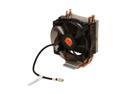
Pros: This is a wonderful cooler. It comes with its own thermal grease (although I still use Arctic Silver), it is easy and intuitive to install and works great. My Intel i5-2500K when under load heavy gaming loads never goes above 45 degrees C, even during Turbo Boost (that Intel auto frequency scaling).
Cons: It may be a little loud for some people, but for me it isn't a problem - I'm too busy gaming to notice any of the fans!
Overall Review: Much better than the stock Intel HSF.