

Your Browsing History


jason h.
Joined on 09/20/12
0
0
product reviews
- 3

ZALMAN CNPS12X 120mm Long Life Bearing High Performance Triple Fan CPU Cooler
Pros: Cools very well. Not as bulky as some might say. I have the Phanteks dual-tower cooler. When you put the fans on that thing...it beats this cooler in size. Install is easier on the Phanteks...but this really wasn't that bad. The directions were pretty easy to understand as well. Blue LED is faint but looks nice with all the blue LED fans I have in my case.
Cons: none so far
Overall Review: I wanted this cooler when I decided on building a new computer. Reviews on-line were mixed so I ended up going with the Phanteks cooler with 3 fans. I then decided to turn my old fx-8120 that was sitting downstairs in my old case into a HTPC. So I went on another site and got this cooler for dirt cheap. Put it in my main computer just to see the temps against the Phanteks monstrosity. On aida64 it's actually cooler. FX-8350 oc'd to 4.7ghz on 990fx extreme9. Socket went up a degree from 57 to 58 compared to the Phanteks cooler...but the core temps dropped down to 42-43 compared to 47 with the Phanteks. I reseated a couple times just to make sure that the thermal paste was done right. Also, much more quiet than the Phanteks. Only thing is that it doesn't really cool the Mobo...the Phanteks if you put your fans down low enough could actually do that...but not a huge deal. Oh, another thing...I didn't do the dot/pea method of thermal grease...I did the line method based on reading about direct touch cpu coolers. Unless it's a flat-out machined flat base with no breaks...you may not get complete coverage going pea sized glob. Went with line method and worked out really well.
8/19/2013See more detail
Very good motherboard. No issues at this time. Came with Bios 0902
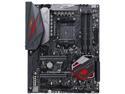
ASUS ROG Crosshair VI Hero AM4 AMD X370 USB 3.1 ATX AMD Motherboard
Pros: Solidly built, sturdy. I have used AsRock boards mostly in the past by with the Taichi being out of stock on a regular basis and having some extra cash from selling other computer parts, I got this board. Have my R5-1600 up to 3.9ghz at 1.395volts. Ram running at rated speeds but I had to put my SOC at 1.20 volts. I honestly don't notice the RGB lights on the board that much. I don't need wireless so it doesn't bother me that it doesn't have it. If I need it, I'll get a card.
Cons: To be honest, so far I haven't had any issues so I can't really give it anything under 5 stars. Over-clocking was easy, temps are solid and no BSOD. I mean, maybe cost but that is my decision to pay it so I'm not going to take an egg off. If I didn't want it, I wouldn't have paid for it.
5/3/2017See more detail
great cooler
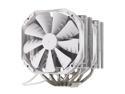
Phanteks PH-TC14PE 140mm UFB (Updraft Floating Balance) CPU Cooler
Pros: Bought the white and black one originally and it did a fine job on my 8350 but Icould get a third fan as phanteks was working on new fans. I purchased two ty-143 fans and prime95 for a couple hours at 4.6ghz it stayed at 42 degrees c. Then a friend of mine asked me to build him a system so I bought a basic brand new white one with three fans off another site. Excellent with stock fans. Didn't do prime95 but around 5 hours of gaming with 24 degrees c ambient and temps hover around 37-40c. The new fans look excellent so I'm going to pick up them as they push a bit more air. Fx-8350 at 4.7ghz at 1.4v. Also I would go with three ty-143 fans but the colors are okay. If you go red phanteks they would match and they drop temps more but sound like jet engines when running at 1700+rpms
Cons: None. Fantastic.
Overall Review: I have a 600t so it's more than wide enough for this cooler. A less expensive case that's wide and would fit this is the raidmax cobra or enermax ostrog gt.
8/1/2013See more detail