

Your Browsing History


Andrew M.
Joined on 11/18/06
0
0
product reviews
- 6
Great for a HTPC
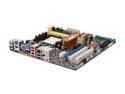
ASUS M3A78-EM AM2+/AM2 AMD 780G HDMI Micro ATX AMD Motherboard
Pros: Integrated graphics handles 1080p playback perfectly under Vista with WinDVD and Windows Media Player (CoreAVC codec and MatroskaSplitter installed) in conjunction with a AMD Athlon X2 BE-2400 and 2GBs RAM. The Q-Connector, allowing for easier installation of power/HD LED case cables, is a nice addition. Comes with 2 SATA cables.
Cons: The one HD IDE port is mounted in the lower right corner with the pins pointing parallel instead of perpendicular to the board, which can make connecting a cable a bit difficult in a micro-ATX case or similar. Minor irritation, take it into account when assembling.
Overall Review: Fits the Scythe Mini Ninja cooler without a problem. I only installed what was absolutely necessary from the installation disc to avoid loading sys tray up with junk, etc. Haven't had any driver or software problems. NOTE: Older models of Samsung DLPs have a firmware bug preventing the use of the DVI port with computers, causing the HDTV to identify as an analog monitor (translation: NO SIGNAL). Requires a board replacement on the TV.
10/26/2008See more detail
Acceptable as a HTPC case
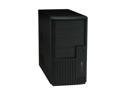
Rosewill R101-P-BK 120mm Fan MicroATX Mid Tower Computer Case
Pros: Inexpensive, small enough not to be an eye-sore as a HTPC case.
Cons: Not the most aesthetically pleasing case. HD vibrations travel throughout the case easily (using a Seagate PATA drive). Doesn't seem possible to add screws to both sides of a HD (the cage isn't removable). The HD activity LED makes a high pitched sound when it lights up. Most people probably wouldn't notice it, but it was annoying enough to me to merit a disconnection. Lastly, there isn't much space to tuck away or hide cables.
Overall Review: In contrast with what one other reviewer said, the motherboard I/O panel IS removable-- you just have to twist it a few times to pop it out (careful not to cut your hand!). Easily fits my heatsink: Scythe Mini Ninja. Can't comment on the case fan, as I immediately replaced it with a quiet one by Scythe.
10/26/2008See more detail
Sufficient for passive cooling with lower-end CPUs
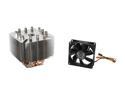
Scythe SCMNJ-1000 80mm Sleeve "NINJA MINI" CPU Cooler
Pros: Passively cooling an Athlon X2 BE-2400 (with 120mm case fan about an inch away)-- idle temps: 34-36°C. Under load (1080p playback): 41-45°C. Comes with thermal paste, though I used Arctic Silver. Easily fits an ASUS M3A78-EM motherboard without even blocking one of the RAM slots.
Cons: Documentation doesn't mention that the brackets on the side of the AM2 mount are adjustable; can be confusing.
Overall Review: With the AM2 brackets adjusted to the middle notch, the heatsink mounts just fine. Heatsink as I have it mounted looks a little crooked for some reason, but as it is cooling well, I haven't touched it.
10/26/2008See more detail
Excellent for a HTPC
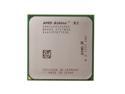
AMD Athlon X2 BE-2400 - Athlon 64 X2 Dual-Core 2.3 GHz Socket AM2 Processor - ADH2400IAA5DO
Pros: Successfully cooled "passively" with a Scythe Ninja Mini and a 120mm case fan about an inch away. Handles 1080p playback perfectly (in conjunction with a mobo with integrated Radeon HD 3200 and 2GBs RAM) with Corel WinDVD and Windows Media Player under Vista (with CoreAVC codec and MatroskaSplitter installed). Inexpensive!
Cons: None
10/26/2008See more detail
Good HTPC setup
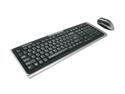
IOGEAR GKM551R Black 105 Normal Keys 4 Function Keys 2.4GHz Wireless Media Center Desktop
Pros: Both keyboard and mouse are very responsive from about 15 feet away. Acceptable aesthetics.
Cons: Large, though not unwieldy keyboard design. Mouse could be a bit more ergonomic, but is more than satisfactory for HTPC usage. Complaint: this particular model's keyboard is powered off using the key combination Shift+ESC, which will close some windows (in Vista, anyway) in spite of the fact that the shift key is being held. Would have preferred a "safer" key combination or a switch. It's a minor annoyance, though.
Overall Review: Range and responsiveness were my highest priorities, and this keyboard lives up to its promise. I would not bother with more expensive Microsoft or Logitech combination.
10/26/2008See more detail
Acceptable quality with some tweaking
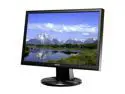
ASUS 19" WXGA+ LCD Monitor 5 ms D-Sub, DVI-D VW193T
Pros: Low cost, decent image quality (web browsing / movie playback) after tweaking with the default settings
Cons: Unadjustable height, bad default settings (weird bluish/green hue), not as crisp and vibrant an image as in some of the higher end Dell LCDs (particularly near the edges)
Overall Review: I'm not a gamer, so I can't speak for its performance there, but for general use it is a decent monitor. However, if extremely vibrant, rich color and crisp imagery is what you're looking for, you'd be best to spend a little more for one of the higher end Dell LCDs or similar.
10/1/2008See more detail