

Your Browsing History


Mark P.
Joined on 05/31/05
0
0
product reviews
- 20
Works Great
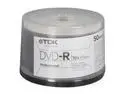
TDK 4.7GB 16X DVD-R White Thermal Hub Printable 50 Packs Spindle Model 48933
Pros: Images are good, disc quality excellent, competitive pricing
Cons: None
Overall Review: Per the other reviewers that had problems with these discs, it sounds like you were using these in an inkjet printer, like the Dymo Discpainter. These are not inkjet discs, they are for high-end thermal printers (a la Teac). The problems stated are a matter of the users using the right tool for the wrong job. Do not buy these if you plan on using an inkjet printer. Otherwise, these work great with thermal printers.
1/3/2012See more detail
Does Not Work on Windows 7
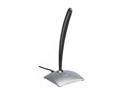
Logitech 980186-0403 Silver USB Connector USB Desktop Microphone
Pros: none
Cons: Does not run on Windows 7 Design is a little clunky
Overall Review: If you are running Windows 7, this will not work. This is a known bug that is known to Logitech. It might affect Vista, too. In any case, unless you are running WinXP or earlier, I would look for something else.
9/13/2012See more detail
To Clarify Model vs. Kit Numbers
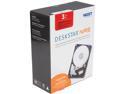
HGST DeskStar NAS 3.5" 3TB 7200 RPM 64MB Cache SATA 6.0Gb/s High-Performance Hard Drive for Desktop NAS Systems Retail Packaging 0S03660
Pros: Lots of space (I have the 6TB model Basically quiet Great performance
Cons: Unknown compatibility with existing NAS systems, so you have to figure it out on your own.
Overall Review: I wanted to clarify a couple of misconceptions on the review by Edith A. She is confusing the drive # and the kit #. The drive number is indeed HDNxxxx; the kit number is H3IKxxxx. A little research on her part would have revealed this. You can find it here: http://www.hgst.com/tech/techlib.nsf/techdocs/0BF8B842F66D454288257C74007E842B/$file/DS_NAS_spec.pdf This drive is under warranty from HGST, regardless of what Ms. A claims, as I have been through this process before. They track warranties by serial number, not receipt.
12/4/2014See more detail
Great Value for the Price
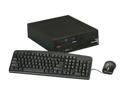
ThinkCentre Desktop PC M57P 2.30GHz 2GB 80GB HDD Windows 7 Home Premium
Pros: - Inexpensive - Green/low power consumption - Solid build, typical ThinkCentre - Surprisingly quick - Runs Win7 just fine
Cons: - Small drive - Takes forever to boot
Overall Review: I can think of a dozen uses for this, but here are some ideas: - Lightweight web server - Workstation for entry level user - Workstation for a startup, non-for-profit, or other lean organization - Single purpose workstation for basic office users (email, browsing, documents, etc.) - Computer for your grandparents I bought this to donate to our children's preschool. They just needed a computer to use with their educational CD-ROM's. I wanted a computer that could stand the rigors of a bunch of 4-5 year old children. The keyboard and mouse are basic, but functional. The ThinkCentre itself is incredibly solid. Thankfully, it wasn't loaded up with all the usual Lenovo software/bloatware, so it actually runs fast, for a disk-based system at least (haven't had one of those in years). I disabled automatic updates and did not install a virus scanner, as they are not connected to a network. I loaded TuxPaint, GCompris, and Starfall and they all run fast. They should be good for a few years at least. At the discounted price that I paid, about $170, this was a no brainer.
2/26/2013See more detail
I love it I love I love it
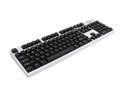
Rosewill RK-9000I - Mechanical Keyboard with Cherry MX Blue Switches
Pros: - Excellent tactile feedback - Exceptional accuracy - Not as noisy as the the old IBM M mechanical keyboards - Solid build, metal frame - All of the keys are in the right place - Comfortable typing for hours
Cons: - No frills (no USB ports, headphone jack, etc.) - Not keen on the white color of the frame, but it is growing on me (TRS-80 anyone?)
Overall Review: I have two IBM M mechanical keyboards from way back that still work and will probably work 20 years from now. I stopped using them because the noise was killing my office partner and wife. Since I have to both work and sleep with her, the keyboard had to go to the basement. This keyboard provides essentially the same experience, but quite a bit quieter, lighter. I was afraid the MX Blue switches would be too loud (almost went with a MX Brown switched keyboard), but I'm glad I opted for this one. This has a smaller footprint, but is just as accurate. I am a touch typist and do some development work, as well as a ton of documentation and other writing. This keyboard is perfect for those purposes. I'm not a keyboard based gamer, so I can't speak for the gaming chops of this keyboard. I have to say that it is nice to work with a keyboard that has all of the keys in the right place. I recommend this to anyone who wants to improve their typing speed and accuracy. I will never go back to a regular keyboard again. ...now if I can only figure out how to mod this for use on my laptop... :D
1/25/2013See more detail
HTPC Sweetness
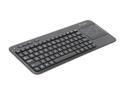
Logitech K400 2.4GHz Wireless Touch Keyboard
Pros: This is awesome. I wanted a small, lightweight wireless keyboard for our new HTPC. This is awesome. Range from about 25 feet is rock solid.
Cons: The right shift key is about as big as a pinhead. Fortunately, I knew that going into the relationship, and this really isn't for typing a lot. The Logitech software is a little klugy and crashes sometimes, but it works without it.
Overall Review: If you are considering a HTPC keyboard, this is it. I wish the touchpad was a little more functional (scrolling), but I'll take what I can get.
12/12/2012See more detail