

Your Browsing History


Nathan P.
Joined on 11/28/04
0
0
product reviews
- 10
Who can resist Blue
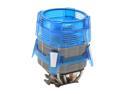
GIGABYTE GH-PCU23-VE 92mm Ball CPU Cooler
Pros: Keeps my X2 6000+ under 45c during gameplay. Idles at 30-33 with fan speed at 2100rpm. Maybe a little loud, however it comes with a switch you can mount in your case that allows you to adjust the fan speed. You could probably turn it down during times when you're not going to be putting a load on it.
Cons: It is a bit loud. Not disturbing people in the library loud, but loud enough that you notice it when there isn't much noise. Instructions are printed rather small and aren't very descriptive.
Overall Review: I could probably easily overclock my cpu, and may eventually try it. I have no doubt this HSF would be able to handle it. It is a tight squeeze in my mid-tower case. It's not that it's wide, it's that it's tall. The benefit of that is you get the cool air from the outside a lot better if your case happens to have a vent over the cpu. Could be why they designed it that way.
1/31/2008See more detail
Terrible Keyboard, don't buy
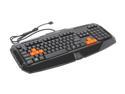
Rosewill Gaming Keyboard RK-8100, Anti-Ghosting feature, Fully programmable keys, 10 profiles setting
Pros: Nice layout. Looks nice. Rubber keys on most used gaming keys. Lots of multimedia and macro buttons. Somewhat quiet keys.
Cons: Some key combinations do not work. For example, holding down the W key and trying to use SHIFT+T does not work at all. You have to let go of the W key in order to make it work. This issue does not present for every key though. W plus SHIFT+R(among many) works fine. Just not SHIFT+T. Spacebar and shift keys must be pressed hardly and firm in order to work. I am constantly having to fix typing errors due to the spacebar not registering.
Overall Review: I bought this keyboard because it was one of the cheaper keyboards available that had the multimedia buttons I wanted. I would not recommend buying this keyboard unless you enjoy buttons not working and other intermittent issues. I signed up for the 30-day trial of the Newegg Premier service so I was able to return this keyboard without paying return shipping. Had I not been able to do that, this keyboard would be going in the trash as soon as the replacement(different manufacturer) arrived. Be warned, I have seen versions of this exact keyboard from 2-3 different manufactures here on Newegg. I can't speak for any brand other than the Rosewill one I own, but I can't imagine those other identical keyboards work any differently. The funny thing is, one of the clones I saw was $10 more expensive than this one.
4/23/2014See more detail
Great Keyboard
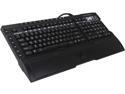
SteelSeries 64105 Shift Keyboard
Pros: Quiet keys. Every button is programmable. Keyboard has a great feel to it, nice and springy with that satisfying cushioned rubber sound when you press them. Has 2 USB ports on the back for plugging things in(I was not aware of these until I opened the box). Also had headphone and mic jack with them as well.
Cons: Have not found any real cons with this yet. Read my other comments though.
Overall Review: This keyboard sits a little higher than a standard keyboard does because it needs room for the keyset to be able to be swapped out. This is not a con per-say, but it does take a little bit of getting used to. However, it doesn't take long and this will be a different process for each person. I installed it this afternoon and am already getting used to it a bit. Don't get discouraged if you have some typos when you first use it. I opted not to use the included "ramp" that goes on the front of the board and we was delighted to see that it was removable when I opened the box. Bearing in mind that I'm someone that has never spent more than $10 on a keyboard in my life, this is the finest keyboard my fingers have ever had the honor of touching. This is my first experience with a Steelseries product of any kind and so far I am extremely impressed.
4/25/2014See more detail
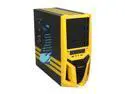
RAIDMAX Blade ATX-298WY Black / Yellow Steel / Plastic ATX Mid Tower Computer Case
Pros: Solid construction, plenty of space, good layout.
Cons: Screws that were included had lots of trouble going into the included standoffs. Threads must have been of pictures from each other. If I ever have to take the motherboard out of this case, the standoffs will be coming out with it at the same time. I did not subtract an egg for this, as it really is probably a hit or miss thing.
Overall Review: We bought this case for our children's computer because my wife and I thought it looked like bumblebee from Transformers.
3/2/2013See more detail
Awesome card
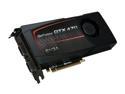
EVGA 012-P3-1472-AR GeForce GTX 470 (Fermi) SuperClocked 1280MB 320-bit GDDR5 PCI Express 2.0 x16 HDCP Ready SLI Support Video Card
Pros: This will be the 7th video card I have purchased in the last 10 years, and never have I experienced as big of a performance boost than I did with this one. My previous card was a GTS 250, which is still a decent video card these days. I run all my games at 1280x1024 now, which simply wasn't possible before I got this card. I am also able to turn up all the setting of each game I play(Battlefield Bad Company 2, World of Warcraft, Starcraft 2, and Modern Warfare 2) to high as well as use Anti-Aliasing(mid-high settings depending on game) and Ansiotropic filtering(maxed). I haven't tested it at higher resolutions so I cannot comment on the performance in those situations, but the benchmarks for this card show it does well, and for lower resolutions(smallest resolution in benchmarks seems to be the 1920x??? resolution a lot of the time) it should run things smooth as ice.
Cons: Not really any to speak of yet. There are a few things about this card though that I'll address below.
Overall Review: A couple of things. First off, this card runs pretty hot, like most of the Fermi cards do. The EVGA cooling setup is pretty good, though even with the fan at 75% it can still reach upwards of 80 Celsius depending on what game you're running. Those temps seem to be well within the design threshold of the card, but I am always a bit put off by high temps. Keep in mind with this card that you'll want to have good air flow and cooling in your tower, and I wouldn't suggest putting this card into a mid-tower, especially if it's cluttered inside with wires and other things. EVGA sold a version of this card that comes with a high flow bracket and an aluminum backplate that mounts to the back of the card. That backplate can help drop your cards temperatures under load by 4-10 degrees(seems to be the average from the reviews and comments I've seen). The problem is, if you bought the version of this card that doesn't come with the backplate, you can't order it from EVGA.
11/18/2010See more detail
Ho Hum
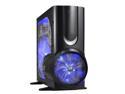
XCLIO A380PLUS-BK Fully Black 1.0mm SECC / ABS ATX Full Tower Computer Case
Pros: Lots of room. Lots of fans and air flow. Fairly sturdy construction. It looks fairly good.
Cons: There are definitely a few. First, airflow through the front fan gets obstructed by the hard drive brackets. I have 3 mounted in mine and temperatures were the same or higher at idle than they were in my old piece of poop mid tower with no front fan. I eventually removed the empty hard drive brackets which did improve air flow and temps on my hard drives but if you have more than 3 drives, it may not make a difference. Secondly, the design of the add-on card bolts. It was a pain in the tookus getting my video card and sound card to mount in the case because of the location of the screw holes for the screws that hold your cards in. There is no hard drive LED that I can find though there is a wire for it. Maybe it's on the top(my case is on my desk) but I haven't seen any blinking lights as of yet. Also worth noting is, the top fan and side fan will not work if you do not connect the speed control knobs to them that come with the case.
Overall Review: If you buy this case, you'll quickly get the impression that the people in charge of design for it must have been partaking in some late night ether binges before coming to work the next morning.
2/20/2009See more detail