


Your Browsing History


Jarred I.
Joined on 12/18/06
0
0
product reviews
- 19
Didn't do my research
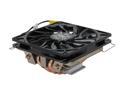
Cooler Master GeminII M4 - CPU Cooler with 4 Direct Contact Heatpipes
Pros: It does an EXCELLENT job cooling and is, compared to the stock AMD heatsink fan, whisper quiet.
Cons: The base isn't flat and has deep grooves between the heatpipes. This, of course, requires different TIM application methods compared to flat-based heatsinks. It is wide and only fits one way for AMD boards, dependent on how the board's original mounting bracket is placed. This means poor compatibility for mini-itx motherboards, as this heatsink can easily block PCIe slots and ram slots. If you do proper research, this shouldn't be a problem.
Overall Review: I didn't do my research. I bought a great product that just wasn't for my motherboard, a Gigabyte F2A88XN-Wifi FM2+ board. The heatsink wasn't rotatable 90 degrees, so I lost both my first ram slot (standard height ram would not fit, I suspect low-profile wouldn't also) and my PCIe slot. The heatsink was also right over my CPU 4-pin plugin spot, so it made it incredibly hard to plug in my power supply. Had I done proper research before buying this heatsink, and basic observations, I would never have bought this heatsink and my problems would have been non-existent. Things to look for when using this in a mini-itx build are: 1. How far are the ram slots compared to the socket? *Note that mounting brackets perpendicular to the ram slots may mean you will lose one of your ram slots, since you won't be able to turn the heatsink 90 degrees. 2. How close is my socket to the PCIe slot? *never be willing to bend your graphics card to make it fit, it needs to be level and not touching the CPU heatsink. 3. Where are my audio/usb/CPU power plugs on the motherboard? Will the heatsink obscure them or keep me from being able to easily add or remove the plugs? Keep these things in mind and I'm sure none of you will relive my stupidity.
3/6/2014See more detail
Oddest hardware flaw...?
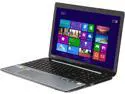
TOSHIBA Satellite 15.6" Intel Core i5-3337U 6GB Memory DDR3 1600 Windows 8 S55-A5274
Pros: The graphics card and the CPU don't get very hot, only about 75c at max, games play great without AA, wireless card has good range. Backlit keyboard is fantastic. Has an option to return the laptop to factory settings and wipe all personal files. Plenty of ram and storage space for most people.
Cons: This was sooner than I expected, but here's that 2nd review. Wireless card derped. It connects to the internet, it downloads things fine, it uploads fine. But MMOs will not play. Blacklight Retribution, Phantasy Star Online 2 and PlanetSide 2 all cannot connect to their respective servers. This of course, was after a week of no problems and them playing just fine. Thinking that HAD to be a software flaw, I reinstalled the games, one after another. They still don't work. Maybe something else was wrong. I made firewall exceptions for the games. Nada. I take off the firewall and all antivirus measures. Zilch. I reset the laptop to its factory settings. Surely anything I had installed that may have messed with it will be gone now, I even did the complete personal file wipe. Didn't work. MMOs are still a no go. So I reinstalled the drivers straight from Toshiba's website. Still nothing. It has to be the games right? So I hook up an ethernet cord and check it out if the games still won't connect. They connect. And play great. Was all wireless not going to work? I grab my Rosewill USB Wifi adapter. MMOs connect. Maybe it was just my network or router? I take the laptop down to my local fast food place and try logging in from there. Still no MMOs. STRANGE. I download Dead Space 3. Game downloads with no issues and plays fine. Hmm. I upload photos to imageshack. They're fine. I stream video and check e-mail. No issues. Built in Wifi, for some odd reason, just decided certain games would not work any longer on it. This is the first thing time I've ever experienced such a phenomena.
Overall Review: Laptop plays nice with everything else I throw at it. Just one day decided it didn't want me to have access to my online gaming addictions. Surely, SURELY it has to be some kind of hardware bug, I can't fathom anything else. I've sent it back to Newegg and they say they have to test it before I get a replacement, so here's hoping they see what I see. Again, I will make another review once I receive a new laptop and a few months has gone by. Hard to give this laptop a bad score over such an odd flaw. Everything else about it works great.
8/29/2013See more detail
Terrible Customer Support
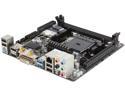
GIGABYTE GA-F2A88XN-WIFI FM2+ / FM2 AMD A88X (Bolton D4) USB 3.0 HDMI Mini ITX AMD Motherboard
Pros: At default settings, the board works fine. I knew that I needed a FM2 processor to use the motherboard before hand, so I was ready for it not to be FM2+ ready, which it wasn't. So all was well on that end. It has a nice VRM heatsink and plenty of connectivity options. A fairly decent motherboard. Built in Wifi is great with Intel's latest drivers, and the magnet on the antennae is a cool idea, but doesn't work with my aluminum case :( This isn't a bad board, first and foremost I want to get that across, it just has very early BIOS with bad feature support and worse tech support standing behind it. If you use default settings, the AMD stock heatsink and never go into the BIOS, please consider it, this is a great motherboard.
Cons: Terrible support from both Intel and Gigabyte. The Intel 7260-AC wifi that is built into this board had many issues with the initial Windows 7 driver. It would frequently disconnect and need the PC restarted to get connectivity back. Weeks of tech support with Intel (or really, waiting for them to get around to answering and my questions) and I had no solution. Then the released an updated driver and everything from there was peachy. No thanks to tech support, but hooray for their driver team getting the lead out. Now, Gigabyte's issues. I'm STILL troubleshooting issues with their board. Their turn-around time is terrible and when I had two separate concerns, they ignored BOTH to tell me to group my questions together. I had to wait 5 days for them to snub me and ask me to group my questions together??? OH HAR HAR VERY FUNNY, GIGABYTE. The only program that will read my A10-7850k's temps properly is their Easy Tune 6 (AIDA, HWmonitor, CoreTemp and Open Hardware monitor all fail) but it frequently crashes with "GUI MFC" errors. I contacted their customer support about that too (a week ago) and am still waiting for answers. If you try to set a lower Vcore to undervolt your APU, it will fix the Vcore to that value and it won't go down to idle voltages anymore. I tried contacting customer service about it and they fed me some "Oh, our default settings have no problem with that!" bullcrap and I had to REMIND THEM I was NOT using default settings. Still waiting for a proper answer on that too! Voltages are shaky, too. You want 1.5v ram? Too bad, it's 1.54 now. You have to pick 1.48 or 1.46v to get 1.5v in Windows. It doesn't let you set RAM voltage to 1.65, but gives you 1.64 and 1.66, but picking either one gives you higher voltages in Window's, as Easy Tune 6 reports 1.67 when you pick 1.64 and 1.69 when you pick 1.66. As another customer said, the APU's temps in BIOS skyrocket to the high 70's (See Steven S.). I'm not sure why, but an AMD A10-7850k has a max temp of 72.4 according to AMD's support. This means just browsing the BIOS can make your APU hot enough to fry it. That is unacceptable. Again, contacted Gigabyte about it, haven't gotten a straight answer yet. If it wasn't for the fact that Gigabyte's tech support didn't take so long to reply, I would have returned this board within the 30 days Newegg gives you. Hindsight is 20/20, I won't be getting Gigabyte boards and expect any customer service anymore- if i don't like anything with the board, I will return it promptly. THIS IS NOT A MOTHERBOARD FOR OVERCLOCKING, UNDERVOLTING OR TWEAKING. ONLY BUY IT IF YOU INTEND TO USE THE DEFAULT SETTINGS.
Overall Review: These aren't issues, but things you should be aware of: The CPU socket is placed awkwardly, it is very close to the PCIe and ram slots and severely limits options for aftermarket cooling. Coolermaster's Gemini II M4 will block the first RAM slot and the PCIe slot. The Tech Report uses a Noctua NH-L9a on this exact same motherboard (pictured in "A quick look at Mantle on AMD's Kaveri APU") and it doesn't block the PCIe slot or the ram, I've considered using it in the future.
3/6/2014See more detail
Good ram, just not fast ram
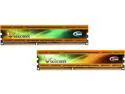
Team Vulcan 8GB (2 x 4GB) DDR3 2133 (PC3 17000) Desktop Memory Model TLYD38G2133HC10QDC01
Pros: Bought primarily for a AMD APU rig using the latest Kaveri based A10-850k. Tested on two motherboards and 4 processors without errors at lower speeds. Runs great at 1.5v 1600mhz. Stays pretty cool at those settings. No errors in Memtest 86+ after 24 hours.
Cons: Doesn't reach advertised speeds. First I tried testing the ram before my A10-7850k showed up. Using Intel XMP on Asrock Z68 Mobo which supports 2133 mhz ram caused constant reboots with no way into the BIOS without resetting it by taking out the motherboard battery. I tried with both an i5-2500k and a i5-3470s. 1866 settings would boot into windows but would quickly blue screen. Yes, I know, those processors aren't built to handle 2133 mhz speeds and that it's up to the luck of the draw as to whether those chips can handle it or not. I held off judgement. My A10-7850k arrives. I used a A4-4000 to flash to the latest bios on my Gigabyte A88 FM2+ Mini-itx board and throw in the A10 and install Windows 7 64-bit. Ram in Gigabyte board, by defualt, was 1.5v 1600mhz. The board supported loading XMP profiles, so I did so. Loaded up 2133mhz at 1.65v. Wouldn't boot properly. I kept getting boot errors and the motherboard prompting me to load defaults or go back to bios. Didn't once make it to loading Win7. I try the same timings at a lower speed of 1866 at the same voltage of 1.65v. Boots to Windows7, bu with immediate artifacting and obvious visual glitches. Moved back down to 1600mhz cas 9-9-9-20 @ 1.5v and no problems.
Overall Review: Gotta say, I didn't expect this memory to not be able to reach 1866mhz or 2133mhz. Ram doesn't seem board-incompatible, as it runs great at the lower frequencies with no issue. It passes Memtest just fine at 1600mhz on two different motherboards and 3 different processors, but none can reach 1866, no less 2133. It's not faulty ram, just improperly specced ram. I'll get a replacement from Newegg as many times as necessary to get my 2133mhz ram, the A10 needs faster ram for the graphics to live up to their potential.
2/9/2014See more detail
I can see why it was an openbox...
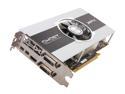
XFX Core Edition Radeon HD 7850 1GB GDDR5 PCI Express 3.0 x16 CrossFireX Support Graphics Card FX-785A-ZNL4
Pros: It delivers on the graphics front, it plays most games very well that don't require more than 1gb of vram. Some newer games need the settings turned down to medium or high. The construction is VERY SOLID. All metal shroud and heavy, it feels like quality to me. It isn't very long either, it should fit in most cases easily. Despite any qualms I may have with the card, I've not once had a driver crash or have I noticed any artifacting indicating a faulty card. It does it's job admirably. During general use, minecraft and web browsing, it stays very cool, only reaching about 45c. I see idles as low as 33c.
Cons: The heatsink is terrible. This heatsink looks like the big brother of the notorious Intel Heatsink for their low-end processors. All aluminum. After a few hours of gaming, the card got to a massive 87c. I was astonished, I couldn't imagine why. Fresh air was being pulled by the card's fan directly from outside the case, ambient air temperature was 25c. Despite several 120mm fans in my system, the metal of the case immediately around the card was very warm to the touch. In an otherwise silent system, the fan is a tad bit more than noticeable. That was an understatement. It moves plenty of air and starts out reasonable, but as soon as it hits around the 75c mark, it gets very loud. This is what prompted me to check the temps to begin with. Oh, and the card doesn't come with any accessories. Every card should come with a DVI to VGA adapter IMO.
Overall Review: This is one of those cards that needs lots of airflow. It vents most of the heat out its sides and not out the back. I'm assuming my card is an anomaly no other reviewers seem to have my problem and praise it for running cooler and quieter than what I experience. It was bought as an openbox item and I can see why now it was returned, it's annoying and hot. I'd be best served buying a new one. Please note that my problems could very easily be a bad thermal paste application, but I don't want to take it apart to find out if that means I cannot return it. Also, as far as any GPU manufacturer is concerned, 87c is within safety tolerances and the fan noise people are willing to put up with varies, my gripes are subjective and in no way does this card fail to do its primary job of gaming and delivering great FPS for the price. If it was quiet, I don't think I'd care too much about it reaching into the high 80's. System: Intel Core i5-3470s Biostar H61 Mobo G.Skill Sniper 2x4gb WD Caviar Blue 640gb Rosewill HIVE 550w Modular PSU XFX Radeon HD 7850
4/21/2013See more detail
Incredibly stupid motherboard
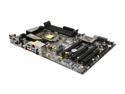
ASRock Z68 Extreme3 Gen3 LGA 1155 Intel Z68 HDMI USB 3.0 ATX Intel Motherboard
Pros: Feature rich motherboard with lots of options.
Cons: Doesn't come with aspirin to cover all the headaches it will cause. Bought this board 11/10/2011. Memory slots b1 and b2 stopped working after a few months. Computer won't even boot if there is a memory stick in either of those slots. Motherboard ONLY WORKS WITH SANDY BRIDGE WITH NO IVY BRIDGE SUPPORT. I have the latest bios (P2.30) and still can't get the computer to boot with an Ivy Bridge processor. Same processor works fine in a Biostar H61 board. Go figure. The motherboard also has issues with the USB 3.0, having incredibly long boot times if anything is plugged into them, sometimes not booting at all depending on the device. Using Asrock's latest drivers doesn't help. Some devices won't even initialize if plugged into the USB 3.0. Then there is the USB problems in general- I can't get ANY external DVD burner to work with this motherboard, in any USB slots. None of the external DVD drives I use have a problem on my netbook, second home computer, office computer, or any friend's computers. Seems to be a miracle to me that this board ever passed quality control... The more time I spend with this motherboard, the more problems I discover.
Overall Review: I have used many Asrock motherboards in the past. The 939Dual-VSTA, the N68C-GS FX, A55M-HVS, just to count a few. And every board I've gotten from them has to have at least ONE problem. I've been building computers for the past 6 years and no other motherboard manufacturer has given me so much grief. So far my favorites are Biostar for budget builds and Gigabyte/Zotac for enthusiast builds. Parts/OS used for build with this motherboard: Windows 7 Pro 64-bit i5-2500k Gigabyte Radeon 7870 G.Skill Sniper 2x4gb Western Digital Caviar Blue 1TB OCZ ModXstream 600w Modular PSU
4/2/2013See more detail