

Your Browsing History


Stefan H.
Joined on 02/05/08
0
0
product reviews
- 9
nice overkill board
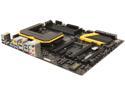
MSI Z87 MPOWER Max LGA 1150 Intel Z87 HDMI USB 3.0 ATX Extreme OC Flagship High Performance Triple CFX/ SLI Platform Intel Motherboard
Pros: This board is amazing. It's loaded with 16 usb port capability (12 usb3, 2 usb2, 2 usb2 with quick charge capabilities), a good high number of sata3 ports, it's running the realteck hd sound system off the back ports which I have always liked (and make my speakers actually much louder than on my last system) and creative sound blaster through the amplified headphone port up front with virtual surround capabilities. The on board gpu features where great for gaming with Intel 4600hd while awaiting my graphics card order. And the control center/bios is well done and very easy.
Cons: There are not many issues here, but the included 2 port usb3 back panel needs to be a bit longer reaching. It was a hard squeeze which made my cable management useless on it since there's just enough length to reach from the header straight back to the case back. Included software is buggy and live update has problems updating some components, but the versions online work well. Install live update from the Web, then use that for all the other software installs and you'll be fine
12/18/2013See more detail
h100i
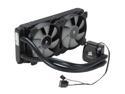
CORSAIR Hydro Series H100i Extreme Performance Water/Liquid CPU Cooler. 240mm
Pros: Seems very sturdy construction wise. The thick rubber hoses are a good plus. Cooling a 4670k on stock settings saw almost a 10c drop at idle using the pre-applied thermal paste over the stock Intel cooler. Installation was a breeze due to that magnetic top clamp part and the tooless hardware (though obviously I did do a final fitting with a screwdriver) and the easily turned hose fittings on the pump. 4pin pwm fans are a nice touch, and there's good spacing between the fans and cooling fins to make sure they don't scrape and cut down on potential dead spots a bit. The Link software has some very good points too for setting up your fan profiles and color codes on the pump.
Cons: It really ticked me off that the drivers and firmware are all handled through Link and are not handled separate. Installation as directed did not work. Either the junk mini usb to usb header cable, a software issue in Link, or a firmware issue in the pump does not allow Link to detect the h100i if you use the included cable. Now I have a normal usb to mini usb coming out a gpu water cooler hose hole in my case to a back usb port on my computer. This is not good. It works flawlessly now, but I really hate that I have my cpu cooler wire running outside my case where it may be damaged or unplugged easily, and also looks bad and takes up one of my ports used for other peripherals. I had to do a lot of research and it seems that even corsair has never gave a solution to this known issue in all the time it's been for sale.. Even on their own forums. My motherboard is a mpower max z87 and uses multiple usb controlers for its many ports. Is there a compatability issue here? Or just a bad cable? If it's the cable, I'd like to try a new one of higher quality.
12/22/2013See more detail
So huge
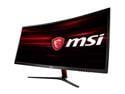
MSI Optix MAG341CQ 34" UWQHD 3440 x 1440 2K 100Hz DisplayPort HDMI DVI AMD FreeSync Anti-Flicker UltraWide Anti-Glare Backlit LED Curved Gaming Monitor
Pros: Huge ultra wide 100hz 1440p great color Can't beat the price
Cons: VA panel, so it shows trails in fast motion that you dont get with an ips Not HDR
Overall Review: This thing is huge if you are coming from a 23 or 24" 1080p screen like i was... It will feel weird looking at this massive monitor for a while, but you get used to it and then fall in love with it even more. I am basically running 2 screens in one here with all the windows i keep open and how i lay them out, so it feels natural. The screen is VA. I came from an IPS, so I noticed the slight trails in fast motion pretty quickly... but after a couple weeks I stopped noticing them as I adjusted... that said, this thing is 100hz with freesync, which is by far better than the 60hz locked refresh rate of my previous monitor. I guess it is a trade off of the lower than competitor price, but I just wish this beast supported HDR as well. The on screen menus are tedious, but work well enough... I just wish they had a companion app that would allow for keybinding some features like video mode and such. There are higher end monitors out there, and similar spec ones, but almost all are far higher priced, and those of similar cost are either little known chinese brands that are a gamble, or have some pretty bad revies for things like screen tearing and dead pixels. This one from MSI might be their entry level 1440p ultrawide, but it is solid. I regret nothing.
3/6/2020See more detail
worth it
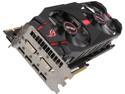
ASUS Radeon R9 280X 3GB GDDR5 PCI Express 3.0 x16 CrossFireX Support Graphics Card MATRIX-R9280X-P-3GD5
Pros: This thing is a beast. A beautiful, huge, flashy, BEAST. Maxed all my games on it without issues. Didn't run benchmarks because my 4670k is running a stock cooler so taking no chances on the cpu till my cooler is ordered for it, but it ran bf3 at max for 3 hours totally quiet. Temp logs never showed it over 43c and my case is huge but I only have 2 front fans and one rear right now so case temp could be lower. Fans never hit over 30 percent. Easily fit in my xion case and only covered 1 pci slot on my mpower max board which I didn't need anyway.
Cons: Driver issues right off the bat. Took me a day of testing drivers and doing driver sweeps and system restores. Advice to all: use the newest stable driver from the Asus site... Do not even attempt the one on the cd and don't bother with the amd ones like the latest beta... They all gave me black screens after login on Windows 7 ultimate 64... Only the latest stable one from Asus worked. This is a brand new card line, so expect that to get better... The Asus one worked so I only deducted 1 egg.
10/29/2013See more detail
excellent
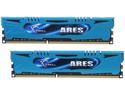
G.SKILL Ares Series 16GB (2 x 8GB) 240-Pin PC RAM DDR3 2400 (PC3 19200) Desktop Memory Model F3-2400C11D-16GAB
Pros: Runs perfect at 2400mhz on my mpower Max 1150 socket board with the xmp setting. no fuss. build quality seems very high and these sticks are not too tall or wide so any cooler you have will be fine. scored a 7.9 windows experience score at rated speed under windows 7 ultimate 64bit
Cons: none so far
10/23/2013See more detail
better than expected for the money
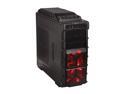
XION Gaming Series XON-980-BK Black with RED LED Light Steel / Plastic ATX Mid Tower Computer Case
Pros: Huge case, much larger than I expected. This is a great thing actually except that I need to rearrange my room now to find a place for it lol. The fans are all VERY quiet. Plenty of wire pass throughs and lots of drive space.
Cons: Would have much preferred a 4pin fan wiring setup on the fan controls so I could use the fans with my mother board controls while keeping the on and off switching of the case controls, instead I have to track down 4 pin and molex connectors to wire it myself... Left side usb 3 port was slightly bent in, easy fix but seemed like it should have been right already. Power and reset buttons are a bit wobbly and should have been more crisp with less play.
10/22/2013See more detail