

Your Browsing History


Jonathon W.
Joined on 05/14/11
0
0
product reviews
- 22
Awesome card for the money
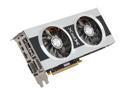
XFX Double D Radeon HD 7870 GHz Edition 2GB GDDR5 PCI Express 3.0 x16 CrossFireX Support Graphics Card FX-787A-CDFC
Pros: I probably shouldn't review this card since I only just installed it today, but why not? I've had a chance to see the difference it makes, so here it goes! I upgraded from a HIS 5670 1GB card (I had two running in Crossfire for awhile, but had to put one of them in another system). In crossfire my HIS 5670's would do newer games like Skyrim at High settings with only 4x anti-aliasing turned on, but even then there was some lag. I installed this XFX 7870 card within minutes, fired up my build, downloaded and installed the drivers, and restarted. I immediately loaded up Skyrim to see just how well it would perform. To my surprise, Skyrim automatically detected my new card and set all of the settings to Ultra High (I checked all the settings, and they were turned up as max as they could go). I played for awhile and was just amazed at the difference...I could see campfires off in the distance, water looked more realistic, and there was fog, I tell you, fog! And I could see off into the distance, objects and people, and the world looked amazing, and there wasn't so much as a skip or hiccup, or even a graphical glitch. A tear formed in the corner of my eye. I then loaded up L4D2 (yeah, not the most graphic intense game ever, but still I had to see what it would do), and turned it up as high as it could go and the game ran so smooth, even when hoards of zombies were running at me and my faithful bots. I was spinning around with my axe, chopping off heads and throwing pipe bombs, and there was no blur or choppiness at all. My heart leaped for joy, my fingers shook with glee, as I pounded zombies into the ground on the highest settings possible. Unfortunately, my rampage had to be cut short because I had to work, but the time me and this card spent together were wonderful. I intend to taker her for another spin, and try out a bunch of my other games later on, but I would imagine that this card can pretty much handle any game I will throw at over the next year or two. I'm pleased with the quality and the price. It's worth every penny. My build: AMD 8 core CPU ASUS Mobo 16 GB Ram SSD as main drive HAF 922 Case
Cons: None as far
10/8/2012See more detail
Yeah, I didn't see it in the description, but it's still 1 egg
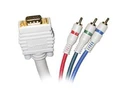
STEREN 253-506IV 6 ft. VGA to 3RCA RGB Component Video Cable
Pros: It's solid
Cons: Doesn't work with a TV, which is why I bought it! I should have read the details and reviews but when you are just looking for a darn cable, you figure it is going to work.
Overall Review: What on earth would anyone use this cable for besides hooking a computer to an older TV? What a useless product.
4/8/2013See more detail
Good processor for an HTPC
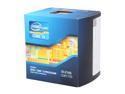
Intel Core i3-2105 - Core i3 2nd Gen Sandy Bridge Dual-Core 3.1 GHz LGA 1155 65W Intel HD Graphics 3000 Desktop Processor - BX80623I32105
Pros: Fast, solid, good price. My HTPC runs smooth and never uses 100% of this processor.
Cons: None that I can think of
Overall Review: Using it in HTPC and it works great.
3/21/2013See more detail
It works
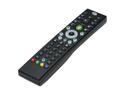
Rosewill RRC-126 - Windows Vista / 7 / 8 MCE Infrared Remote Control with Netflix Function
Pros: Easy setup: plug it in, it works. Has every button on it you'll ever need for WMC. Works sitting across my living room.
Cons: You have to point it right at the sensor or it doesn't work. No light up buttons. Netflix function refers to the config utility in which you can choose to have the big green button open netflix. However, it doesn't work. I really don't care, but they make it sound like a positive feature of this remote, and it doesn't even work. The USB plug is larger and looks kind of funny sticking out the front of my HTPC.
Overall Review: This remote is good for the price you pay. It will work for now. I will probably use it, but I also installed an app on my ipad that works really good. It's call Air Keyboard, and you can configure any type of keyboard layout you want, including media controls. You can create a track pad also so you can have full mouse capabilities. If I had the 7" ipad instead of this 10" one I'd just ditch the remote altogether.
3/21/2013See more detail
Excellent Product but not for the novice
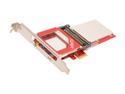
Ceton InfiniTV 4 PCIe - Quad-tuner Card for Watching Digital Cable TV on the PC, PCI-Express x1 Interface
Pros: Easy to install for the tech savvy Excellent drivers Easy WMC integration 4 tuners! Connect it to the motherboard and it just works!
Cons: Network tuner setup didn't work for me. I ended up with a non-functioning tuner and spent an hour trying to remove the bridge and reset my tuner back to defaults and get WMC to detect it again lol...Oh well. The cable adapter on the back is fragile. I worries me that it looks like it could break for get bent so easily. Why didn't just build in a standard connector is beyond me. It would have been much better. I couldn't find any telephone support, but I have not needed support yet. I hope I never do.
Overall Review: Most of the issues I had experimenting with this card were with WMC and with the cable companies equipment. My first tuner adapter was defective. It would not establish and upstream connection. I required a second visit from a tech to check things out. Even though he didn't know much about cable cards, he was very helpful (Time Warner Cable). He checked my signal strength and everything was fine, but not quite as good as he'd like to see for digital TV. He replaced the TA and after awhile it connected and we were in business. He replaced a couple connectors and we got a signal but not the best. I'm still missing a few HD channels, but most everything is coming in now. He said he set up another time when someone will come out and replace the line coming from the pole to the house since it is very old and the signal strength isn't what it needs to be. Setting up the xbox in the bedroom was a breeze and it even selects a tuner that is not in use so my boys can watch one channel while I watch something else in the living room. As I mentioned in the cons, network tuners don't seem to be a very easy experience. Setting mine up ended up completely disabling my signal in WMC. Even though the diagnostic tools showed the card was working fine, WMC would not get a signal. It took me awhile to figure out how to get it back to factory default, since choosing to do so in the ceton utility doesn't remove the Network Bridge. I had to manually disconnect it, reset it, and use the Ceton utility to reset network settings, reset tuners, rediscover tuners, and reboot my machine twice before WMC would detect it again. Overall though I'm very happy I did this and it has been a fun experience.
3/21/2013See more detail
For those of us who have room for it
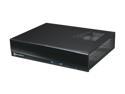
SILVERSTONE Black Aluminum skin reinforced plastic front panel, 0.8mm SECC body MILO Series ML03B Micro ATX Media Center / HTPC Case
Pros: This case is nice and roomy. It is about the same width as my directTV box but taller. It has feet under it to keep it up off the service. Keeping my HTPC cool shouldn't be a problem in this case. It was easy to install everything. It came with cord management stuff, and plenty of screws. It was very easy installing all my components into it. It went back together easily and all the holes lined up perfect.
Cons: It's big, but I knew that going in
Overall Review: It's a big case, so if you have an entertainment center that doesn't have a lot of room in it, you are going to need to go smaller. It fits a mini ITX with plenty of room to spare. IMO, the quality of this case is quite good for the price.
3/12/2013See more detail