

Your Browsing History


Andrew S.
Joined on 07/30/02
0
0
product reviews
- 8
A perfect solution to an annoying problem
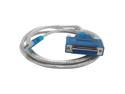
Sabrent 6ft USB 2.0 to DB25F Parallel Printer Cable (USB-DB25F)
Pros: There are a lot of "USB to Parallel Printer" adapters on the market, but the majority of those products fail to work with all printers. This product is different because rather than go from USB to a Centronics connector for the printer, it instead simply provides a fully functional parallel port, to which you could conceivably connect anything! As far as your operating system and printer are aware, there is no functional difference between a traditional parallel port and this device. It worked with every printer I tested (11 of them), including 15-year-old HP LaserJets and ink-jets, some 10-year-old Epson ink-jets, and a variety of laser and ink-jet printers that are much newer.
Cons: You will need a standard cable for your printer (full or mini-sized Centronics to 25-pin). Every parallel printer cable has male screws on the 25-pin end, and unfortunately, so does this adapter. That means when you try to connect the printer cable to this parallel adapter cable, they both have male screws and it is not possible to tighten them together. However, these ancient connector housing being what they are, they have a great pressure fit, and I did not find the lack of tightening to be a problem whatsoever. It just looks silly when you stare at it for a second.
Overall Review: The market is full of old printers still in perfect working order, but lacking USB connectivity. Such was the case for me; I have several HP LaserJets (4100, 2100, 1100, 6P, 5L, 4L) that all work like they day they were new, but don't work with modern computers that lack a parallel connection. I tested all of these printers with this device and every one of them worked perfectly, as expected.
3/8/2008See more detail
Not impressed
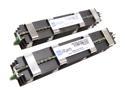
iRam 4GB (2 x 2GB) DDR2 800 (PC2 6400) ECC Fully Buffered Dual Channel Kit Memory For Apple Mac Pro Model IR4GMP800K
Pros: Good price, lifetime warranty, solid construction with good heat sinks
Cons: I've bought 3 pairs of this. One pair was DOA and the other two pairs died within a couple of months. NewEgg was good about letting me return the first DOA pair, although I wasn't pleased about having to pay to return it. I kept the other two pairs and used them for a couple of months. Today, the MacPro tower they were in had a quickly flashing power light, with a solid red light on each of the RAM boards, indicating a RAM failure. Re-seating the modules and changing their order around did nothing to satisfy the machine. I wasn't able to get it booted again until I put in the original Qty 4x1GB sticks it came with, at which time it came right back up and is operating now without any problems.
Overall Review: If you're doing this work for a business like I am, I wouldn't recommend getting these because they'll cost you a lot of lost time, which is more valuable than the savings of them being a good price.
4/11/2011See more detail
An awesome upgrade for my Mac Mini (Late 2012)
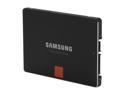
SAMSUNG 840 Pro Series 2.5" 256GB SATA III MLC Internal Solid State Drive (SSD) MZ-7PD256BW
Pros: Surprise-free, no-nonsense installation in my Mac Mini (2012). SATA III, TRIM and MDX controller make this thing really fast. I chose it after reading some really great reviews here, as well as the results of some head-to-head comparisons from a third-party hardware review site.
Cons: Some SSDs carry lifetime warranties, so the 5-year warranty here leaves a little to be desired. On the other hand, it's unlikely most people will need this thing to last more than 5 years when you consider how fast the SSD size and capability landscape are advancing.
Overall Review: Play your cards right and you may be able to use this SSD in an enterprise environment. I maintain a lab of machines used to perform continuous integration and compile and package a widely used software product for official distribution. After Apple discontinued the Xserve, we switched to using several Mac Mini (Late 2012) machines to build our latest Mac code. Our four Minis have the i5 2.5 GHz processor, 16 GB of RAM and these Samsung SSDs. I'm very happy with the performance. Some folks would say it's a bad idea to use commodity hardware in an enterprise environment. In my case, there's nothing sacred stored on these machines; they check out their code dynamically with every build. So if one of the drives or machines dies, I just go get another one and keep moving. This strategy saves us thousands of dollars over buying enterprise-grade stuff.
5/1/2014See more detail
A solid choice for my Mac Mini (late 2012)
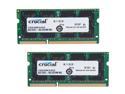
Crucial 16GB (2 x 8GB) DDR3 1600 (PC3 12800) Unbuffered Memory for Mac Model CT2K8G3S160BM
Pros: Fully compatible with my Mac Mini (Late 2012), pushing it to its 16GB maximum RAM. I've installed this specific model of RAM in four separate machines and haven't had a problem with any of them.
Cons: I haven't had any problems and couldn't be happier.
5/1/2014See more detail
Power Supply DOA
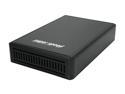
BYTECC ME-535U3 Aluminum 5.25" & 3.5" Black SATA I/II USB 3.0 SuperSpeed Enclosure For SATA HDD/DVD
Pros: Sturdy, all-metal casing with external power supply and hefty construction.
Cons: Power supply uses a proprietary, four-pronged, round (dime-sized) connector. Since my PS arrived DOA and I have no others on-hand that use the same type of connector, I have no way to use this thing. I'll have to get a replacement from NewEgg, but the delay has really messed up some plans I had to use it this week.
3/18/2011See more detail
Great speed; less than stellar boot reliability
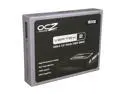
OCZ Vertex 2 3.5" 180GB SATA II MLC Internal Solid State Drive (SSD) OCZSSD3-2VTX180G
Pros: Read and write speed for this drive is incredibly high. Power consumption and heat generation are both very low. I'm using five of these drives in various workstation and server machines that are used by SW developers and in a compile farm. For workstation machines, the speed is incredible compared to the SATA drives they replaced, although the cost is far greater than for a SATA hard drive. The servers previously had very expensive SAS drives that cost twice as much as this SSD and the performance and power consumption are much better with the SSD. One might argue that this type of SSD is not well suited for the rigors of a server environment, but I disagree. For the cost of an SAS drive, I can afford to buy two SSDs and keep one around for a backup if the first one dies from overuse. This setup is far easier on my power supplies also and if I had an entire rack of SSD-powered servers, the cooling bill would go down a ton as well!
Cons: Occasionally, when booting an HP Z600 with this drive installed, the BIOS will not detect its presence. This is usually manifest with a message saying that the boot media is invalid and prompt to insert a valid system disk. Cycling the power on the machine usually repairs the issue and it boots correctly the next time. I expect it's an issue with the drive's electronics not starting up and making itself known to the BIOS quickly enough, so the BIOS fails to see it. That's just an annoyance for a desktop machine, but if I start seeing this problem with the server machines where I'm using this drive (which are locked away in a data center), it's going to cause some serious problems.
Overall Review: I have five of these drives, being used in the following ways: 2x HP Z600 workstations; Win 7 Enterprise 1x Dell Precision T3400 workstation; Win 7 Enterprise 2x Apple Xserve1,1; MacOS 10.6 Server
1/6/2011See more detail