

Your Browsing History


Timothy W.
Joined on 10/01/05
0
0
product reviews
- 6
The only thumb trackball currently in production
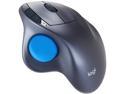
Logitech M570 910-001799 Silver and Blue 5 Buttons 1 x Wheel USB Trackball Laser Trackball
Pros: - Best sensitivity of any thumb-trackball ever produced. - Good battery life. (Averages over a year). - Has forward & back buttons, which previous wired model did not have. - Smooth-rolling ball. (Better average build quality than the MS thumb trackball.)
Cons: - No wired version available. - Wireless can be flaky if receiver is located too far from mouse. - A bit small for large hands.
Overall Review: This is the only thumb-trackball currently in production, and overall it is the best version that has been made. The biggest gripe that can be made for desktop use is that you may have to deal with wireless issues, when there is really no need for a trackball (which doesn't move) to be wireless for that use-case. I recommend locating the receiver as close as possible to the mouse to prevent the occasional hiccups that some people have mentioned in other reviews. If there is a USB port on your monitor close to the mouse, you might consider using that.
1/14/2014See more detail
CF is now viable
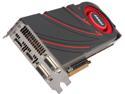
MSI Radeon R9 290X 4GB GDDR5 Graphics Card R9 290X 4GD5 BF4
Pros: The cards are fast, but you probably already knew that. Crossfire has come a long way from where it once was. I remember the microstutter and texture corruption that I commonly ran into when trying to run dual 4870s a couple generations ago. Now, the driver support is much better, there is no stuttering, and the games that I've tested so far at least seem to work the same with CF or not - which is what you'd expect. CF also no longer requires the physical bridges as SLI still does. My dual 290xes are driving 3 30" 2560x1600 monitors - one of them is a 3007WFP that I bought quite a few years back, and the other two are U3011s that I bought more recently. I couldn't do surround gaming on them with nVidia, because they require the sync polarity to be the same on all of the monitors, and mine were not. AMD Crossfire however has no such limitation. The horsepower really wasn't there to drive a setup like this before anyway. Now with this latest generation of cards though, it's viable. I get pretty good framerates in all of the games I've tested.
Cons: A bit loud, but I knew what I was getting into after reading the reviews.
Overall Review: If you are going to high-res multi-GPU, multi-monitor gaming, AMD is definitely the way to go. The 290 (no X) that was just released is probably a better value for your money, though it is a bit louder still than the 290X. If you have the time and expertise, I'd suggest buying two or three of those and installing more powerful air or water coolers.
11/7/2013See more detail
Great cooling
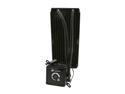
CORSAIR Hydro Series H100 (CWCH100) Extreme Performance Liquid CPU Cooler
Pros: Keeps my 3930K cool. 63C max @4GHz in Prime95.
Cons: Had trouble initially getting it to fit on my socket 2011 motherboard. I had to bend one of the clamp prongs with a wrench in order to get it to fit.
Overall Review: It's a bit loud when running at maximum power, but does a great job at cooling.
12/25/2011See more detail
Very nice case
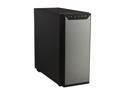
Antec P280 Black Aluminum / Steel Super Mid Tower Computer Case
Pros: - Quiet - Roomy - Great build quality - Easy cable management - Easy to install drives - Compatible with Corsair H100
Cons: - Nothing significant
Overall Review: I was most impressed by the precision of the case. I've built systems with expensive, high-end cases from Silverstone, Lian-Li, etc. in the past, and often still would have issues with things not quite lining up perfectly - the back of the case being slightly bent, etc. With this case, everything was solid and precise. I am using the Corsair H100 watercooler with this case for an i7 3930K build, and I recommend that setup. I have the Asrock x79 extreme9, and the watercooler will clear the top motherboard heatsink in this case. I moved the two top fans displaced by the watercooler to the front, and that has worked out well. My CPU idles at about 32C and hits 62C max in Prime95 OCed to 4GHz.
12/25/2011See more detail
Great wireless headphones
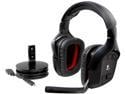
Logitech Wireless Gaming Headset G930 with 7.1 Surround Sound, Wireless Headphones with Microphone
Pros: Good wireless range - I can use them anywhere in my apartment with no artifacting or degradation of quality. I can continue to listen while heading to the kitchen for a drink, etc. This is probably a side effect of the headphones using WIFI technology (as opposed to bluetooth etc.). Comfortable - This pair does not have multiple switchable headband pads like their wired cousin, but I have on several occasions worn them all-day in front of the computer with no discomfort. I am a tall guy with a not gigantic, but large head, and was impressed with the comfort level. Excellent cable management when plugged in - The wireless transmitter plugs into an included round USB hub. The USB hub dispenses the micro USB cable in increments of about 3". If my wired headphones had cable management this good, I wouldn't have needed wireless ones. Great sound quality - Clear, quality sound. The closed over-ear design blocks out a significant portion of external noise as well.
Cons: Hard to turn on - The recessed, rubberized button used to turn them on has to be held down for some period of time in order to turn them on. If the mic light isn't on, you can use the mic light to figure out when it's OK to release the button. I thought mine were actually defective until I talked to a friend who has the same pair. Even after a month, I still haven't quite figured out how exactly it's supposed to work. USB - This is a minus as well as a plus. Because this isn't a standard headphone configuration, it's not easy to switch sound output between headphones and speakers. WIFI - This is also a minus as well as a plus. You get great range, but you have to make sure you don't have wireless channel interference between this and other devices such as nearby wireless routers. Just like other WiFi devices, you can configure the wireless channel to reduce interference however.
Overall Review: This was my first wireless headset, and I'm very happy with it. I haven't thoroughly tested the mic yet, the headphone functionality is impressive. The battery life matches the rated 10 hours, but unlike some other wireless headsets, they can be used plugged in as well. As long as you don't plan on using them in a room full of other people who also have wireless headsets (which would cause interference with each other), it's hard to see a downside to getting this pair.
6/5/2011See more detail
Great board
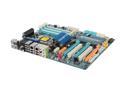
GIGABYTE GA-EX58-UD5 LGA 1366 Intel X58 ATX Intel Motherboard
Pros: - Great overclocker. - 8 USB ports. - Excellent onboard audio quality.
Cons: - Location of front audio connector. It's right behind the rear audio ports in the middle of the board. I had to route the cable for it under the video cards.
Overall Review: It was actually the audio that made me want to write a review of this board. This board has the best onboard sound of any motherboard I've ever owned. I would definitely buy again.
11/6/2009See more detail