

Your Browsing History


Robyn B.
Joined on 11/09/03
0
0
product reviews
- 9
Works well, great support
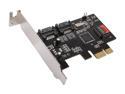
SYBA SD-LP-PEX2IR PCI Express Low Profile SATA II (3.0Gb/s) Controller Card
Pros: Works great in Windows Home Server. Transfer speeds at 120+ MB/s sustained, which maxes out the hard drives I'm using. Support from Syba is fantastic.
Cons: Ships ONLY with the low-profile bracket, as others have mentioned. The ports on this card do not have anything for newer SATA cables to "clamp" onto. Can use JBOD without installing alternate BIOS, but there will be an error message that no RAID volume is detected.
Overall Review: Contacted Syba support for the full-height brackets, and after filling out a simple form, I received them within a few days at no charge! The newer SATA cables with the clamps DO work fine on this card, just make sure you get ones that fit snugly, as they won't actually clamp. I've added three of these to fill up the PCI-e 1x slots on my motherboard. The initialization screens for these cards pass within moments on my system (even with three cards installed), and as I rarely reboot, it's not much of an issue. If you're looking for extremely fast startup times, however, you may want to look elsewhere.
10/25/2009See more detail
Poor Quality at high resolutions
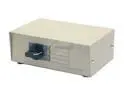
StarTech.com DS154 4 to 1 Manual VGA Video Switch
Pros: Cheap?
Cons: The picture quality is very poor with this unit, especially at high resolutions.
Overall Review: I needed to easily switch between three computers, so I purchased this unit along with three VGA cables. The picture quality on my usually sharp 20" Dell 2007WFP monitor became blurry and text was unreadable. I had to lower the resolution down to 1024 x 768 in order to get any kind of usable image. Since the native resolution of my panel is 1680 x 1050, that was not acceptable.
8/16/2007See more detail
Windows 7 64-bit support!
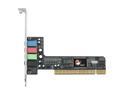
SIIG IC-400012-S1 4 Channels 16-bit PCI Interface DP SoundWave
Pros: Inexpensive, great sound quality, Windows 7 support. I'm no audiophile, but the sound quality is at least as good if not better than the old riser card that came with my motherboard.
Cons: It wasn't free? I don't know why other reviewers have had so many issues with the drivers for this card in the past. The box I received has a "Windows 7 Ready" sticker on the front, and the installation from the driver disc went flawlessly for me. Perhaps this is a new revision with an updated driver disc. Either way, it never hurts to go to a manufacturer's website and download the most current drivers for any product you buy.
Overall Review: I have an older Asus P5N32-E SLI Plus motherboard that uses a custom riser card for the onboard sound. When that card failed, I didn't want to replace the entire motherboard, nor did I need an extravagant sound card. This card was cheap and got the job done. I highly recommend it for anyone who needs to replace their onboard sound, or who has an older sound card not supported in Windows 7.
2/14/2010See more detail
Windows 7
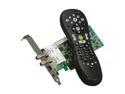
Hauppauge WinTV-HVR-2250(WinTV-HVR-2255) Media Center Kit Dual TV Tuner w/ IR Remote PCI-E x 1
Pros: For most users, this should provide a simple, all-in-one solution for those wishing to add TV to their Windows 7 computers. However, if you are using Windows 7 Media Center with set-top boxes (not analog or QAM), and you purchased this kit over the white-box (as I did) because of the included remote control and IR blasters, then be forewarned...
Cons: The included CD has outdated drivers and software for Windows 7, which renders the IR blasters USELESS. Also, the driver package alone won't do it - you MUST install WinTV 7 1.2 or later to use the IR blasters in Media Center, which is counter intuitive. Included setup instructions are a joke, even for a highly technical user.
Overall Review: To get things working, ignore the included driver disc go to the Hauppauge website to download the latest WinTV 7 software. This includes the drivers and everything required to make the remote and IR blasters work. You don't actually have to USE this software, though. Once installed, the remote and IR blasters are recognized perfectly by Media Center. Once it was all up and running, the picture quality is great. The remote receiver is very sensitive, though, and holding down a button just a nanosecond too long will result in multiple button presses. This is apparently a known bug in Windows 7, and a future driver release will likely fix it. Overall, I am happy with the purchase. It was just frustrating to get everything going! Let's hope this lasts me until the multi-stream CableCard tuners come out next year. [=^D
10/3/2009See more detail
Great in Linux, not for Windows
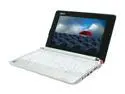
Acer Aspire One AOA110-1295 Seashell White Intel Atom N270(1.60 GHz) 8.9" WSVGA 512MB Memory 8GB SSD Netbook
Pros: The size and form factor are excellent. Build quality is higher than expected for a small netbook. The screen quality and resolution is superb. The Linux operating system is simple and easy to use. The speed of the device is great under Linux.
Cons: Upgrading the memory requires disassembling the notebook and removing the motherboard. The included SSD is slow and unreliable under Windows. The power cord is much bulkier than the one included with the Eee PC.
Overall Review: While the Linux operating system is great for basic web browsing and e-mail, I needed Windows for work. I have installed it, but the slow SSD is quite a hindrance. I have upgraded the memory and will be replacing the SSD with a 300x CF-to-ZIF card, but those modifications will add up to almost half the cost of the device. It's a great netbook, but if you need Windows, I'd recommend holding out for the Windows version of the Aspire One. It comes with more memory and a standard hard drive.
7/21/2008See more detail
Excellent HTPC Case
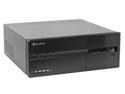
SILVERSTONE Black Aluminum front panel, 1.0mm SECC body LASCALA 10 CS-SST-LC10B ATX Media Center / HTPC Case
Pros: This inexpensive HTPC case has solid construction, a well thought-out design, full-height slots for add-in cards, uses a standard ATX power supply, and can accommodate a full ATX motherboard. Tidbit: by using standard 3.5" to 5.25" drive brackets (or Silverstone's own optional bracket), you can mount an additional hard drive above the optical drive. Therefore, installing up to five hard drives is possible (but results in VERY high temps).
Cons: At 17" deep, it will not fit into many entertainment centers and A/V racks. Take good measurements before ordering! For best airflow, place it on an shelf without enclosed sides. It does not have a fancy VFD, infrared receiver, or remote control. It is just a very simple, elegant case. Optical drives with oddly shaped or rounded tray fronts can be a pain to install. Either use an optical drive with a very flat, square tray front, or simply remove the tray front entirely before attaching the one included with the case. The included bracket for mounting a drive under the optical drive is awkward.
Overall Review: I have owned this case since November of 2004, so I thought I would finally post my thoughts on it. My HTPC has morphed with the changing technology, and this case has followed it from living room, to closet, to office, and back again. With my latest build, it has finally found its permanent home in my entertainment center, and it really does belong there. While it is one of the most flexible HTPC cases on the market, it can still be infuriating if you do not plan your build properly! Here is my advice. 1) Use a modular power supply with a quiet fan. 2) Replace the included 92mm intake and 2 x 60mm exhaust fans. 3) Use a mATX or a narrow-ish ATX motherboard if you can. 4) Avoid using IDE drives if possible. 5) Take the time to route your cables properly. If you follow this advice, you will be very happy with your purchase, as I have been
2/11/2008See more detail