

Your Browsing History


Sean D.
Joined on 12/11/05
0
0
product reviews
- 10
12 inches
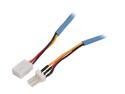
Rosewill RCW-309 - 12" Fan Power Supply Cable
Pros: Extends length of fan cable by 12 inches
Cons: Only extends length of fan cable by 12 inches
Overall Review: Depending on your application, 12 inches is satisfactory.
1/17/2009See more detail
SATA on Windows is iffy
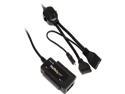
StarTech.com USB2SATAIDE USB 2.0 to SATA/IDE Combo Adapter for 2.5/3.5" SSD/HDD
Pros: I have two of these, one at work and one at home. I've used it for a large variety of drives on a large number of desktops on Windows and Linux. The device usually does what it is supposed to do, and it supports all consumer drives.
Cons: Finicky when it comes to SATA. Also, the power cord where it splits into SATA, IDE and Adaptor power; on one of mine needs to be moved around a bit until the LED comes on. There is a loose wire inside the split but it is not accessible to repair. I imagine after heavy use this would be a problem for anyone, but this one is brand new. Minus two eggs.
Overall Review: Getting the adapter to work properly in Windows for SATA is a bit of a hassle. At first I followed the directions to a T and this did not work. The directions state to connect it to the computer and boot it up to get SATA working. Instead connect the power and your SATA drive and power it on first and wait for the device to interface with the drive. You can tell by the status LEDs. Then connect it to the computer and allow the computer to detect it and Windows will start installing the bridges to the drive. The first few times I did this the device locked up. This is indicated by a solid blue ide/busy LED. Keep trying until successful. I guess the device has problems with Windows because the first time I used it with Ubuntu, it worked perfectly and automatically.
1/8/2009See more detail
Overpriced Yet Necessary. Solution: Avoid ICY DOCK External Enclosure...
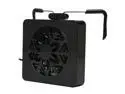
ICY DOCK MB884U-CB Black EZ-FAN 3.5" Single Bay External Hard Drive Enclosure Cooler
Pros: What could be a cheap solution to your drive cooling problem. Built to fit external enclosure and uses USB power from the dock, it solves a problem that shouldn't exist.
Cons: Uh, _ICY_ DOCK needs a fan? Shouldn't this have been built into the original design of the external enclosure? The external enclosure should have a fan with a similar design to the Nintendo Wii. Considering the price of the dock and this product here, it's really a smack in the face in my opinion.
Overall Review: ICY DOCK does have some of the best designed docking solutions for home or workstation use, but there is still a lot of room to improve. If you want to mount your ICY DOCK drives externally, I suggest using a StarTech adapter instead.
3/31/2009See more detail
You're still going to want RAID0
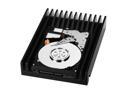
Western Digital VelociRaptor WD3000GLFS 300GB 10000 RPM 16MB Cache SATA 3.0Gb/s 3.5" Hard Drive Bare Drive
Pros: High capacity Looks awesome Faster then SCSI
Cons: Expensive Slower then 36gb Raptor in raid 0 (which I still run btw)
Overall Review: "will not allow this drive to fit in a 2008 version of the MacPro. As far as I am concern if you offer a high performance solution it should at least fit in a high performance machine." hahaha! good one dude. You shouldn't be skewing the review score though with your jokes, as funny as they may be. Maybe you should try peeling off the heatsink! lololol
1/30/2009See more detail
EGA's Best Board Yet
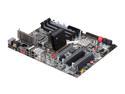
EVGA E758-A1 3-Way SLI (x16/x16/x8) LGA 1366 Intel X58 ATX Intel Motherboard
Pros: LED code display onboard - This is a great feature and you will be very happy you have it when things go south with your expensive build. You can never have too much information about what is going on during POST. It certainly is nice being able to Google "evga 7F code beep no video output" and finding descriptive posts from people who were assisted by the code display and beeps. This way you know if their problem and solution is the same as yours. When the board is done booting the display turns into a CPU temp monitor. Good layout with no problem areas or clearance issues even with most large coolers such as my TRUE 120. The coolers and heat pipes are designed for utility more then looks and do their job well when overclocking. E-LEET utility is just an executable with no installation. I love those. It looks like a customized version of CPU-Z. Gamers won't need a discrete soundcard since the on board sound is good with little EMF noise.
Cons: No frills bios. The bios is quite capable and has all the options you expect, but some weren't correctly implemented until the latest bios update and there's nothing special, just plain old blue screen style. There is still, at this point, some kinks they need to work out with the disk controllers. This is like only the fifth board EVGA has released. I'm always happy to see another manufacturer in this class considering the problems with Gigabyte and Asus now that they are top dog. Doesn't overclock to TEH XTREME like some other boards. I like my builds to last 3+ years though so that's not a problem for me.
Overall Review: Over all EVGA seems to be positioning themselves in a niche of "no nonsense enthusiast class," or "utility class" Well designed motherboards that don't have blacklight slots, extraneous copper, buzzwords and 16 heat-pipes, only useful features that actually make a difference. The support is good and what you would expect from a medium sized company. They don't have a leagues of coders like bigger companies but being smaller they are more flexible and reactionary so are more devoted to individual products, where a larger company could get away with ignoring a small bug in one of their enthusiast boards due to management saying it's not worth their time/money to fix boards they already sold, or a smaller niche company will just not have the resources.
1/24/2009See more detail
OF THE OMNIBENEVOLENT GODBOX
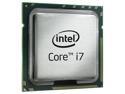
Intel Core i7-920 - Core i7 Quad-Core 2.66 GHz LGA 1366 130W Processor - BX80601920
Pros: Price Speed Overclock-ability
Cons: Highly variable quality in 920 packaged CPUs Included Heat Sink
Overall Review: My motherboard died in my old dual Opteron system. I've always had issues with the Tyan motherboard but after four years it finally gave out. So I build a new top of the line system. Hopefully, being an early adopter of bleeding edge tech won't bite me in the this time like it did with AMD 2xx Opteron/Tyan.
1/17/2009See more detail