




 here!
here!
I’m your shopping assistant for PC builds, upgrades, and everything tech.
Got questions? Ask away!
Start a conversation
here!
I’m your shopping assistant for PC builds, upgrades, and everything tech.
Got questions? Ask away!
Start a conversation

Joined on 03/08/06
Sounds nice, works fine
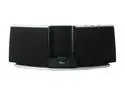
Pros: The Sound from this pint-sized speaker dock is truly impressive!! Nice tonal balance, very clean and articulate sound. Crisp highs, but not exxagerated or distorted sounding. I have had quality JBL speakers from the 70s for 40 years, and I know what accurate reproduction sounds like. Listening to this reminds me of the first time I heard a Bose Wave Radio and thought, "How'd they do that in that little box?" Yeah, it's not as impressive as the $400 Bose dock, but very pleasant to listen to at 1/4 the price. And still sounds good if turn it up Party loud inside. It doesn't want for bass or make pretend bass by distorting like so many small speakers do. Carries well outside, and plenty loud enough unless you don't have neighbors for miles and really want to play Rock CRANKED. I don't have any problems with the remote, maybe the battery saver tag left part of itself inside when pulled out? I opened the battery compartment and there was still a shred of paper in there. The price is great - I paid $84 on sale. Easy to carry around the house. The loudness compensation buillt-in to the Klipsch renders the absence of tone controls relatively unimportant. Less to fool with. It just sounds good from Acoustic instruments, to Classic Rock, to String Ensembles and Symphonic Music recordings. Surprisingly present and clean-sounding Bass, turned up or down. Charges an iPhone 4 and my iPod Nano. 30 pin connector seems sturdy enough. NOT UGLY - some of the docks they are putting out just look stupid to me. This one looks nice and doesn't stand out like a sore thumb. No space-ship, radio alarm clock, or other gimmicky cabinetry.
Cons: The dock adapters are numerous, but I keep my iPod Nano in a plastic case, and the adapter for the Nano won't take it with the case on. I just plug in in without the adapter - works fine without one. Not really very important. I suppose I could go to the trouble to enlarge the hole if it really bothered me. No built-in alarm clock might be a con for some of you. Won't take an iPhone 5 with the newer "lightening" connector - 30-pin connector devices only.
Overall Review: Perfect for the bedroom, kitchen, or sparse minimalist architecture houses or apartments with an open design. When you read the dimensions and wonder how it can sound decent - just remember all the reviews of people here telling you how good this little sucker sounds!
COMPATIBILITY PROBLEMS
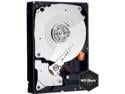
Pros: Never got to find out personally, but read on for your own sanity and avoidance of returns.
Cons: BACKWARD COMPATIBLE - well, DEPENDS. I have a Seagate 320 GB SATA rev.2 (after reading the SATAIO site (the body that writes SATA specs) in GREAT DETAIL, I learned there is no SATA II or SATA III, and they explicitly request manufacturers and retailers NOT to use those terms, which obviously is working great, huh? Anyway, the SATA rev.2 works fine with my computer. Not these. According to Tech Support level 2 at WD, these FAEX models are designed to sense the SATA signal rates and adjust to the interface rate. The GOATCHAs: 1) It won't go down to 1.5 mb/sec. 3.0 mb/sec is as slow as it will go. 2)If your mobo BIOS doesn't support negotiating with SATA rev. 3 (6mb/s) drives, or if your processor doesn't respond fast enough, your computer may never make it through POST. 3) You can buy an add-in SATA rev. 2.4 or higher PCI card for about 75-85 bucks, (Promise makes one Newegg sells), and it MAY work at 3 mb/s. WD says they haven't run any tests and cannot guarantee compa
Overall Review: If you have a really fast late model computer with a PCI-express bus and a 6 mb/s SATA card, these are probably wonderful drives to make you a SCREAMER computer. But DON'T get these drives assuming that just because SATA rev.2 drives work on your computer that these drives will too. If you really want the 6.0mb/sec speed (whether you really can tell a difference is apparently debatable) and are willing to spend the BIG bucks for a SATA rev. 3 PCI-EXPRESS card, and you have a FAST computer, you MAY be OK, too. BEFORE you order, read the SATAIO site if you don't have a tech support phone number to ask if your computer can handle a SATA rev. 3 drive. If it looks iffy, the WD1001FALS 1TB drive is a much safer bet for plug and play compatibility with your not-so-state-of-the-art computer. And the price is the same. For the non-techie with no support guy - if your computer doesn't have at least a PCI-EXPRESS bus, there's a pretty good chance it can't handle this drive, so go
Some compatitbility probs & heat
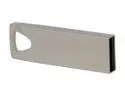
Pros: Lots of storage cheap, compact package
Cons: Worked fine under Windows XP with FAT32 format, but didn't work in my Honda CRV Audio player. I tried low level format in FAT32, just didn't like it for not apparent reason. Mushkin with same EXACT FAT32 directory structure and files worked fine - go figure. These drives get quite hot when written to, and run warm when being used. Won't burn your fingers or anything, but it isn't just warm after writing, it's hot. Read and write speeds are on the slow side.
Overall Review: I won't be able to use it for my intended purpose, but it will work as a key chain flash drive.
I Love it!!!!
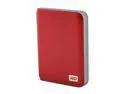
Pros: A great size to take with you and your laptop. Sturdy case - I wouldn't be afraid to put it in my back pocket. I think it's some kind of tough plastic, but it feels substantial. If I squeeze it hard between my fingers and thumb, it flexes a tiny bit, but I can't feel it touching the guts inside. Runs off ONE USB port power. The drivers for it are on the drive and the hardware wizard figures it out and fixes her right up, even on WinXP SP3. Run cool even during long transfers. Not even warm.
Cons: I don't have a USB 3 port on my computer, but it works fine with USB 2. Does that count as a con? I can't say how it works on USB 3, but it seems pretty fast without having run any benchmarks.
Overall Review: I backed up a big My Documents folder with 10+ gigs on it, and it seemed faster than another external Hitachi I have with a 250M capacity, just by subjective reckoning. Back up your backups.
Nice monitor
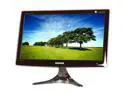
Pros: Plug and Play, does analog and digital input. Cable included. Plenty bright. No dead pixels. Sharp picture. Beautiful color rendition.
Cons: No complaints.
Overall Review: Bought this to replace my old CRT monitor. The screen seems every bit as fast as the old CRT. Just clearer and bigger. Took a while fooling around with the settings to get it where I like it. Playing around with the "viewing angle" setting makes a major difference in color saturation, and I don't set it where the setting labels suggest it should be set for my viewing position. Play with it and you'll see what a great picture it will get.
Cache size reality check
Pros: Sounds good on paper - I don't actually own one, but I was looking at it and there isn't a NewEgg,"hey, is this an error" box that I can find.
Cons: Seagate website says it only has a 16M cache, not 32M What's up here?
Overall Review: Don't understand why Glynn couldn't find it. Here's the link http://www.seagate.com/ww/v/index.jsp?vgnextoid=8eff99f4fa74c010VgnVCM100000dd04090aRCRD&locale=en-US#


