

Your Browsing History


Jeffery B.
Joined on 11/14/01
0
0
product reviews
- 8
No Pain No Gain
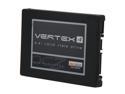
OCZ Vertex 4 2.5" 256GB SATA III MLC Internal Solid State Drive (SSD) VTX4-25SAT3-256G
Pros: Very Fast. Ugraded from a Vertex 2.
Cons: Lots of pain to set up. I have a Asus P8P67 Delux MB. You cannot do firmware update unless it is attached to the Intel 6gb SATA ports. Does not like the Marvel 6gb SATA ports for some reason. Then you can only use the OCZ toolbox to flash if you manually uninstall the Intel AHCI SATA driver and re-install the Windows default AHCI driver. This cuts speed in half. Then I had to flash it 3 times before it took the firmware update. Then you have to re-install the Intel SATA driver.....pain in the rear.
Overall Review: Once I got it flashed did clean install of Win 7 64bit and it flys. Have not benchmarked yet but I can clearly tell difference in boot and access times in the Vertex 4 and the Vertex 2. Frustrated getting firmware update but all and all very satisfied after all that. My biggest regret was not being able to afford the 512gb drive so I could have put all my programs on it. Thanks to the Super Moderators on the OCZ user forums that put up with my griping and helped me figure out how to flash firmware. And as usual...Newegg rocks. Paid three day shipping and got it in two days.
5/29/2012See more detail
Not as good as my last Taichi
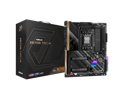
ASRock X670E Taichi AM5 EATX Motherboard. 4xDDR5 slots, 2 x PCIe 5.0 x16 Slots , AMD Cross Fire, Quad M.2 slots, 2.5GB LAN, WIFI-6E, 5,1 HD audio, HDMI 2.1, DP 1.4 ports, USB4 Type-C, 8 Layer PCB.
Pros: 1) Plenty of NVME storage 2) Included NVME cooler (not really needed for a 4th gen SSD though)
Cons: 1) On board audio is not very good at all (lots of distortion and poor tones) 2) There are only two PCIE slots and they are so close together that when I install a Soundblaster Z sound card ( because the onboard audio is so bad) it all but blocks the first fan on my RTX 3080 video card that is only a 2 slot card. 3) Space is really tight between my video card and the #1 NVME cooler that is included 4) For some reason my monitor will not wake up when powering on from this mother board. Worked fine on my las MB. Cable is not issue. 5) I have read that AM5 system are slow booters but this is ridiculous. It takes at least 30 second to boot to windows even after RAM training, every time. 6) BIOS settings are confusing when trying to set RAM Expo settings.
Overall Review: This is like my 4th or 5th ASROCK MB and it is easily the worse. I feel it was rushed out the door to be ready for the Ryzen 9 launch. Maybe with some bios updates it will be better. As for the audio....not sure what is up with that, maybe bad drivers? The biggest issue is the system not waking my monitor up. I have to turn monitor off and then back on after the system finally boots to windows welcome screen. I would not recommend this board in its present state. Maybe after its first revision or a better bios update. I am really torn about sending it back or hoping for improvements. I hate to start over from scratch again after all the time I have invested in this build.
10/18/2022See more detail
Beautiful Case with some caveats.....
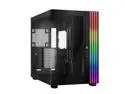
be quiet! LIGHT BASE 900 DX Black ABS / Steel / Tempered Glass ATX Full Tower Case
Pros: Nice looking case Love the ability to orient in either vertical direction or horizontal System runs cool Ability to use two full size 360mm AIO coolers
Cons: Case arrived with a broken foot (loose in bag). Upon investigation and moving of other feet determined why it was broken. The movable feet have a tiny plastic knob that is twisted in place to hold it. These feet have to be placed in an exact location that is hard to determine. There are some tiny indents in the case that are not visible unless you use a flashlight and look closely. At first glance the indents are not visible. When I tried to move the feet I broke the little knob off another foot because I did not see the indents. The knobs are very brittle and if you do not line up exactly to indent they will break. Although the multiple cable pass-throughs are nice and well placed, there is very little space behind the motherboard to store excess cable. I had to remove the SATA drive enclosure to have room for placing cables. I am obsessive-compulsive about cable and wire management and it took me over eight hours to finally get them organized and tucked away. I am running a total of nine 120mm RGB fans using two AIO coolers so with all the fan cables it was difficult and only removing the SATA cage could I do it. The cables from the front panel going to motherboard are not long enough and they have to pass either in front or behind my GPU cooler. Need to be longer so they can be placed out of airflow. Documentation that comes with case is useless. A bunch of pictures but no directions on where cables hook up (only on was labeled "FP" which I figured out meant front panel. The others took awhile to figure out. I still have one cable that goes to one of the ARGB headers that I have no idea what it does....Fan speed sensor???? Waiting on response from BE Quiet Tech support. The ARGB fan headers will not communicate with my mother board (ASROCK x670E Taichi) I have already had three screw holes in the case strip out and had to re-tap to a larger screw size. At this price point Be Quiet should have included a vertical mount support for graphics card. I use a RTX 4090 with AIO cooler so not an issue for me but some of the monolith cards will probably sag if case mounted vertical.
Overall Review: All in all.........a nice case that needs better cable storage space and some documentation on using the ARGB headers. Would purchase again Would recommend Taller air coolers may have difficult fitting in case
10/18/2024See more detail
Looks good, performance not so good
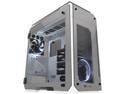
Thermaltake View 71 Tempered Glass Snow Edition 4-Sided Tempered Glass E-ATX Vertical GPU Modular Gaming Full Tower Computer Case CA-1I7-00F6WN-00
Pros: Grate looking case, easy to work in. Love the vertical gpu shelf. Well built.
Cons: Because there is no shroud around top vent for aio cooler the warm air just recycled. Nothing forced hot air out. Gpu shelf only wide enough for two space gpu. The car is loud. The fans echo off glass even in low speed. Get this weird fan resonance from inside of case.
Overall Review: Case looks great, just the above issues ruin the experience. Probably would not buy another case with glass.
11/23/2022See more detail
Best Monitor I have ever owned
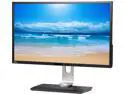
BenQ BL3201PH Black 32" 4ms (GTG) IPS UHD Widescreen LED Monitor, 350cd/m2 DCR 20,000,000:1, 100% sRGB Color Space, CAD/ CAM and Animation Mode, Built-in Speakers, VESA Mountable, Height Adjustment
Pros: Drop dead gorgeous display...settings good right out of box Multiple connectivity options USB hubs Low power consumption (compared to my old HP ZR30w) Good for gaming even if monitor is capped at 60hz.
Cons: Price is sort of high. I did not buy at New Egg for two reasons. I got it $200 cheaper at another supplier and their return policy is much better if you have bad pixels or problems. I used to buy exclusively from New Egg but on a purchase this I do not won't to play return games if there is a problem. Monitor can only do 60hz...however, I am running a pair of GTX980 Strix in SLI with I5820K CPU and at 4K my system is screaming for mercy while trying to run Star Citizen at 4K high settings. I have no problems running Skyrim or Farcry at 4K maxed settings. Just turn AA down at 4K as makes very little distance at 4K.
Overall Review: Until NVidia or AMD comes out with a new video card that can really handle 4K better, this is probably one of the best if not the best 4K monitor at this size you can buy. Some day we will have 4K at >120hz or Gsync/Freesync but no such monster now. Warning you again, you better have a pretty decent system to drive this monitor. Recommend at least 980GTX SLI or better for graphics and a 4790K or I5820K or better for CPU.
10/8/2015See more detail
Fantastic Drive but Questions
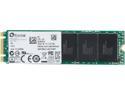
Plextor M6e M.2 2280 256GB PCI-Express 2.0 x2 Internal Solid State Drive (SSD) PX-G256M6eA
Pros: Fast Small Does the job as a boot Drive
Cons: Questions regarding compatibility and Drivers/Firmware
Overall Review: I just did a new build with a ASUS X99 3.1 Deluxe MB. I had no problem installing Win7 64bit to this drive. However, as soon as windows starts its updating the system will hang at Windows splash. I have been building systems >20 years and nothing I tried fixed this. I did not have a problem using a older Vertex 4 drive. Out of frustration I tried installing latest TP of Win 10. Runs like a champ. No issues at all. Therefore I suspect a driver/firmware issue with drive and the ASUS x99 Deluxe under Win7 64bit. Not sure where the fault is. Since the hardware on both sides is so new could be either but Win 10 obviously fixes issues. Still, I wish it would work under Win 7 as ASUS lists this drive as compatible with the X99X Deluxe. Otherwise, Fantastic drive.
4/21/2015See more detail