

Your Browsing History


Doug B.
Joined on 03/17/06
0
0
product reviews
- 9
Decent workstation computer for price and specs
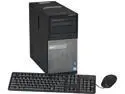
DELL Desktop PC OptiPlex 7010 3.40GHz 4GB DDR3 500GB HDD AMD Radeon HD 7470 1GB Windows 7 Professional 64-Bit
Pros: A Display port to DVI adapter came in the box as well as an DVI to VGA adapter. The two I bought are licensed for Windows 7 pro and came with OEM Windows 7 pro media. Computer has 4 dimms inside and can support 32 gb of ram (The manual listed 32gb) should I ever need it. Saved money with buying the computers from Newegg. An available 5 1/4 bay to add an additional Optical drive or a media card reader.
Cons: It would have been nice if there was a description of what came inside the box. I bought two Display-port to DVI adapters along with the two computers and it turns out I didn't need them. I can find use for the adapters elsewhere so I have no plans on returning the adapters.
Overall Review: Bounced between this one and an Optiplex 3020. I ultimately decided on the 7010 since this particular one was on sale, had 2 USB 3.0 ports on the front an Ivy Bridge I7 and a dedicated video card. I had enough with Dell's sales reps not quoting me the right items and the hassle of dealing with pre-configured systems. If they want to only deal with pre-configured unless you have a premier account then that's fine I will make sure I get the best deal and Newegg had the best deal for this system. I was able to buy everything I needed for my Windows 7 migration at work in one purchase. I ordered Sunday evening and I got the computers Wednesday.
1/22/2014See more detail
If you have office 2007 or 2010 I would say pass on this one.
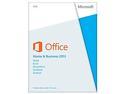
Microsoft Office Home and Business 2013 Product Key Card - 1 PC
Pros: At least Microsoft listened on one thing and made the license transferable.
Cons: Simplistic graphics that look more like Office 1993 than Office 2013. Forced Skydrive integration, Live account, no media options, no downgrade rights to Office 2010 Home and Business. That the interface looks like the same ugly and annoying look and interface that Windows 8 has.
Overall Review: I can say not everyone is going to be jumping onboard with cloud services and I will never use any cloud service. I for one will be blocking all ports that Skydrive uses on the firewall side. I wondered what happened to the Windows 7 was my idea mentality cause Microsoft didn't follow that mentality as of late.
6/18/2013See more detail
Cools I7 4930k nicely watch out with screws
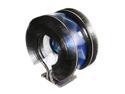
ZALMAN CNPS9900MAX-B 135mm Long life bearing CPU Cooler Blue LED
Pros: Kept an I7 3820 cool in the low 80s and after upgrading to a I7 4930k temps average in the high 80s. Does a good job with keeping processor cool under normal loads. Loading up a Server 2008 R2 VM and a Win 10 Technical Preview VM during review and temp only rose a few degrees. Never went above 111 degrees.
Cons: With the size of the fan the screws can easily get stripped. Zalman customer service.
Overall Review: When upgrading the processor I stripped the screws trying to remove the fan. Current one was out of warranty since I had bought it in February 2012. Ordered a new one while in the mean time I would reach out to Zalman to get or purchase some replacement screws. Going to use the old CPU to build a server so I could still use the fan. Response took about 1-2 weeks and I got a Paypal invoice. I expected that and it was reasonable for a new kit. Paid invoice and never received item. After a couple of attempts to reach out to Zalman on the status on the order and with no response I submitted a dispute with Paypal. So if you need to upgrade the CPU be careful, take it slow and avoid stripping the screws. If you have to deal with Zalman customer service hopefully it will go smoother for you.
12/31/2014See more detail
For the price not bad of an case
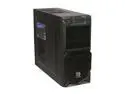
Thermaltake Commander Series Commander MS-II Black SECC ATX Mid Tower Computer Case
Pros: The price. plenty of room for case fans. USB 3.0 on the front. Nice coating on the case. Room for several hard drives.
Cons: The same coating inside the case where the mainboard is mounted. Tried to screw in the motherboard mounting screw and I ended up having to use needle nose pliers to finish screwing them in. Pliers slipped and ended up pinching my finger and getting a blood blister. The case fan runs dim and slow (600 rpm). Really not any room for Cable Management.
Overall Review: I would recommend using a case screw to strip off the coating for the main board screw holes. That way you would avoid a blood blister from the needle nose pliers pinching you. To use a 120 mm case fan you would need to use a standard case fan. The Antec True Quiet fans will not work in the front. They will work else where in the case.
6/18/2013See more detail
Great flash drive
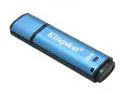
Kingston DataTraveler Vault - Privacy Edition 8GB Flash Drive (USB2.0 Portable) 256bit AES Encryption DTVP/8GB
Pros: 256-bit AES encryption built into the hardware. Drive will not mount until the password is entered in and will format after 10 attempts. That it will work on Linux (v2.6.x) and Mac OS (10.5+) platforms so it's not just limited to Windows based systems.
Cons: So far nothing.
Overall Review: I have been buying these drives for the place I work at for several months now and decided to buy one of my own. That way I know how to use one if I am asked and also with studying for the Security+ exam I felt this would be a good purchase as well. Thus far I have been impressed with the flash drive. I like the features of the drive and also how Kingston has other models available and additional layers of protection so that way an organization has more options of secure flash drives based on how much the files need to be encrypted. A few reviewers have complained about write speeds but let me ask you this question. Are you more concerned how fast the drive can read/write files or how secure the files are on that flash drive. The more secure the flash drive whether it be from Hardware, software or a combination of both the slower it will be. Personally I would rather the drive take a performance hit than have it write files fast and have no encryption. You can't have your cake and eat it too. If you need more Hardware based encryption than what the this flash can do then go with the Data Traveler 4000, 5000, and 6000 series flash drives. Those flash drives have more encryption built into them. And those are slower but again you have to choose between performance or how secure it is.
6/18/2013See more detail
Nice gaming keyboard but it could have been better
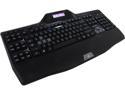
Logitech G510s Illuminated USB Gaming Keyboard
Pros: I have had this keyboard for little over a week now. I have been gaming, doing classwork and overall internet browsing. It's nice to have a backlit keyboard again. I like that it has USB audio ports on the keyboard so I can plug in some head phones quickly. Really like I can have multiple profile settings so I can change things on the fly without having to open up the software and mess around.
Cons: A couple of things I wished the keyboard was more capable of. First thing I would have liked to have seen on the keyboard an acutal USB port on the keyboard so I can plug in a device like a mouse or gamepad/joystick. That isn't really a deal breaker but it would have been nice. Not everyone would agree with me on that. It would have been nice if the keys could have been a little bit brighter. Perhaps that can be fixed in a software update or a HW revision.
Overall Review: Possibly a SW update to do a gradient with the lights so that way? The WASD keys are physically a different color, would it be possible for those keys to have a different light? I just don't like to have software installed on the computer to adjust everything, would have been nice if some settings were built in. I might have missed it but is there an applet for the LCD screen that displays current Temp of the CPU(s).
5/1/2013See more detail