




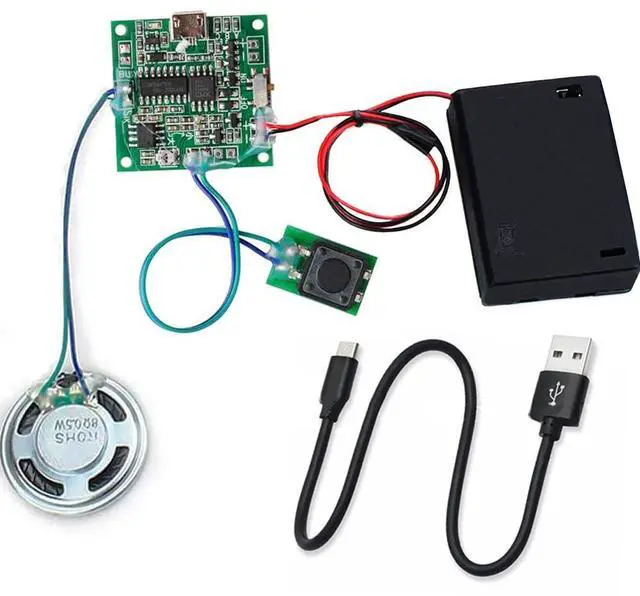
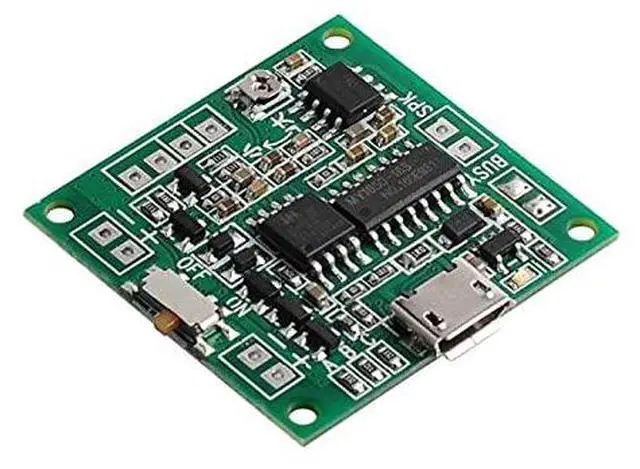


The first step after getting the product is to check whether the module works normally
- Install 3PCS AA batteries (Please use new batteries)
- Turn on the switch on the battery box cover.
- Press the button to play the test song.
If testing is OK, then you can add your own audio file according to the steps. If you have problems, please feel free to con-tact us.

- RAM: 8MB
- Output: 0.5-1W
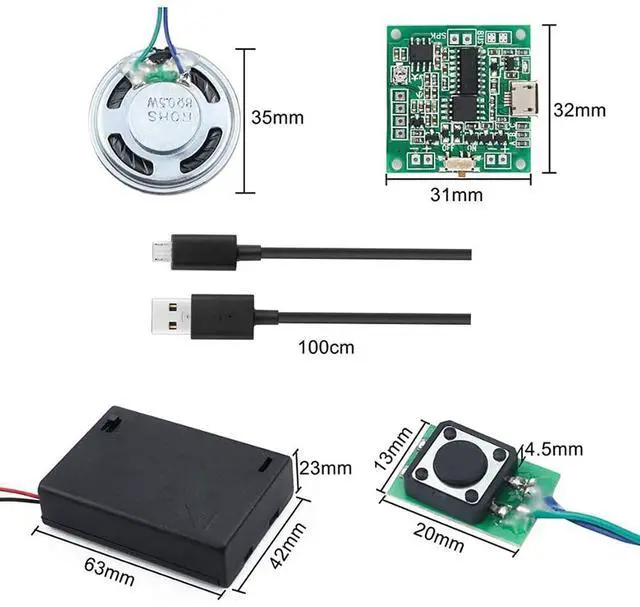
- Size: 30*30mm
- Speaker Size: Dia 36mm

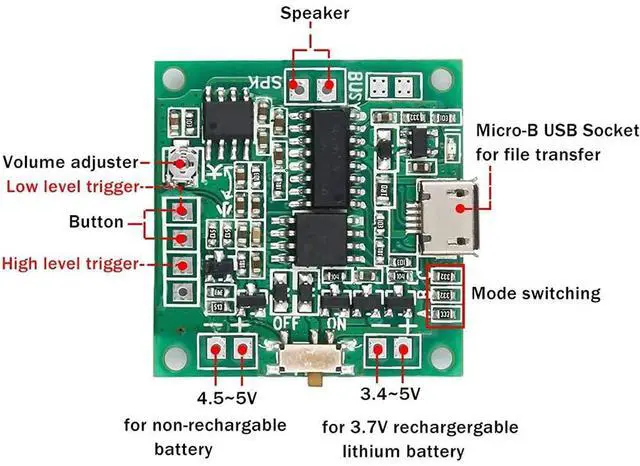
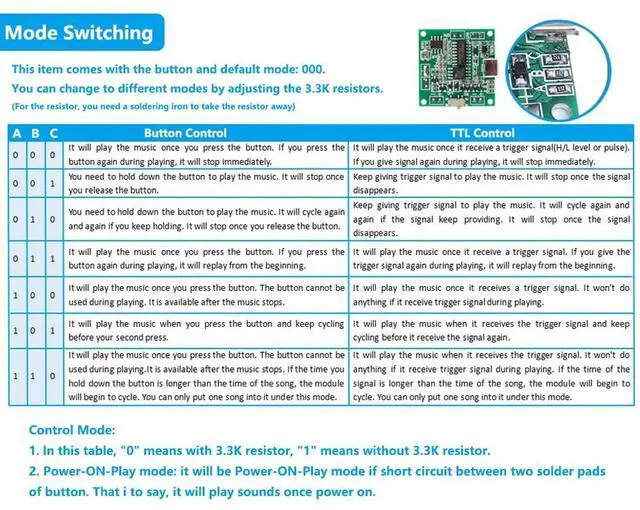
- Control mode: button or TTL (You can select different trigger mode by connecting with different soldering pads, as the picture shown)
There are two ways to supply power:
- 4.5-5V, non-rechargeable battery (Batteries are not included.)
- 3.4-5V, 3.7V rechargeable lithium battery
- There is a potentiometer on the module to adjust the volume. Pls prepare a small screwdriver

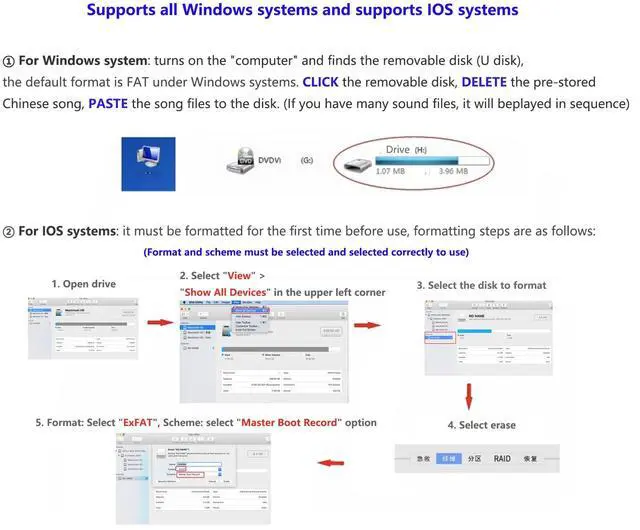
- Download MP3/WAV sound files via USB DATA cable
- Playing mode: It can be changed to “power on and play” mode, short-circuit two solder points of button on the board, then it will play the songs once power on.

Package included
1 X 8MB Sound Recording Module
1 X Empty Battery Case
1 X Mini button
1 X Speaker
1 X USB cable

Control mode
- In the table,‘0' means having 3.3K resistor; '1' means without 3.3K resistor.
- You can see that there are 3 resistors on the board, the default mode is 000 (It will play the music once you press the button. If you press the button again during playing, it will stop immediately)
- You can change to other mode by removing the resistor on the board. For example, if you want to set 001 (Under this mode, you need to hold down the button to play the music. It will stop once you release the button.), you need to remove the third resistor that marked C on the board. To remove the resistor, you need a soldering iron to melt the solder and take the resistor away. It is a little difficult if you are not good at soldering so we recommend you to use 000 default mode.
Note:
1. The songs or record format must be MP3 / WAV.
2. The supporting speaker is used as a prompt sound effect speaker. If you want to play singing with higher sound quality, it is recommended to use a better speaker, but please note that the effect of this speaker can never be compared with a special speaker.
3. If the sound is low, replace the battery with all new.


Instruction
You can find a user guide document in this page:
Under the "Product guides and documents"
Voice Music Player Module 8MB Memory Capacity Button Control MP3 WAV Recordable Sound Volume Adjustment DIY Music Box for Greeting Cards Mother's Day


The first step after getting the product is to check whether the module works normally
- Install 3PCS AA batteries (Please use new batteries)
- Turn on the switch on the battery box cover.
- Press the button to play the test song.
If testing is OK, then you can add your own audio file according to the steps. If you have problems, please feel free to con-tact us.
- RAM: 8MB
- Output: 0.5-1W
- Size: 30*30mm
- Speaker Size: Dia 36mm
- Control mode: button or TTL (You can select different trigger mode by connecting with different soldering pads, as the picture shown)
There are two ways to supply power:
- 4.5-5V, non-rechargeable battery (Batteries are not included.)
- 3.4-5V, 3.7V rechargeable lithium battery
- There is a potentiometer on the module to adjust the volume. Pls prepare a small screwdriver
- Download MP3/WAV sound files via USB DATA cable
- Playing mode: It can be changed to “power on and play” mode, short-circuit two solder points of button on the board, then it will play the songs once power on.
Package included
1 X 8MB Sound Recording Module
1 X Empty Battery Case
1 X Mini button
1 X Speaker
1 X USB cable
Control mode
- In the table,‘0' means having 3.3K resistor; '1' means without 3.3K resistor.
- You can see that there are 3 resistors on the board, the default mode is 000 (It will play the music once you press the button. If you press the button again during playing, it will stop immediately)
- You can change to other mode by removing the resistor on the board. For example, if you want to set 001 (Under this mode, you need to hold down the button to play the music. It will stop once you release the button.), you need to remove the third resistor that marked C on the board. To remove the resistor, you need a soldering iron to melt the solder and take the resistor away. It is a little difficult if you are not good at soldering so we recommend you to use 000 default mode.
Note:
1. The songs or record format must be MP3 / WAV.
2. The supporting speaker is used as a prompt sound effect speaker. If you want to play singing with higher sound quality, it is recommended to use a better speaker, but please note that the effect of this speaker can never be compared with a special speaker.
3. If the sound is low, replace the battery with all new.
Instruction
You can find a user guide document in this page:
Under the "Product guides and documents"
Voice Music Player Module 8MB Memory Capacity Button Control MP3 WAV Recordable Sound Volume Adjustment DIY Music Box for Greeting Cards Mother's Day