• $45.99
  • Free 30-day Returns
  • Price alert
    Shop it at NeweggBusiness.
    Get Educated

    Make informed decisions with expert advice. Learn More

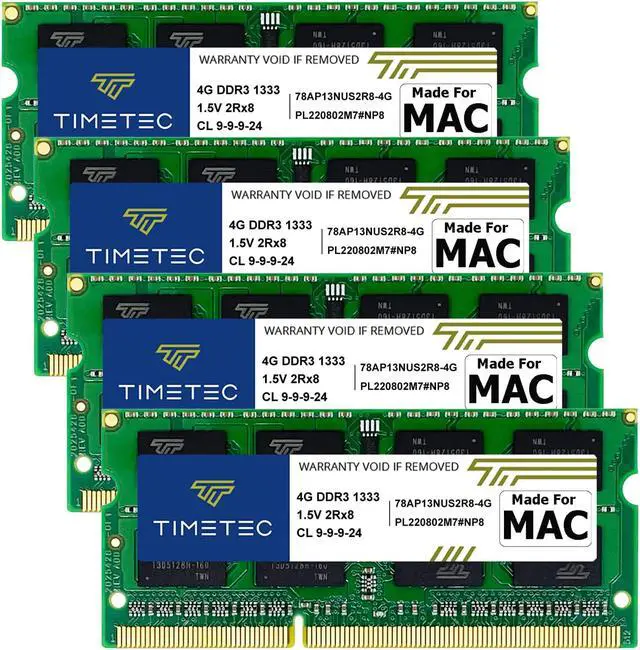
    Timetec 16GB KIT(4x4GB) Compatible for Apple DDR3 1333MHz PC3-10600 CL9 for iMac (Mid 2010 27 inch, Mid 2011 21.5/27 inch) SODIMM Memory Module MAC RAM Upgrade for iMac 11,3 / iMac 12,1 / iMac 12, 2

    • 32GB (4 x 8GB)
    • 16GB (2 x 8GB)
    • 16GB (4 x 4GB)
    • 8GB
    • 8GB (2 x 4GB)
    • 4GB
    • DDR3 1333 (PC3 10666)
    • CAS Latency 9
    • 1.5V
    +
    +
    Overview
    Specs
    Reviews (7)

    Any questions? Ask CelesteSM will help you find out quickly.

    MAC DDR3 SODIMM
    DDR3 MAC SODIMM
    Great Quality, Fast Speed, High Performance

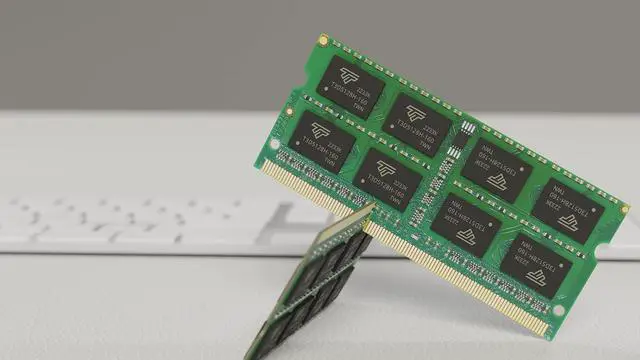
    All Timetec modules are built from strict selected premium chip ICs for the high-performance potential to allow excellent stability and backed by Timetec advanced replacement program. All memory modules are engineered to perform in even the most extreme environments and rigorously worked to ensure that each module meets our stringent performance.

    Specifications
    Module Type DDR3 Non-ECC Unbuffered SODIMM
    Frequency 1333MHz
    CAS Latency CL9
    Capacity 4GB
    Voltage 1.5V
    Pins 204 Pin
    Dimensions 30(H) x 67.6(L)mm
    NP8 C list
    Increase Multitasking

    Timetec memory is engineered to maximize effectiveness and efficiency of your Mac system and increase your Mac multitasking capabilities.

    DDR3 SODIMM MAC bg1
    Easy Installation

    Just with a screwdriver and your owner's manual, you can upgrade your Mac System at home within a few minutes with the easy plug and play design.

    DDR3 MAC SODIMM bg2
    Strict Selected IC

    Timetec memory only use high quality IC which is engineered to maximize effectiveness.

    DDR3 MAC SODIMM bg3
    DDR3 1333MHz PC3-10600 204 Pin Unbuffered Non-ECC 1.5V CL9 Dual Rank 2Rx8 based 256x8
    Module Size: 4GB
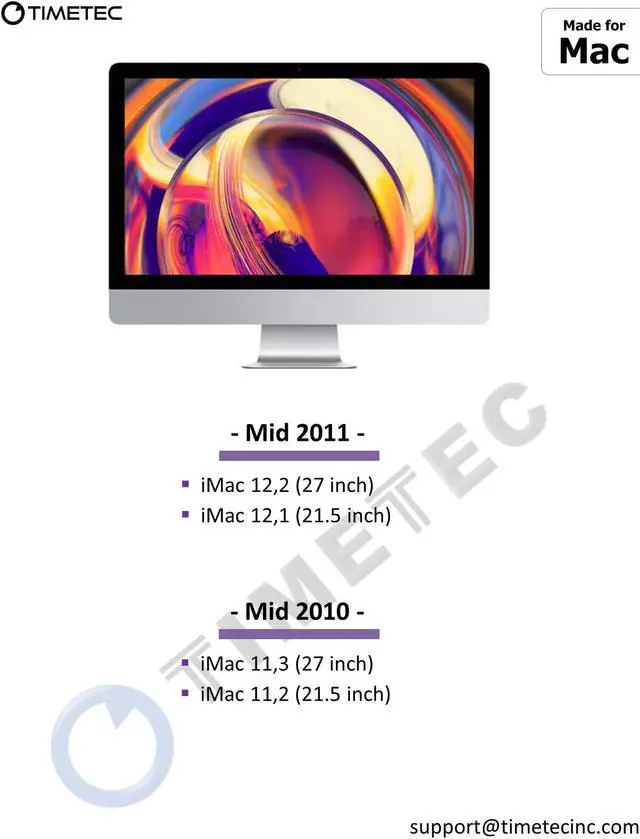
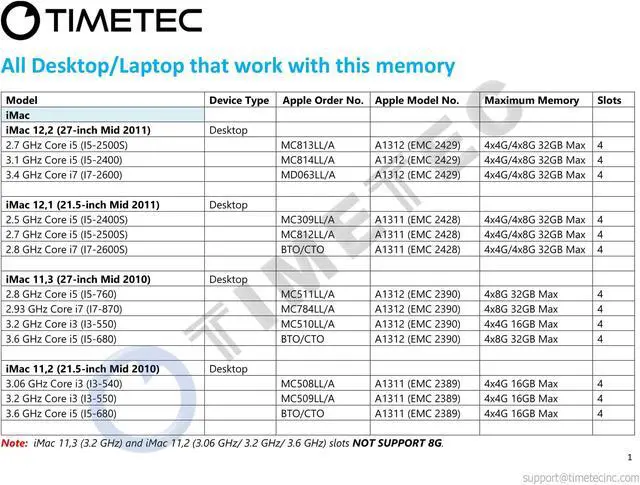
    Package: 4x4GB Designed for Apple iMac - 21.5 inch/ 27 inch Mid 2010, 21.5 inch / 27 inch Mid 2011- iMac11, 2 iMac11, 3 iMac12, 1 iMac12, 2
    Model Number: A1311 A1312 -
    Part Number (s): MC508LL/A, MC509LL/A, MC511LL/A, MC784LL/A, MC510LL/A, MC309LL/A, MC812LL/A, MC813LL/A, MC814LL/A, MD063LL/A, BTO/CTO Supports
    CPU Processors: 3.06 GHz Core i3, 3.2 GHz Core i3, 2.5 GHz Core i5, 2.7 GHz Core i5, 2.8 GHz Core i5, 3.1 GHz Core i5, 3.6 GHz Core i5, 2.8 GHz Core i7, 2.93 GHz Core i7, 3.4 GHz Core i7 Guaranteed Lifetime warranty from Purchase Date Free technical support (support@timetecinc. com)

    Warranty & Returns

    Warranty, Returns, And Additional Information

    Warranty

    • Please contact the Seller directly for warranty information. Warranty information may also be found on the Manufacturer's website.
    • CONTACT

    Return Policies

    Manufacturer Contact Info

    LOADING...

    The Timetec 16GB (4×4GB) DDR3-1333 SO-DIMM kit is a memory upgrade for compatible Mid 2010 27-inch and Mid 2011 21.5- or 27-inch iMacs, including models iMac 11,3, 12,1, and 12,2.

    Recommended For

    • Owners of a Mid 2010 27-inch or Mid 2011 21.5-/27-inch iMac who have confirmed that their current memory is limiting everyday multitasking; this kit brings those configurations to 16GB, Apple’s listed maximum for these models.
    • People keeping a compatible older iMac in service for light home-office work, such as writing, email, and several older apps open at once, who want to upgrade memory rather than replace the computer.
    • Owners of a compatible Mid 2011 iMac with a low-memory configuration who use it for modest music-making or similar older-app workflows and want to reduce memory pressure.
    • DIY upgraders who want a four-module 16GB kit for a listed iMac model; Apple’s support instructions identify 1333MHz DDR3 SO-DIMMs for Mid 2010 and Mid 2011 iMacs.

    Real-World Use Scenarios

    • When you keep a browser, email, and several work apps open on a compatible 2010 or 2011 iMac, moving to 16GB gives the system more room for those apps and can reduce slowdowns caused by running short of memory.
    • For photo or other creative work on an older iMac, 16GB can provide more memory headroom when editing while keeping other apps open; it won't remove limits from the computer's processor or storage.
    • If you use a compatible iMac for music production, the added memory can help when your audio software and other open apps are competing for RAM; the benefit depends on whether memory is the bottleneck.
    • For everyday browsing, documents, and streaming on an older compatible iMac, 16GB can leave more room to run several apps together, but it does not guarantee that newer software will run well on an aging system.