• $26.99
  • Free 92-day Returns
  • Login to Make an Offer
    Sold by Newegg

    Shipped by Newegg

    Price alert
    Shop it at NeweggBusiness.

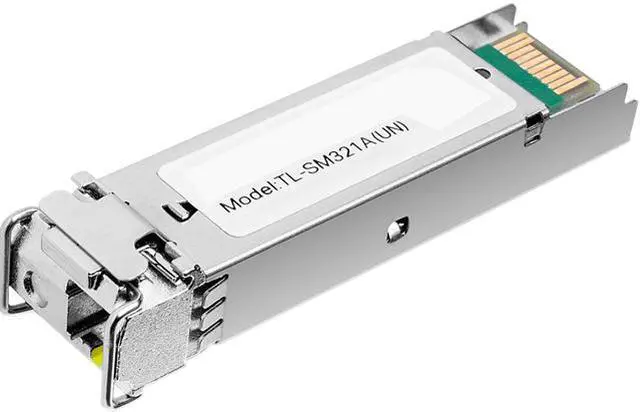
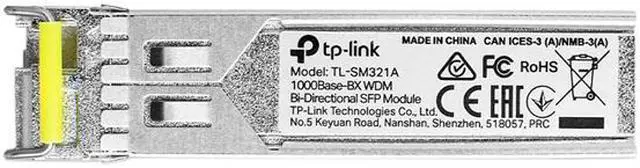
    TP-Link TL-SM321A | 1000Base-BX WDM Bi-Directional Gigabit Single-Mode SFP Module | Plug and Play | LC Simplex interface | Hot Swappable | Up to 20km distance | Support SFP-MSA & DDM

    • Single-mode SFP Module, WDM Bi-Directional communication on a single fiber
    • Work with TL-SM321B as a pair and create a full-duplex gigabit path between your switches, storage devices, and server
    • Wavelength: Tx 1550nm, Rx 1310nm. Data Rate: 1.25Gbps. Port Type: LC Simplex
    • Always keep the protective dust plug on the SFP's optical bores until you are ready to make a connection
    • Compatible with all SFP ports on TP-Link product including JetStream switches, and media converter MC220L
    • Developed in accordance with the Small Form Pluggable Multi-Source Agreement (SFP-MSA), TL-SM321A uses an integrated LC Bi-Directional optical interface connector, and the data link is up to 20 km for 9/125 µm SMF(Single-Mode Fiber)
    • TL-SM321A incorporates the Digital Diagnostic Monitoring (DDM) feature which is compatible with SFF-8472. DDM supports real-time monitoring of the transceiver and shows parameters including the transceiver current which transmits/receives optical power and operating temperature
    +
    +
    Overview
    Specs
    Reviews
    See all Q & A

    Any questions? Ask CelesteSM will help you find out quickly.

    image
    image

    TP-Link TL-SM321A Network Transceiver Module

    TP-LINK´s TL-SM321A is designed to work with TL-SM321B* in pair to create an on-site fiber communication up to 20km. Transmitting over one single-mode fiber with one different wavelength going in each direction, it can extend the range of your network with your switches, routers and media converters.

    image
    • Up to 20 km transmission distance with 9/125 µm SMF (Single-Mode Fiber)
    • Bidirectional WDM communication on a single fiber
    • Compatible with Small Form Pluggable Multi-Source Agreement (SFP-MSA)
    • Supports Digital Diagnostic Monitoring (DDM)
    • Hot-swappable module design
    • Work with TL-SM321B* as a pair

    * TL-SM321B is sold separately.

    Warranty & Returns

    Warranty, Returns, And Additional Information

    Warranty

    • Limited Warranty period (parts): 1 year
    • Limited Warranty period (labor): 1 year
    • Read full details

    Return Policies

      We want to ensure your holiday shopping this year is hassle-free. That’s why we’re automatically extending our return policies on almost every product! For purchases placed between November 1st, 2025 and December 31, 2025 you will have until January 31, 2026 to return your product.

    • Return for refund until: January 31, 2026
    • Return for replacement until: January 31, 2026
    • This item is covered by Newegg.com's Extended Holiday Return Policy.
    • Read full return policy for details.
    LOADING...
    LOADING...

    The TP-Link TL-SM321A is a 1.25Gbps, single-mode bidirectional SFP transceiver for network administrators linking switches, servers, storage, or media converters over one fiber strand. Pair it with a TL-SM321B for a full-duplex connection up to 20km, using simplex LC connectors.

    Recommended For

    • Home-lab and small-office network builders connecting switches, servers, or storage across a single-mode fiber run, when both endpoints support 1G SFP and the link uses the matching opposite-wavelength BiDi module.
    • Installers or site owners extending a wired network between buildings or rooms where a single fiber strand is already run or is preferred; BiDi sends and receives over that strand, with a compatible module at the other end.
    • TP-Link switch or media-converter owners building a compatible fiber link, especially those who want DDM readings such as optical power and temperature for basic transceiver monitoring.
    • Network technicians replacing or adding a 1G BiDi optic in an existing single-mode fiber setup who can verify the host port, fiber connector, module revision, and opposite-end wavelength before installation.

    Real-World Use Scenarios

    • Link two switches in separate buildings or network areas over an installed single-mode fiber strand; with the matching TL-SM321B at the other end, the pair provides a full-duplex Gigabit connection without using a second strand.
    • Extend a wired network to an outbuilding or remote office that already has single-mode fiber; the paired modules can carry network traffic between switches while avoiding a new copper run.
    • Use a single fiber strand between a switch and a compatible media converter when the remote device or network segment needs a copper Ethernet connection; the converter provides the fiber-to-Ethernet handoff.
    • Connect a remote switch that serves devices such as computers, access points, or cameras; the SFP pair forms the fiber uplink, while the switch handles the local device connections.
    • Check optical power and temperature readings while diagnosing a fiber link, if the host switch supports DDM; this can help distinguish a transceiver or signal issue from other network problems.

    Spec Summary

    AttributeValue
    Best ForSingle-mode fiber links between compatible SFP-equipped network devices, with bidirectional transmission over a single fiber
    Optical Interface And ReachLC simplex interface for single-mode fiber, with WDM bidirectional transmission over a single fiber and a link distance of up to 20 km
    Data Rate And Wavelength1.25 Gbps data rate; transmits at 1550 nm and receives at 1310 nm
    Standards And ProtocolsComplies with IEEE 802.3z and SFP-MSA; supports CSMA/CD and TCP/IP
    MonitoringSupports Digital Diagnostic Monitoring (DDM), compatible with SFF-8472, for real-time transceiver status including optical power and operating temperature
    Operating EnvironmentOperating temperature: 0°–70° C; humidity: 10%–90% non-condensing
    Model IdentifiersTP-Link TL-SM321A
    Package ContentsSFP module and installation guide