here!
I’m your shopping assistant for PC builds, upgrades, and everything tech.
Got questions? Ask away!
Start a conversation
here!
I’m your shopping assistant for PC builds, upgrades, and everything tech.
Got questions? Ask away!
Start a conversation Hot Seller

Make informed decisions with expert advice. Learn More





Combo Up Savings Up To $200+
The more you add, the more you'll save!
Any questions? Ask CelesteSM will help you find out quickly.


We want to ensure your holiday shopping this year is hassle-free. That’s why we’re automatically extending our return policies on almost every product! For purchases placed between November 1st, 2026 and December 31, 2026 you will have until January 31, 2027 to return your product.
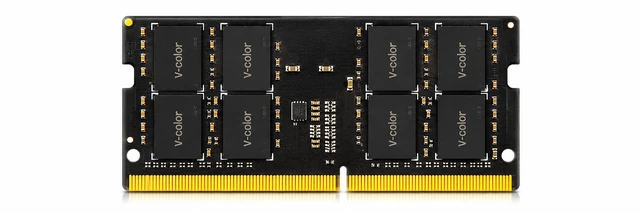
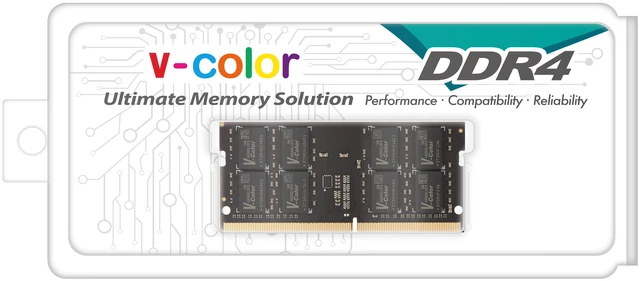
The V-COLOR TN416G32D822 is a 16GB DDR4-3200 260-pin SO-DIMM laptop memory module designed for users who want a straightforward RAM upgrade for compatible notebooks that support non-ECC DDR4 at 1.2V.
| Attribute | Value |
|---|---|
| Best For | Upgrading mainstream laptops and notebooks; stated readiness for Intel-based systems |
| Memory Configuration | 16GB DDR4 SO-DIMM (260-pin) module, non-ECC |
| Performance And Timings | DDR4 3200 MHz (PC4-25600) with CAS Latency CL22 |
| Voltage & ECC | 1.20V, non-ECC |
| Heat And Build | No heat spreader |
| Model Identifiers | V-Color — model TN416G32D822, part number TN416G32D822 |
Q: Is a 16GB DDR4-3200 SO-DIMM like this a better laptop upgrade than staying at 8GB?
A: Yes for most users. A 16GB DDR4-3200 module is the more practical choice when the laptop is used for heavier multitasking, newer games, or running many browser tabs and apps at once. Official guidance from Intel and Crucial commonly treats 16GB as the more comfortable tier beyond basic use, while 8GB is the minimum for lighter workloads. Choose this 16GB module when capacity matters more than keeping the lowest upfront cost.
Q: Should I buy one 16GB stick or a 2x8GB kit for a laptop?
A: Choose a 2x8GB kit if your laptop has two open or replaceable slots and you want the strongest out-of-box performance, especially for gaming or integrated graphics. Dual-channel memory is widely documented by Intel and benchmarked by Tom's Hardware as faster than a single-module setup. Choose this 1x16GB module when you only have one free slot, want a simpler upgrade path, or plan to add a matching second 16GB stick later.
Q: Is DDR4-3200 CL22 enough, or should I look for lower-latency laptop RAM?
A: For a standard laptop upgrade, DDR4-3200 CL22 is usually the sensible choice. Most laptops run JEDEC memory settings rather than enthusiast tuning profiles, so matching the platform's supported DDR4-3200 speed is usually more important than chasing a lower CAS rating on paper. Lower-latency kits can help in some benchmarks, but the real-world difference is usually smaller than the gain from moving from 8GB to 16GB or from single-channel to dual-channel.
Q: Is this 16GB DDR4 SO-DIMM a better fit than 32GB for a laptop?
A: Choose this 16GB module for mainstream laptops used for office work, school, everyday creation, and light to moderate gaming. Move to 32GB when the laptop regularly handles heavier content creation, virtual machines, large projects, or many memory-hungry apps at the same time. Across official guidance, 16GB is the common mainstream recommendation, while 32GB is positioned for heavier multitasking and professional workloads.
Q: Will this 16GB DDR4-3200 SO-DIMM work in my laptop?
A: It is a good fit only if your laptop uses 260-pin DDR4 SO-DIMM memory, supports non-ECC 1.2V modules, and allows 16GB sticks. This V-COLOR module is a single 16GB DDR4-3200 CL22 laptop stick, so the main decision point is compatibility with your specific laptop model and its maximum supported memory per slot.
Q: Is this a single 16GB stick or a 2-stick kit?
A: It is a single 16GB module, not a 2-stick kit. That makes it useful when your laptop has one empty slot or when you want to replace one existing stick, but it does not guarantee dual-channel performance by itself unless paired with a compatible second module.
Q: Is 16GB enough for office work, web browsing, meetings, and everyday multitasking?
A: Yes. A single 16GB DDR4 laptop module is generally a practical upgrade for office work, browser-heavy use, video meetings, schoolwork, and everyday multitasking. It is a sensible choice if your current laptop feels limited with 8GB, but it is less ideal for buyers who specifically want a matched 2-stick kit for the best chance of dual-channel performance.
Q: What is the main trade-off versus a lower-latency or gaming-branded alternative?
A: The main trade-off is that this module is a standard JEDEC-style DDR4-3200 CL22 stick focused on broad laptop compatibility, not peak tuned performance. Compared with lower-latency alternatives such as CL20 gaming-oriented SO-DIMMs, the real-world difference for everyday laptop use is usually small, but performance-focused buyers may prefer a lower-latency or matched kit option if their system supports it.
Q: Who is this RAM most suitable for?
A: It is most suitable for laptop owners who want a straightforward memory upgrade for a DDR4 notebook and need one 16GB stick rather than a full kit. It fits mainstream upgrade scenarios better than niche ones: adding capacity, replacing a failed module, or moving from 8GB to 16GB or higher in a compatible laptop.
Q: Is this a good choice if I just need a straightforward 16GB laptop RAM upgrade?
A: Yes, if your laptop supports DDR4 SO-DIMM memory at 3200 MT/s and uses standard 260-pin, 1.2V, non-ECC modules. This module matches the common mainstream laptop spec, so it is most suitable as a basic capacity upgrade rather than a performance-tuned option.
Q: Who is this RAM most suitable for?
A: It is best for laptop owners replacing or expanding standard DDR4 memory for everyday work, multitasking, browsing, office apps, and general use. It is a practical fit for users who want more capacity in a compatible DDR4 laptop, but not for systems that require ECC, desktop DIMMs, DDR5, or overclocked memory profiles.
Q: What are the main trade-offs of buying this module?
A: The main trade-off is that it is a standard-spec module: CL22 latency, 1.2V, no ECC, and no heat spreader. That makes it appropriate for compatibility-focused laptop upgrades, but it is not aimed at buyers looking for lower-latency enthusiast memory or features beyond basic notebook RAM requirements.
Q: Is one 16GB stick a good buy, or is a matched kit better?
A: A single 16GB stick makes sense if you have only one free slot or are replacing one module. A matched kit is usually the safer choice when you want the best chance of plug-and-play compatibility across both slots, especially if you are moving to 32GB or want to avoid mixing memory from different modules.
Q: Are there any compatibility risks to consider before buying?
A: Yes. Even when the rated specs match, laptop RAM upgrades can still fail if the laptop has platform-specific limits, sensitivity to mixed modules, or a faulty stick. Check that your system supports DDR4 SO-DIMM, 3200 MT/s, 260-pin, 1.2V, non-ECC memory, and confirm the maximum per-slot and total capacity before buying.


 v-color official store