here!
here!
I’m your shopping assistant for PC builds, upgrades, and everything tech.
Got questions? Ask away!
Start a conversation
here!
I’m your shopping assistant for PC builds, upgrades, and everything tech.
Got questions? Ask away!
Start a conversationShipped by Newegg
 Top Rated
 Hot Seller




Any questions? Ask CelesteSM will help you find out quickly.
Overview
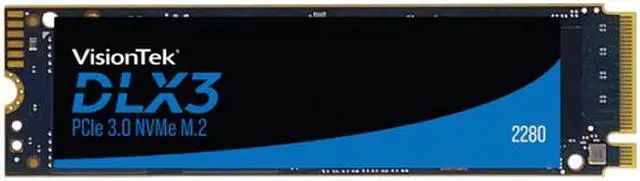
The VisionTek DLX3 is a 512GB internal solid state drive for consumer use, combining an M.2 2280 form factor, PCI-Express 3.0 x4 interface, and NVMe 1.3 protocol.
Key Features
Performance
The drive delivers maximum sequential read speeds up to 3300 MBps and maximum sequential write speeds up to 2900 MBps. Maximum 4KB random performance reaches up to 370K IOPS for reads and up to 288K IOPS for writes. Power consumption is 0.3W at idle and 4.75W when active.
Design
The DLX3 uses an M.2 2280 form factor and 3D NAND memory components.
Connectivity & Compatibility
The drive uses a PCI-Express 3.0 x4 interface and NVMe 1.3 protocol.
Reliability & Durability
Operating temperature is 0°C ~ +70°C, while storage temperature is -40°C ~ +85°C.
Specifications
The VisionTek DLX3 is a 512GB M.2 2280 NVMe SSD for professionals, gamers, and everyday users with a compatible PCIe 3.0 x4 M.2 slot; it offers sequential speeds up to 3,300 MB/s read and 2,900 MB/s write.
| Attribute | Value |
|---|---|
| Best For | Consumer desktop users needing 512GB of internal M.2 NVMe storage |
| Capacity | 512GB |
| Interface And Form Factor | M.2 2280 PCIe 3.0 x4 SSD using NVMe 1.3 |
| Memory And Controller | 3D NAND memory with an InnoGrit controller |
| Read Write Performance | Sequential speeds up to 3300 MB/s read and 2900 MB/s write; 4KB random speeds up to 370K IOPS read and 288K IOPS write |
| Power And Operating Conditions | Uses 0.3W at idle and 4.75W when active; operating temperature 0°C to 70°C and storage temperature −40°C to 85°C |
| Model Identifiers | VisionTek DLX3, model 2280, part number 901555 |
Q: VisionTek DLX3 vs DLX4 Pro 2280: which should I choose?
A: Choose the DLX3 512GB for a compatible M.2 2280 system when PCIe 3.0 NVMe performance and this capacity meet your needs. Choose the DLX4 Pro 2280 if your system supports PCIe 4.0 and you want higher manufacturer-rated sequential speeds; its published figures vary by capacity, so check the specific size. The DLX3 is the more suitable fit when you do not need the DLX4 Pro’s higher performance tier.
Q: Should I get the DLX3 512GB or the 1TB version?
A: Choose the DLX3 512GB if it provides enough room for your operating system, applications, and current files. Choose 1TB if you keep a larger game or media library on the drive or want more headroom for future storage needs. VisionTek lists higher total-write endurance for the 1TB capacity; capacity alone does not establish that it will feel faster in everyday use.
Q: Is the DLX3 2280 or a 2230 SSD a better fit for my device?
A: Choose the DLX3 if your device accepts an M.2 2280 drive. A 2230 SSD is shorter and is intended for devices with a compatible 2230 slot. Check your device’s supported drive length and interface before buying; the two sizes are not direct physical replacements without confirming fit and installation requirements.
Q: Should I buy the DLX3 or a portable external SSD for carrying files?
A: Choose the DLX3 for internal storage in a compatible M.2 2280 NVMe slot. Choose a portable external SSD if you need a self-contained drive that connects externally and moves between devices. The DLX3 is an internal M.2 module, so it is not a portable USB drive by itself.
Q: Will this SSD fit my laptop or desktop?
A: It is an M.2 2280 PCIe 3.0 x4 NVMe drive. It should suit a computer with an available M.2 2280 NVMe slot, but check the device’s specifications first: M.2 slot size and supported interface vary, and not every M.2 slot supports NVMe.
Q: Can I use this SSD as an external drive?
A: The specifications describe an M.2 2280 PCIe NVMe drive, not a complete USB portable drive. To use it externally, you would need a separate enclosure that supports M.2 2280 NVMe; the enclosure and USB connection may limit transfer speeds.
Q: Is this SSD fast enough for gaming and everyday work?
A: It is suitable for everyday computing and gaming when installed in a compatible NVMe slot. The listed maximum sequential speeds are up to 3,300 MB/s read and 2,900 MB/s write; actual performance depends on the computer and workload.
Q: Is 512GB enough storage?
A: 512GB can suit a system drive, everyday applications, and a moderate collection of games or files. It may feel limiting if you keep many large games, videos, or work projects installed, so consider your storage needs before buying.