


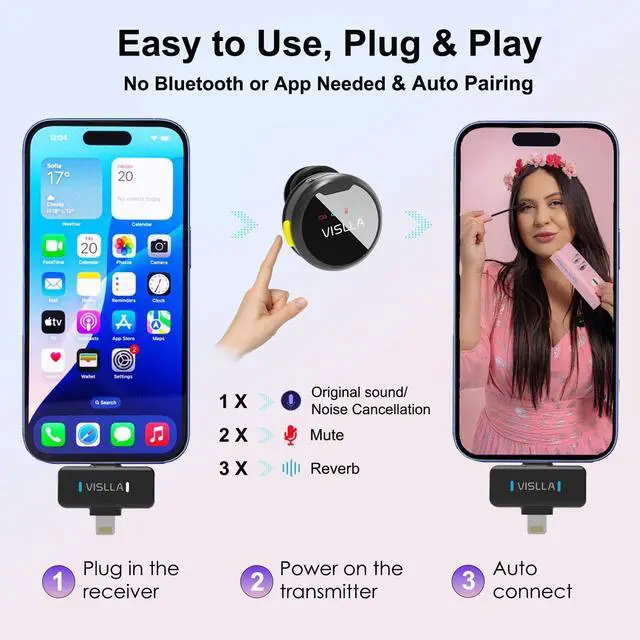


I turned on the transmitter and plugged in the receiver, but why won't they connect?
If the transmitter has been disconnected from the receiver for an extended period, please plug the receiver into your device (e.g., a smartphone), then power the transmitter off and back on. This should establish the connection.
Why is the noise reduction feature not working,or volume is low ?
The receiver may not be properly connected to your device. Unplug the receiver and reinsert it firmly and evenly into the device’s port.
Why can’t I record on my Android device?
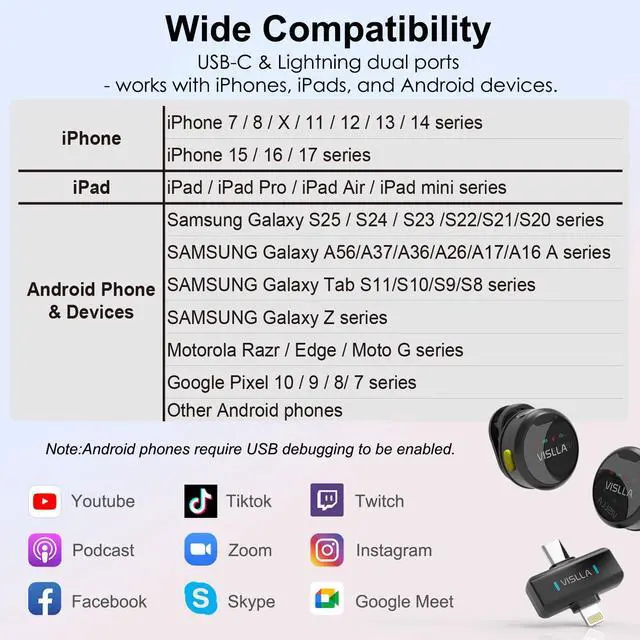
Some Android devices require the OTG function to be enabled. Please refer to your device’s user manual, go to the settings menu, and turn on USB debugging.
What devices can I use this microphone with?
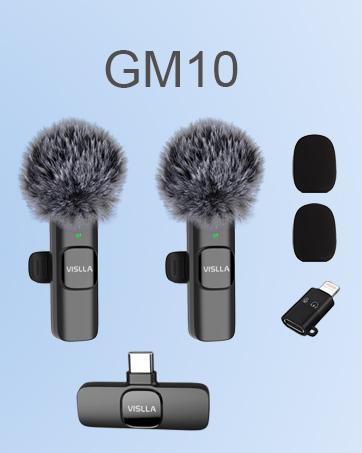
This wireless lavalier microphone works with most iOS and Android devices. It supports Lightning models (iPhone 7 to 14 series, iPads) and USB-C models (iPhone 15/16/17 series, Samsung, Motorola, Google Pixel phones, and USB-C tablets).
Other issues
For further assistance, please contact support using the information provided in the user manual.


VISLLA AUDIO
VISLLA is committed to providing users with high-quality audio products. We continuously pursue innovation, introducing advanced technology to bring users more convenient and intelligent audio solutions. User experience is always our focus; we listen to user feedback, continuously optimizing product design and features to meet evolving user needs.


I turned on the transmitter and plugged in the receiver, but why won't they connect?
If the transmitter has been disconnected from the receiver for an extended period, please plug the receiver into your device (e.g., a smartphone), then power the transmitter off and back on. This should establish the connection.
Why is the noise reduction feature not working,or volume is low ?
The receiver may not be properly connected to your device. Unplug the receiver and reinsert it firmly and evenly into the device’s port.
Why can’t I record on my Android device?
Some Android devices require the OTG function to be enabled. Please refer to your device’s user manual, go to the settings menu, and turn on USB debugging.
What devices can I use this microphone with?
This wireless lavalier microphone works with most iOS and Android devices. It supports Lightning models (iPhone 7 to 14 series, iPads) and USB-C models (iPhone 15/16/17 series, Samsung, Motorola, Google Pixel phones, and USB-C tablets).
Other issues
For further assistance, please contact support using the information provided in the user manual.
VISLLA AUDIO
VISLLA is committed to providing users with high-quality audio products. We continuously pursue innovation, introducing advanced technology to bring users more convenient and intelligent audio solutions. User experience is always our focus; we listen to user feedback, continuously optimizing product design and features to meet evolving user needs.