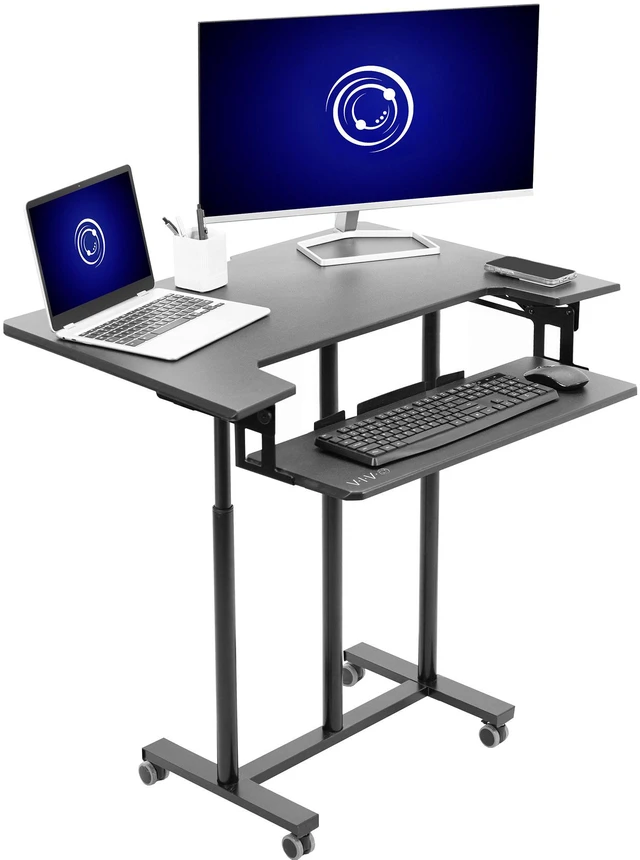
VIVO Mobile Height Adjustable Stand Up Desk Cart with Sliding Keyboard Tray
- Mobile Workstation: Desk cart with four durable casters (all lockable) provides a portable solution for efficient workflow. Perfect to use as a free-standing desk alternative for those wanting more flexibility or working in limited spaces
- Height Adjustment: Enjoy standing throughout the day with powerful tension springs providing quick and smooth height adjustment (30.3 to 47). Easily lock your desired height in place with the innovative one-touch height lock mechanism
- Solid Support: The dual-tier design is supported by 3 steel pillars for ultimate stability, allowing the desktop to hold up to 33 lbs on its spacious 35.4 x 22.2 surface. Accommodates dual monitor/laptop setups with room to spare
- Sliding Keyboard Tray: A large lower 27 x 9.4 platform conveniently holds your keyboard and mouse side-by-side, and smoothly pulls out for comfortable typing angles and space efficiency
Any questions? Ask CelesteSM will help you find out quickly.
Take your adjustable workstation wherever you want to go with mobile desk cart (CART-V06A) from VIVO! Four durable 2.5" casters provide quick and smooth mobility, and all the casters are lockable for excellent stability when the cart is stationary. Constructed of high-grade steel, this workstations desktop is able to support up to 33 pounds, keeping your expensive equipment safe and secure. Featuring over 16 inches of tension spring height adjustment along 3 solid support bars, a spacious desktop allowing room for your preferred setup, and a sliding keyboard tray for ultimate convenience, this cart was made to perform. All of the necessary hardware and instructions are provided to get your cart assembled in no time!
Features
- Color: Black
- Desktop Dimensions: 35.4" x 22.2"
- Keyboard Tray Dimensions: 27" x 9.4"
- Base Dimensions: 25.5" x 18"
- Height Adjustable Range: 30.3" to 47"
- Desktop Weight Capacity: 33 lbs
- Keyboard Tray Weight Capacity: 4.4 lbs
Warranty & Returns
Warranty, Returns, And Additional Information
Warranty
- Please contact the Seller directly for warranty information. Warranty information may also be found on the Manufacturer's website.
- CONTACT
Return Policies
- Return for refund within: 30 days
- Return for replacement within: 30 days
- This item is covered by VIVO Return Policy
Manufacturer Contact Info
- For a directory of all our manufacturers, please click below.
- Manufacturers Directory
The VIVO Mobile Height Adjustable Stand Up Desk Cart is a rolling workstation with a 35.4 × 22.2-inch desktop, smooth height adjustment from 30.3 to 47 inches, and a sliding keyboard tray, suited to people who want to switch between sitting and standing in a flexible workspace.
Recommended For
- Remote workers using a small room or living-room nook who need a freestanding sit-stand workstation that can be moved out of the way; VIVO customer reviews mention using it in limited home-office space.
- People who move a computer workstation between rooms or shared work areas and want lockable wheels to keep it in place while working.
- Laptop-and-monitor users who want a compact typing setup with a separate pull-out keyboard tray; a VIVO customer review describes using it with a laptop and monitor.
- Workers who want to switch between seated and standing positions without replacing a conventional desk, using a height-adjustable workstation cart.
Real-World Use Scenarios
- In a home office without room for a permanent desk, use the cart as a movable computer workstation; its rolling base lets you position it where you can work, then lock the wheels in place.
- During computer work, switch between seated and standing positions by adjusting the work surface; the keyboard tray keeps typing equipment within reach at either height.
- For a work-from-home setup, place a laptop or monitor on the main surface and use the pull-out tray for a separate keyboard and mouse; this keeps typing controls off the main work area.
- When you need to move your computer workspace between rooms, roll the cart to the new location and lock its casters before working there.
- In a compact room, pull out the keyboard tray while typing and slide it back when finished; the two-tier layout helps keep the main surface available for other work items.