




 here!
I’m your shopping assistant for PC builds, upgrades, and everything tech.
Got questions? Ask away!
Start a conversation
here!
I’m your shopping assistant for PC builds, upgrades, and everything tech.
Got questions? Ask away!
Start a conversation





Any questions? Ask CelesteSM will help you find out quickly.


Systems/ Devices Compatibility
- Windows 7/8/10/11
- Mac OS 10.8 or later
How to Confirm if the Type-C Port of Your Laptop Supports Vido Output and Charging?
Step 1: Please check the model of your laptop, it should be on the back of the label;
Step 2: Search brand + the model number of the device + manual in Google, for example: asus ux435 manual;
Step 3: Check the manual and navigate to the view and check the type-c specification, if it states it supports power delivery which means it supports charging. If it states the type-c port supports display which means it could support video output. If the specification states bandwidth the type-c port supports only, which means the type-c port might not support video output and charging. You could also contact the manufacturer to confirm that.
Multiple Display Resolution (Max. Resolution)
Notice: Please make sure the type-C port of your host supports video output.
Windows:
Single Display:
DP1.2: 4K@30Hz
DP1.4: 4K@60Hz
Dual Display:
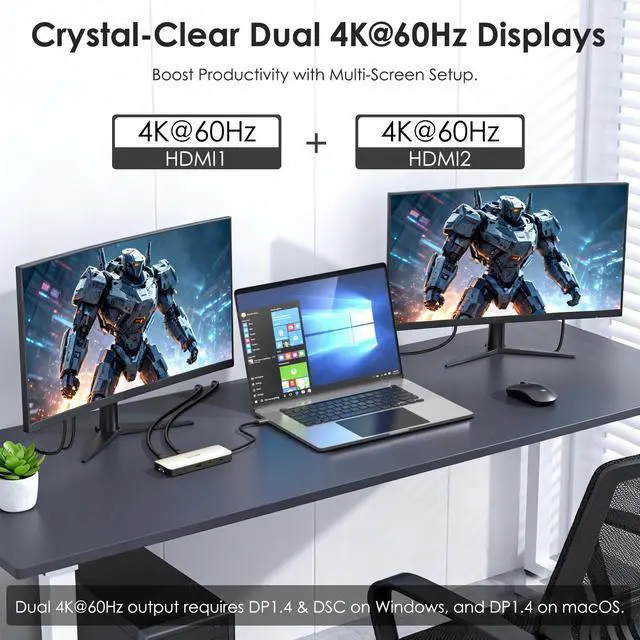
DP1.4&DSC: Dual 4K@60Hz
DP1.4: Dual 2560*1440@60Hz
DP1.2: Dual 1080P@60Hz
macOS:
Single Display:
DP1.2: 4K@30Hz
DP1.4: 4K@60Hz
Dual Display:
DP1.2: Dual 4K@30Hz
DP1.4: Dual 4K@60Hz
Specification:
1.Model: WL-UMD325
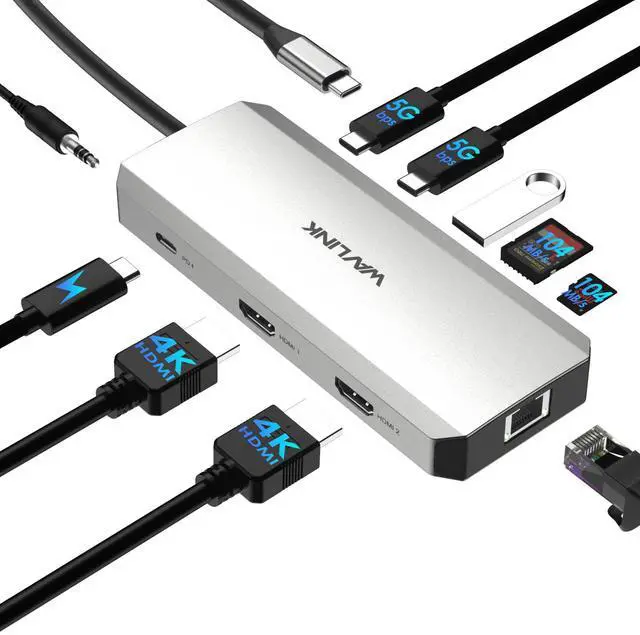
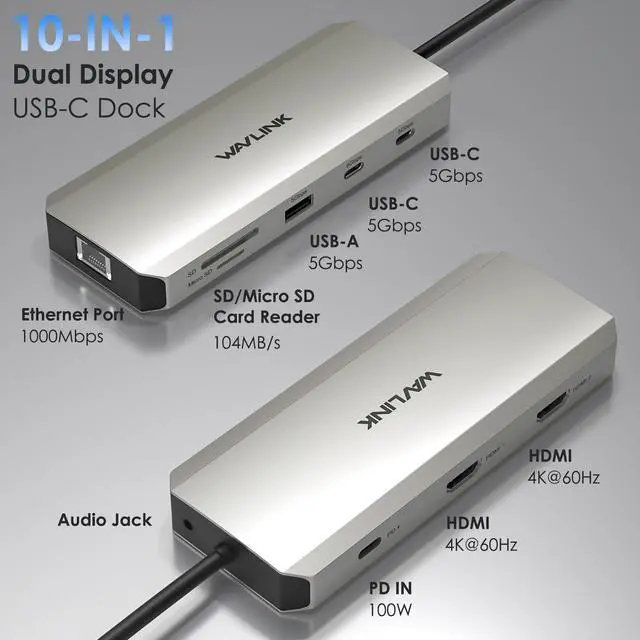
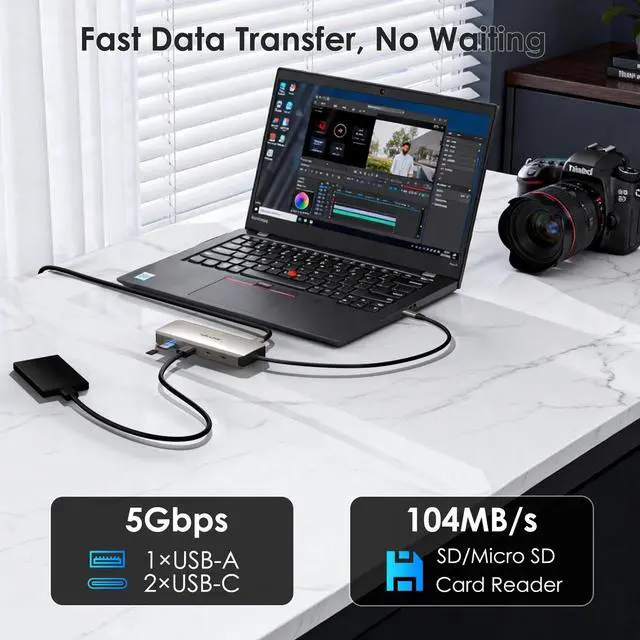
2.Ports: Front: SD/Micro SD Card Reader(104MB/s); 1×USB-A(5Gbps);2×USB-C(5Gbps);Audio Jack;
Rear: USB-C(PD IN 100W); 2×HDMI(4K@60Hz); 1×RJ45 Ethernet(1Gbps).
3.Unit Size: LxW×H :14cm*4.6cm*1.7cm/5.5in*1.8in*0.67in
4.Cable Length: 25cm/9.84inch
5.Unit Weight: 4.4oz/125g
6.Material: Aluminum alloy
Features
-2×HDMI ports support dual 4K@60Hz display output when the host supports DP 1.4 with DSC via USB-C port.
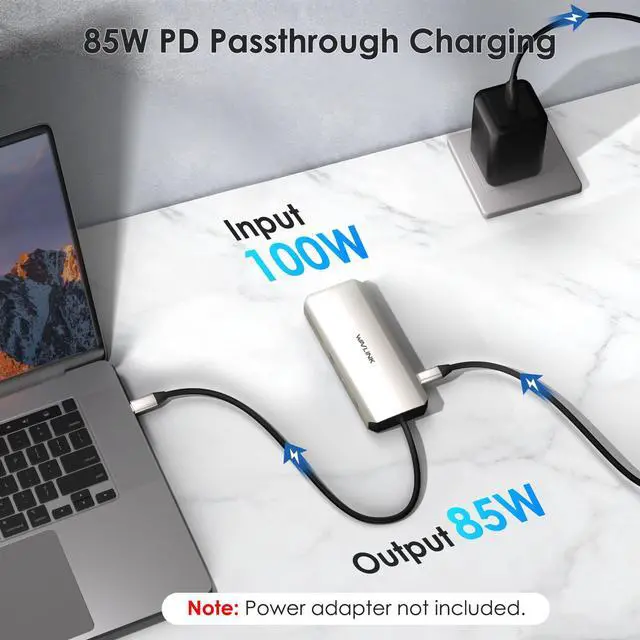
-1×USB-C connector provides 85W charging for the host.
-1×USB-A and 2×USB-C ports support up to 5Gbps data transmission.
-1×USB-C port offers 100W power delivery to the docking station.
-1×RJ-45 port allows a one Gigabit wired network.
-1×Integrated SD V3.0 card reader with SD/Micro SD slot support UHS-I theoretical bus speed up to 104MB/s.
-1×Integrated TRRS 4-pole phone jack provides crystal-clear sound.
-Compatible with a PC with an available USB-C with DisplayPort Alternate mode (Alt Mode) or Thunderbolt 3/4 port.
In the Box
-1×USB-C Dual Display MST Docking Station
-1×Quick Start Guide
Warm Tips:
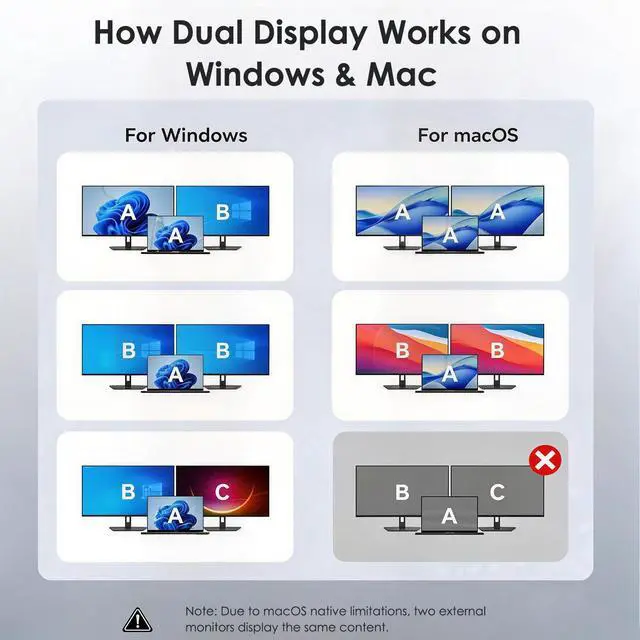
1.For macOS Users: Due to system limitations, this dock only supports Mirror Mode (SST) for external displays. When connecting two monitors, both will show the same content (ABB mode).
2.Ensure your laptop's USB-C port supports Power Delivery (PD) and DisplayPort Alt Mode. If the port is for data transfer only, video output and charging will not function.
3.4K@60Hz Requirements: To achieve dual 4K@60Hz, Windows hosts must support DP 1.4 with DSC. Mac hosts must support DP 1.4.
4.Power Information: Power adapter not included. Supports up to 100W PD Input and 85W Passthrough charging.
The WAVLINK WL-UMD325 is a 10-in-1 USB-C docking station for Windows and compatible Mac laptops that adds dual HDMI, USB-A/C, SD and microSD, Gigabit Ethernet, audio, and laptop charging, making it a strong fit for users who want a cleaner desk and dual-monitor productivity from one cable.
| Attribute | Value |
|---|---|
| Best For | Windows and macOS laptops that need dual external 4K@60Hz displays, wired Gigabit Ethernet, SD card access, and PD pass-through charging; extended dual 4K@60Hz requires a host with USB-C DisplayPort Alt Mode or Thunderbolt supporting DP1.4 + DSC |
| Video Output | 2× HDMI outputs supporting up to 4K@60Hz; extended dual 4K@60Hz requires a host USB-C with DisplayPort 1.4 + DSC or Thunderbolt |
| Power And Charging | USB-C PD input supports up to 100W (20V DC input) with pass-through charging to the host up to 85W |
| Ports And Expansion | 10‑in‑1 docking layout with 1× USB‑A (5Gbps), 2× front USB‑C data ports (5Gbps), 1× USB‑C PD IN, SD + MicroSD card slot, 2× HDMI, 1× RJ45 Gigabit Ethernet, and 3.5mm TRRS audio jack (total 4 USB ports) |
| Data Transfer & Card Readers | Front USB‑A and USB‑C data ports support up to 5Gbps; integrated SD v3.0 (UHS‑I) card reader with theoretical bus speeds up to 104MB/s |
| Networking | RJ45 Gigabit Ethernet port providing up to 1Gbps wired network connectivity |
| Audio Setup | Integrated 3.5mm TRRS 4‑pole audio jack for headphones or headsets |
| Compatibility | Compatible with Windows 7/8/10/11 and Mac OS 10.8 or later; requires a host with USB‑C DisplayPort Alt Mode or Thunderbolt 3/4 for external displays; commonly used with Windows laptops from vendors such as Dell, HP, and Lenovo |
| Physical & Packaging | Silver color; package dimensions 2.6 × 10 × 22.5 cm; package weight 0.18 kg; package quantity 1; no batteries included or required |
| Model Identifiers | WAVLINK WL‑UMD325 (Model Number UMD325), Part Number WL-UMD325 |
Q: Should I choose the WAVLINK WL-UMD325 or a DisplayLink dock for a MacBook with two external monitors?
A: Choose the WAVLINK WL-UMD325 if your priority is a simple USB-C dock for Windows, or for Mac use where one extended display is enough and a mirrored second display is acceptable. Choose a DisplayLink dock if your main need is two extended external displays on macOS over one cable. The key trade-off is display technology: the WL-UMD325 is positioned as a native USB-C dual-HDMI dock that depends on host DisplayPort Alt Mode and MST behavior, while DisplayLink docks add software support to enable multi-display setups that macOS handles more consistently.
Q: Is the WAVLINK WL-UMD325 a better fit than a basic dual-HDMI USB-C hub that only does dual 4K at 30Hz?
A: Choose the WL-UMD325 if you want a higher-resolution desktop setup on supported Windows laptops, especially for two 4K monitors at 60Hz, plus Ethernet, audio, card readers, and up to 85W host charging. A lower-tier dual-HDMI hub is the better fit when your setup is lighter, such as office work on lower refresh displays or when cost and compactness matter more than full dual-4K60 capability. The trade-off is that lower-tier hubs often reduce dual-monitor bandwidth to 4K at 30Hz.
Q: When should I pick the WAVLINK WL-UMD325 instead of a Thunderbolt 4 dock?
A: Pick the WL-UMD325 when you want a simpler and typically lower-cost dock for a USB-C Windows laptop that already supports DisplayPort 1.4 with DSC and you mainly need dual HDMI, 5Gbps USB, Ethernet, card readers, and charging. Pick a Thunderbolt 4 dock when you need broader compatibility across premium laptops, more downstream expansion, or better multi-display flexibility on Macs and Thunderbolt systems. The trade-off is that Thunderbolt docks usually offer a more robust display path and expansion headroom, while the WL-UMD325 focuses on mainstream USB-C docking needs.
Q: For dual monitors, is the WAVLINK WL-UMD325 better for Windows laptops or MacBooks?
A: The WL-UMD325 is a stronger fit for Windows laptops with USB-C DisplayPort Alt Mode, especially systems that support DP 1.4 with DSC, because that is where its dual 4K at 60Hz positioning is most relevant. For MacBooks, it is a practical dock for ports, charging, Ethernet, and a single extended display, but it is not the right choice if your goal is two independently extended external monitors from one cable. The trade-off is operating-system behavior rather than port count.
Q: Is the WAVLINK WL-UMD325 better for portability or for a fixed desk setup?
A: The WL-UMD325 is the better fit for a fixed desk setup than for ultra-portable travel use. Its value comes from combining dual HDMI, Gigabit Ethernet, SD and microSD, audio, multiple USB ports, and pass-through charging into one station, which aligns with a permanent workstation. A smaller travel hub is the better fit if you mainly want a lightweight adapter for one display and a few basic ports. The trade-off is convenience at the desk versus lower carry weight.
Q: Will this dock actually support two external monitors on my laptop?
A: Usually yes on Windows laptops, but only if the USB-C port supports DisplayPort Alt Mode or Thunderbolt, and the laptop’s graphics/display pipeline can handle dual displays. For this WAVLINK model, dual 4K at 60Hz is a best-case result that depends on DP 1.4 with DSC. On macOS, the two HDMI outputs are not a normal dual-extended setup for most users here; both external displays are expected to mirror rather than act as two separate extended desktops. This is a strong fit for Windows office setups, but buyers should verify host port video support before purchase.
Q: Is this a good choice for MacBook users?
A: It is only a partial fit for Mac users. The dock can work for ports, charging, Ethernet, audio, and storage access, but its dual-monitor value is limited because this product’s own listing says macOS outputs the two external screens in mirror mode rather than dual extended mode. If a Mac buyer specifically wants two independent external displays, a DisplayLink-based dock is usually the safer comparison point.
Q: Is it good for office work, meetings, and a simple home desk setup?
A: Yes, for typical office use it is a practical all-in-one dock. It covers the ports people repeatedly ask for on retail Q&A pages: dual HDMI, pass-through charging, USB-A/USB-C for accessories, Gigabit Ethernet for stable calls, SD/microSD for file transfer, and a 3.5 mm audio jack for headsets. The main limitation is that it is a productivity dock, not a high-bandwidth creator or gaming dock: USB data tops out at 5Gbps, and display performance still depends on the laptop’s USB-C video capability.
Q: Is this worth buying as a travel or hot-desk work device?
A: Yes, if you want one compact dock that adds monitors, charging, wired internet, card readers, and basic peripherals without carrying a full desktop dock. It is better suited to travel and hot-desking than to permanent high-end workstation use because it relies on your laptop’s USB-C capabilities and uses pass-through power instead of its own bundled power supply. Buyers who need maximum charging headroom or guaranteed multi-monitor behavior across many computers may prefer a larger powered dock.
Q: What is the main trade-off versus a DisplayLink dock or a more expensive universal dock?
A: The main trade-off is compatibility versus simplicity. This WAVLINK dock is simpler and likely easier for driver-free USB-C use, but it depends heavily on the host laptop having the right USB-C video features. A DisplayLink dock is often the better alternative when buyers need broader compatibility, especially for Macs or PCs whose USB-C ports do not fully support dual-display video output. In exchange, DisplayLink docks usually require software drivers and may cost more.
Q: Is this a good buy for a Windows laptop with two 4K monitors?
A: Yes, if your laptop’s USB-C port supports DisplayPort Alt Mode or Thunderbolt and can provide DP 1.4 with DSC. In that setup, this dock is suited to desk-based productivity because it offers two HDMI outputs, Ethernet, card readers, USB ports, audio, and laptop charging through one hub. The main trade-off is that performance depends heavily on the host laptop’s USB-C video capability, so it is a better fit for compatible work laptops than for uncertain or mixed-spec setups.
Q: Is this dock a good choice for Mac users who want two separate external monitors?
A: Usually no. Based on the product information, macOS supports dual 4K output only in mirror mode on this dock, not two independent extended displays. That makes it a reasonable Mac hub for mirrored presentations or general I/O expansion, but not a strong choice if you specifically want two separate external desktops from one cable.
Q: Who is this dock best suited for?
A: It is best suited for Windows users who want a compact one-cable desk hub for office work, web use, file transfers, Ethernet, and dual-monitor productivity. It is less suitable for buyers who switch often between Windows and macOS, need guaranteed compatibility across many laptop models, or want a dock mainly for advanced gaming display needs.
Q: What are the main trade-offs compared with a Thunderbolt dock?
A: The main trade-off is certainty and flexibility. This hub can work well for standard dual-monitor productivity on compatible Windows laptops, but Thunderbolt docks are generally the safer choice for mixed-platform setups, higher-end display chains, and more predictable dual-monitor behavior. This model is more attractive when you want the core ports and charging in a smaller, simpler package and you already know your laptop meets the video requirements.
Q: Is this a good pick for gaming or high-refresh monitors?
A: Not usually. Community discussion around docks like this repeatedly treats them as productivity accessories first, with direct laptop-to-monitor connections or higher-end Thunderbolt solutions preferred for gaming and high-refresh displays. This model is a better fit for workstations than for buyers trying to preserve top refresh rates, variable refresh features, or the simplest gaming setup.


